
Key Information Documents (KID)
Overview:
IBKR is required to provide EEA and UK retail customers with Key Information Documents (KID) for certain financial instruments, and Key Investor Information Documents (KIID) for funds.
Relevant products include ETFs, Futures, Options, Warrants, Structured Products, CFDs and other OTC products. Funds include both UCITS and non-UCITS funds available to retail investors.
Generally KIDs or KIIDs must be provided in an official language of the country in which a client is resident.
However, clients of IBKR have agreed to receive communications in English, and therefore if a KID or KIID is available in English all EEA and UK clients can trade the product regardless of their country of residence.
In cases where a KID or KIID is not available in English, IBKR additionally supports the German, French and Dutch languages as follows:
German: The product can be traded by residents of Germany, Austria, Belgium, Luxembourg and Liechtenstein.
French: The product can be traded by residents of France, Belgium and Luxembourg.
Dutch: The product can be traded by residents of the Netherlands and Belgium.
How to overcome the "Downloading settings from server failed" error
Background:
Store settings on server allows clients the ability to store their Trader Workstation (TWS) settings/configuration on the cloud and retrieve them at anytime from another computer. This feature allows you to use the layout of a specific user on two or more machines.
In some specific circumstances, the operation which stores/downloads the settings to/from the cloud may fail and the following error message may appear shortly after the TWS has loaded on the screen:
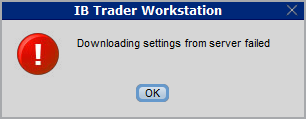
How to overcome this error message?
The underlying causes of this message are usually the following:
- ACCESS TO THE LOCAL MACHINE IS BLOCKED: A security setup, such as a firewall or antivirus, prevents the access of this computer to the cloud storage. This prevents TWS from accessing the remote server, thus disallowing the settings file upload or download. Recommended workaround: set up an exception on the firewall or antivirus in order to exclude the TWS executable file (c:\Jts\tws.exe) or the entire TWS folder (C:\Jts) from the real time security scan. The procedure to set an exclusion may vary, according to the software you are using, therefore we recommend consulting the user guide or the on-line documentation of your specific security program.
- ACCESS TO THE REMOTE SERVER IS BLOCKED: A firewall or proxy service blocks the communication with the cloud storage through the network on which this computer is. In this scenario, you (or your IT / Networking departments, in case you do not have the rights for such an operation) can modify the firewall or proxy settings to allow the computer to communicate with the cloud server s3.amazonaws.com on the TCP port 443. For additional details about the hosts/ports which needs to be allowed for the proper TWS operation, please see as well the section "DESKTOP TWS" of KB2816. Please refer to the documentation of your specific software in order to create specific rules for your firewall or proxy system.
See KB2323 for instructions on how to restore TWS settings from external storage
See KB2320 for instructions on transferring settings from one user to another
When and how should I increase the memory allocation for TWS?
Overview:
Java Virtual Machine memory allocation
The Trader Workstation is a Java-based application. As any other Java applications, it executes within a Java virtual machine (JVM) which manages the interactions between the program and the underlying Operating System (OS).
The memory (RAM) which is allocated by the operating system to the JVM constitutes the heap space. That is the area where all the class instances and arrays needed by the application are allocated. The heap space is created when the JVM is started and it is dynamically freed-up by the Garbage Collector (GC), the Java memory manager. When the need arises, the Garbage Collector is invoked to free up the heap space by unloading Java classes and other code structures no longer used by the application.
If the heap space is undersized, the Garbage Collector may not be able reclaim memory at the needed pace or may have to be called too often, draining the processor (CPU) resources. When this happens, the application may slow down, be unresponsive or even crash completely.
To ensure a smooth TWS run, it is therefore sometimes necessary to change the memory allocation, according to the layout complexity and the needs of the application itself.
Background:
In which case I should change the TWS memory allocation?
If your TWS layout contains a considerable number of elements (Analytical/Trading Tools, Chart windows, News panels, Watchlists, Layout tabs...) and your platform is slow or poorly responsive, you may want to increase the memory allocation in order to achieve better performances. If your TWS freezes or crashes, we also recommend increasing the heap space as the first corrective action to attempt.
How much memory should I allocate to TWS?
In general we recommend to start with a conservative memory allocation and test the TWS performances with that set up. If the performances improvement is less noticeable then expected or not yet satisfactory, you can switch gradually to higher values until you find the best fit for your platform.
Please consider the following:
Considering the above, we suggest to initially reserve 1.5 GB of system RAM the TWS, as explained in the guide below.
This amount of free memory is usually available on any modern computer and should be a good fit for most of the cases. Should you still notice slowness, freezing or crashes during the TWS execution, you can raise the value to 1792.
In any case, we do not recommend to set the value above 2048 since this will produce an unnecessary overhead and may thus even decrease the overall performances of the application.
How can I change the memory allocation for the TWS?
Please follow one of the links below for the instructions, according to the Operating System and TWS release you are using
Any Operating System
B.1 Your Operating System is Windows
B.2 Your Operating System is Mac OS
A. TWS version 972 and higher
The steps below are valid for all Operating Systems
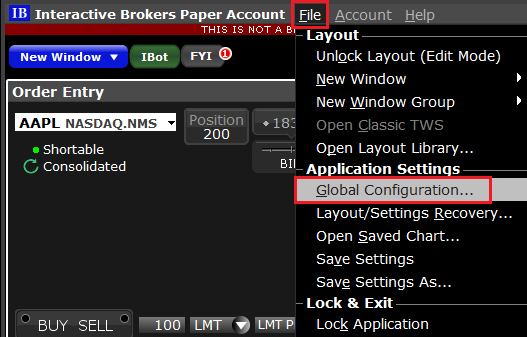
1) In the TWS, click on the top menu File (or Edit if you are using Classic TWS) and select Global Configuration...
2) On the left side menu of the Global Configuration panel, click on General
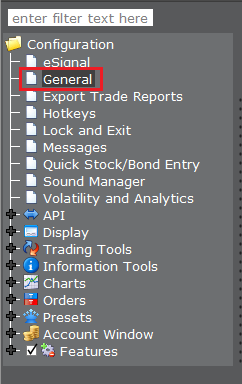
3) In the panel on the right side, in the Memory Allocation field, replace the existing value with 1536(1).png)
4) Click on Apply and then on OK
5) Shut down the TWS
6) Launch the TWS with a double click on the Desktop shortcut Trader Workstation (Should you receive an error message, please see Note 3.

B. TWS versions previous to 972
B.1 Your Operating System is Windows
1) Close TWS in case it is running
2) On your keyboard, press WIN+R (the WIN key is the key with the windows flag located on the left side of tour keyboard, between the keys CTRL and ALT)

3) Type C:\Jts\tws.vmoptions and Click OK
.png)
4) Should the system ask you which program to use to open the file, select Notepad and click OK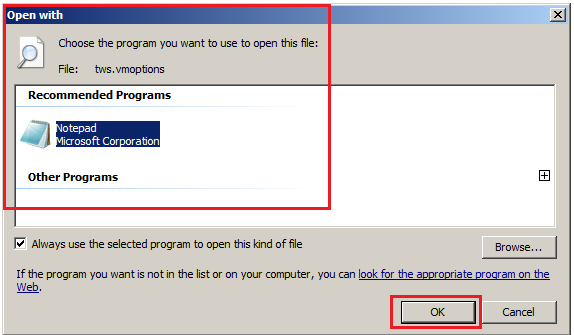
5) Cut the line -Xmx768m and paste it below the line ### Keep on update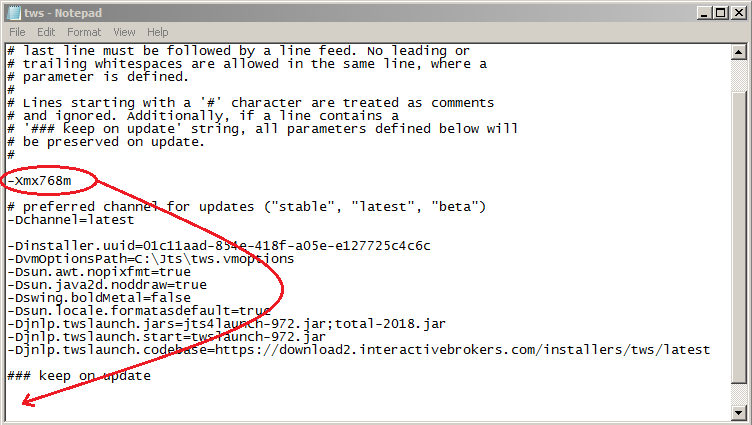
6) Change then the value of the parameter Xmx from 768 to 1536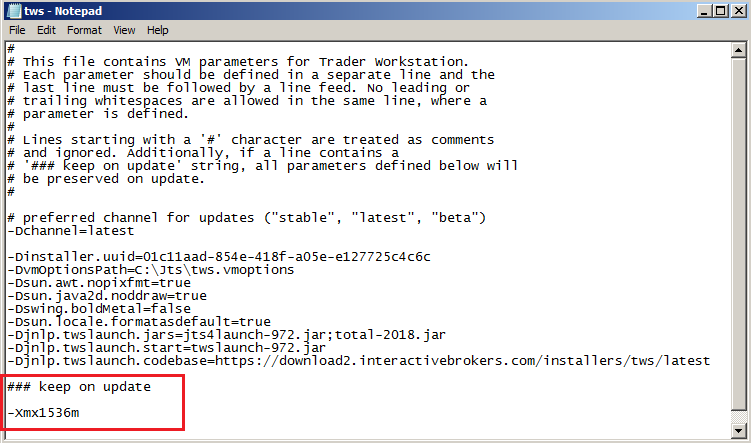
7) Save the changes by clicking on the top menu File --> Save 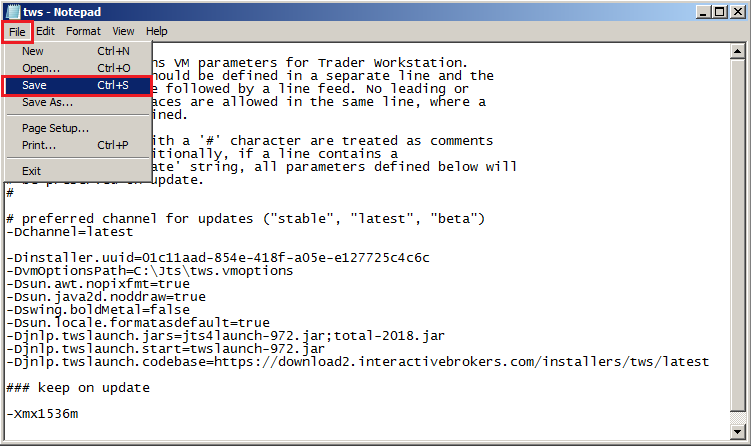
8) Close the file clicking on the X icon on the right side of the toolbar
9) Launch the TWS with a double click on the Desktop shortcut Trader Workstation (Should you receive an error message, please see Note 3.
B.2 Your Operating System is Mac OS
1) Close the TWS if it is running
2) Use the Spotlight search (the magnifier glass on the top right of your Desktop) to find the file tws.vmoptions
Normally the file is located within the Jts folder (a subfolder of your home folder)
.png)
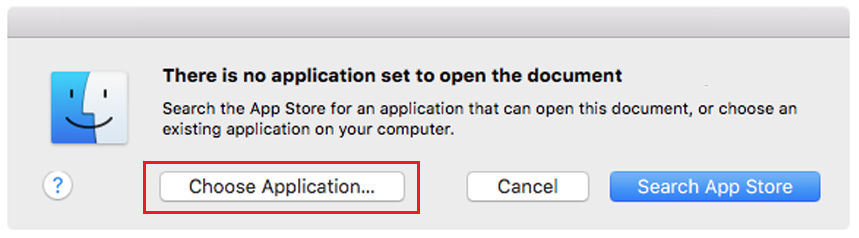
3) On the Spotlight results panel, click on tws.vmoptions to open it. Should the system ask you how to open this file, click Choose Application... select a text editor (TextEdit, Smultron, TextWrangler...) of your choice and click Open
.png)
4) Locate the line -Xmx768m. Cut it and paste it below the line ### Keep on update
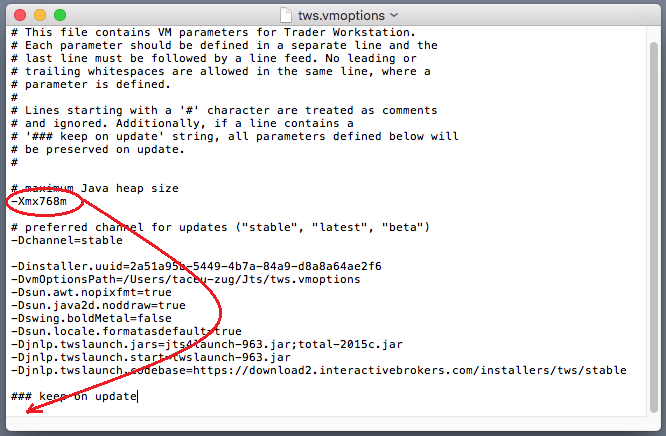
6) Modify the value 768 in to 1536
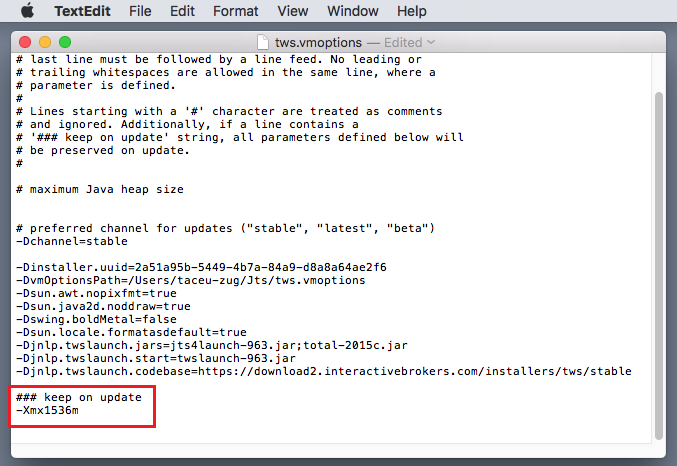
7) Save and close the file
8) Launch the TWS with a double click on the Desktop shortcut Trader Workstation (Should you receive an error message, please see Note 3.
Notes
1. Available system RAM
In order to check the amount of available system RAM on your computer, you can:
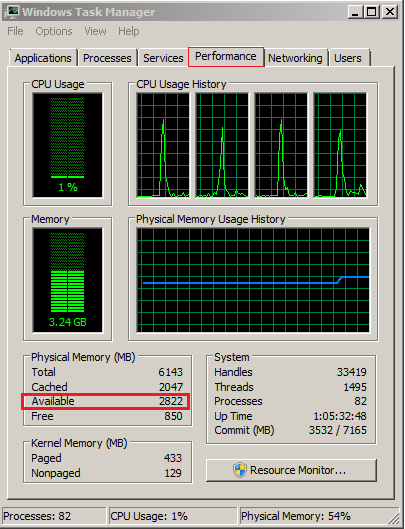
- on Windows: use the key combination CTRL+SHIFT+ESC to start the Task Manager, click on the tab Performance and look for the "Available" Physical Memory. This will tell you the amount of unoccupied RAM in MB (1024 MB = 1GB)
- on Mac OS: Open Finder, go to Application --> Utilities and open Terminal. In the terminal type the command:
sudo purge
and press Enter. The system may ask you to enter your Mac user password. Enter the password. Once the command has completed, type the following command:
top -l 1| grep PhysMem
The "unused" value will tell you the amount of unoccupied RAM in MB (1024M = 1GB)
.png)
2. Limitations of 32-bit Operating Systems
Please notice that 32-bit Operating Systems can normally only address a maximum of 2 GB of RAM per process (see table below for details). Because of this OS architecture limitation, if you have a 32-bit OS, the maximum memory allocation for the TWS must not exceed 2048 Mb.
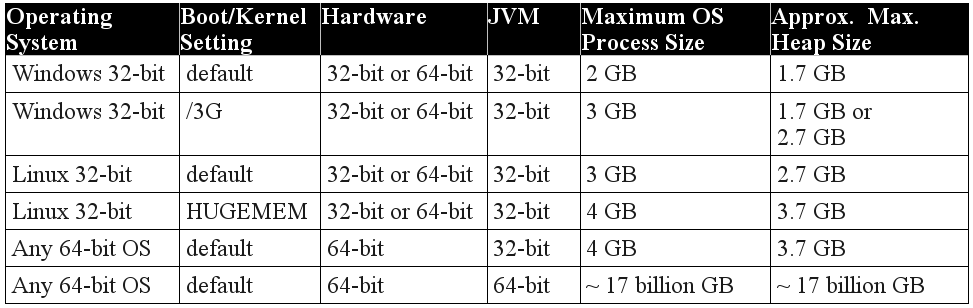
3. Error: "Could not create the Java Virtual Machine"
This error may be displayed upon TWS startup if you set the memory allocation to a value higher than the available RAM of your system or if you set it higher than 2048 on a 32-bit Opertaing System. To overcome the error, you would need to decrease the memory allocation to a lower value using this procedure
TWS Message: Order Barriers are supported only for CCP-simulated stops
Overview:
Account holders receiving the following message Order Barriers are supported only for CCP-simulated stops are attempting to enter an order that has attributes that are not supported and must be modified before the order can be accepted.
An order barrier is a setting (i.e. condition) associated with an order that says, when this barrier is reached trigger an order action. The order action may be triggering a trailing mit, or it may be changing the order type as with an adjustable stop. Exchanges do not support certain order types that contain barriers which are available in the TWS. When this is the case, IB will generally simulate these orders (ie: send only the order details to the exchange that they support and internally handle any order barriers that are not recognized by the exchange.)
Orders that cannot be simulated can only be configured with order barriers that are supported by that exchange. If a native order type is submitted with a barrier not supported by the exhange it will be rejected.
Please notify customer service of any such rejections through a web ticket so that we are able to review the details of the order being submitted and ensure that the issue is known. Please include the following information in the ticket so that we are able to identify the specific order in question;
- The date of the order rejection
- The order details (buy/sell, quantity, symbol, price)
Additional information regarding how to submit a Web Ticket can be found here.
TWS Message: At the moment, orders for this contract are only accepted if they close or reduce open positions. Please contact customer service for assistance.
Overview:
Account holders receiving the following message "At the moment, orders for this contract are only accepted if they close or reduce open positions. Please contact customer service for assistance" will not be able to place orders that would open or increase positions in the specific security.
This restriction, referred to as a closing only restriction, may be applied for a number of reasons including the following;
- Certain equity options series may be placed in a closing only state by options exchanges for various reasons.
- IB may choose not to allow trading in certain securities for various reasons including, but not limited to; account security concerns, clearing limitations, or corporate action processing.
Traders may request that the trading restriction be removed from the security in question by submitting a web ticket with the following information;
- the security symbol (including the contract month and strike for equity options).
- a brief description of the reason for the request.
Once received, IB will review the request and determine whether or not removal of the restriction can be facilitated.
Additional information regarding how to submit a Web Ticket can be found here.
TWS Message: Order price is not reasonable -or- Cannot verify reasonableness of order
Overview:
Account holders receiving the message Order price is not reasonable will have to modify the price associated with the order before it will be successfully submitted.
Account holders receiving the message Cannot verify reasonableness of order will have the option of overriding the message and transmitting the order.
The basis for the order reasonability rejections may vary but are all related to the order price relative to the current market. These reject messages are implemented as precautionary and are intended to prevent orders from being executed based on erroneous price submissions. Some scenarios that may cause these types of rejections are as follows;
- If a security has no active quote (no bid or ask price) traders may be prevented from submitting market orders. This is a protective restriction that attempts to prevent executions from occurring at prices significantly different than the value of the security. Traders are able to transmit and execute limit orders for a security that is not displaying a market quote.
- Traders attempting to enter orders at prices through the market and significantly inferior to the current mark price may receive a rejection indicating that the price is not reasonable. Examples would be an order to buy at a price well above the mark price or a sell order at a price that is well below. Modifying the price to a level closer to the mark price should allow traders to successfully execute the order.
- If our systems are unable to make a determination as to the reasonableness of an order, a warning will be displayed indicating that the reasonableness cannot be determined. Traders receiving this message will have an option to acknowledge the message and transmit the order but should use caution in doing so to ensure that the order being transmitted is what is intended.
TWS Message: could not value contract at this time
Overview:
Account holders receiving the message could not value contract at this time will be unable to successfully transmit an order for the product in question.
The basis for the rejection varies, however, all potential issues causing this are related to an inability of our automated systems to accurately determine a value for the instrument based on real time data and credit management. Some scenarios that may cause this type of rejection are as follows;
- A product that is not reflecting a daily change in the market data line may not have a previous day settlement price. For some products (futures) customer service can facilitate having a settlement price applied manually intraday. For other products (future options, stock, stock options), this change cannot be made intraday and traders will have to wait until the following trading day before being able to place an order to open a new position.
- Futures options contracts that are margined using span and have no open interest may not be able to be traded. Generally, exchanges that disseminate span files to brokerage firms do so only for contracts that have open interest. This is done in attempt to reduce the amount of information being sent to firms to include only those contracts where traders are currently maintaining open positions. Presently, traders will be unable to open new positions in span margined contract in which we have not received margin information from the exchange.
- Products that are currently being tested for future release to customers may appear in the database. When this happens, traders can add these instruments to the trading platform as they can for any other tradable product. Until testing of these products is complete, customers may be able to add market data lines but will not be able to trade these products.
TWS Messages - Your account is restricted from placing orders at this time
Account holders receiving the following message 'Your account is restricted from placing orders at this time' are not allowed to place any opening or closing orders without prior assistance from the IB Trade Desk. Questions regarding this restriction should be addressed to the Trade Desk via Customer Service (see contact information link below).
Links:
TWS Messages - Your account has been restricted to closing orders only
Account holders receiving the following message 'Your account has been restricted to placing closing orders only' are limited to placing orders which serve to close or reduce existing positions (i.e., sell orders which close out or reduce existing long positions or buy orders which which close out or reduce existing short positions). The basis for this restriction varies and often involves pending documentation, compliance and/or risk issues. Regardless of its basis, the restriction affords account holders the ability to manage and reduce the market exposure of their positions while in effect. Questions regarding this restriction should be addressed to Customer Service (see contact information link below).
Links:
