
Exchange name change
Overview:
Interactive Brokers is completing an effort to update and consolidate exchange names where appropriate. When this effort is complete, the following updates will be in effect:
- GLOBEX and CMECRYPTO will be consolidated to a single exchange, ‘CME’
- ECBOT will be updated to ‘CBOT’
- COMEX listed metals (previously reflected as NYMEX) will be updated to exchange ‘COMEX’
- NYMEX, no change
Given the breadth of products involved, we are migrating in four waves based on underlying products:
| Key | Effective Trade Date | Products |
| Wave 1 | October 30, 2022 | GLOBEX: ZAR, LB, DA, IXE |
| Wave 2 | November 6, 2022 | GLOBEX: EMD, BRE, CHF, SOFR3, E7, NKD CMECRYPTO: BTCEURRR, ETHEURRR, MET |
| Wave 3 | November 13, 2022 | GLOBEX: All remaining products CMECRYPTO: All remaining products ECBOT: ZO, ZR, 2YY, 30Y NYMEX: ALI, QI, QC |
| Wave 4 | December 4, 2022 | ECBOT: All remaining products NYMEX: All remaining "Metal" products |
I am trading via API, how does this impact me?
For API clients the only requirement would be to provide a new exchange name, for example: exchange=”CME”, for existing contracts for the affected exchanges.
Old exchanges names will no longer be available after the change.
More details can be found within our FAQs through the following link: Upcoming Exchange name Changes
Note: If you are using a third party software connected to TWS or IB Gateway and that software does not recognize the new contract definitions, please contact the third party vendor directly.
Backup RSA Key Pairs
If you use RSA encryption in file exchange communication with Interactive Brokers, best practice requires that this key be backed up for security and retrieval purposes. Creating a backup is quick and ensures the longevity of your Key Pair.
Note: this tutorial assumes you have already set up a Key pair. If you need guidance to set up the Key pair please refer to this article, which is a prerequisite to the instructions below.
Please select one of the below links, according to your Operating System:
Windows
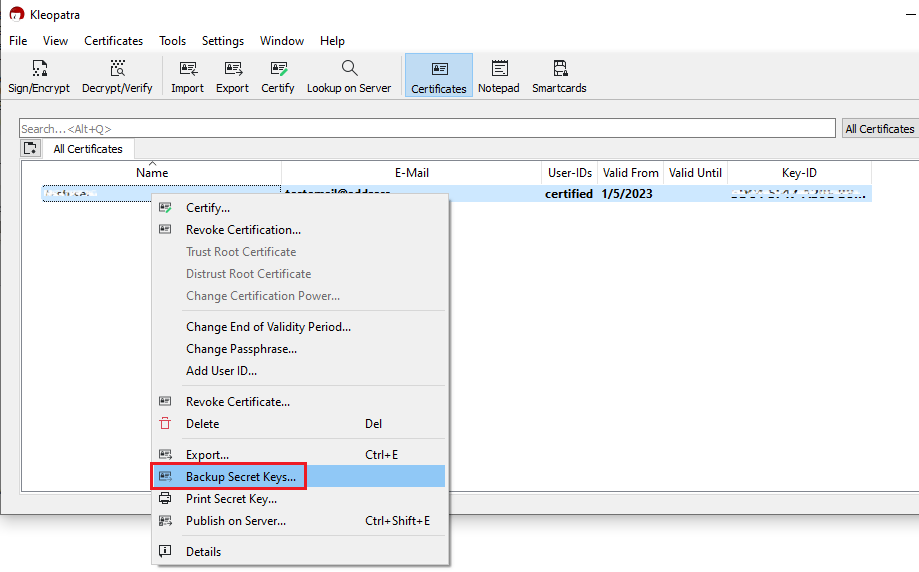
1. Launch the application Kleopatra and select the encryption key you want to transfer. Then right-click on the selection and choose Backup Secret Keys...
Note: Do NOT use Export..., as this will only export the public part of the Key while you need to have a backup of both public and private parts.
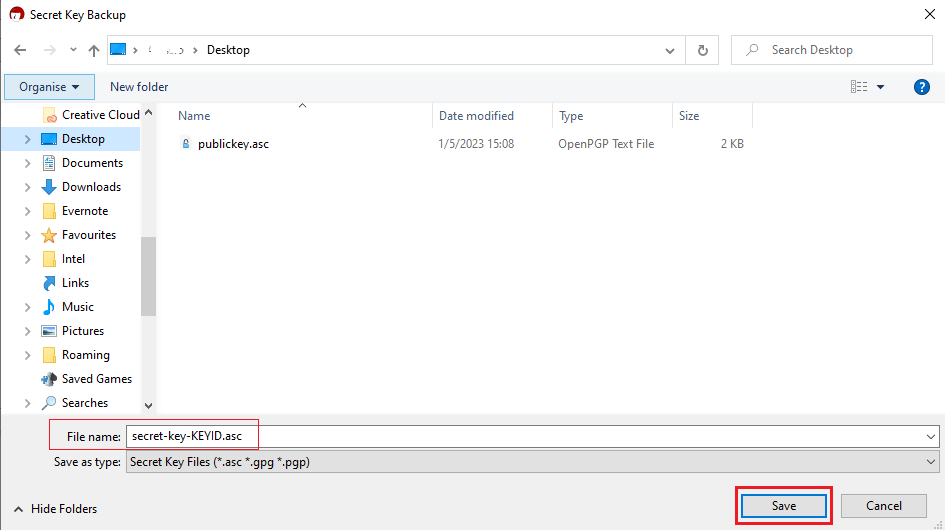
2. Select a folder of your preference (e.g. Desktop) and a file name of your preference (e.g. secret-key-KEYID.asc) for your backup copy. Then click Save.
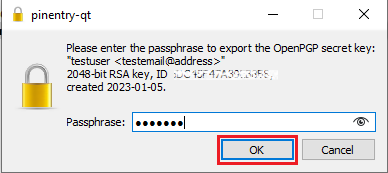
3. Enter the passphrase you have set when you created the Key and click OK.
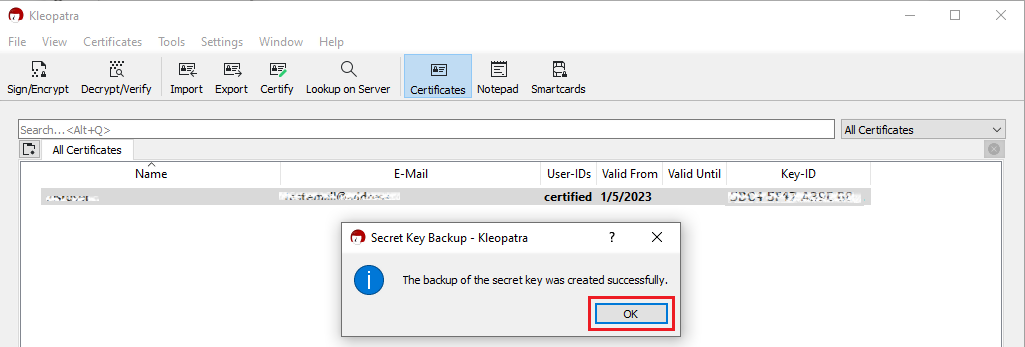
4. A pop-up will confirm the backup has been successfully created. Click OK.
macOS
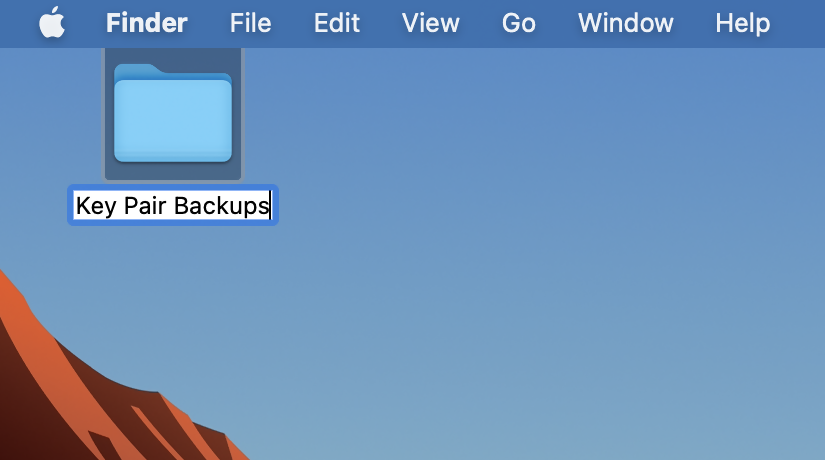
1. On the machine where the encryption keys are stored, create a new folder (e.g., on your Desktop).
2. Launch the application GPG Keychain and select the encryption key you want to transfer. Please make sure that Sec/Pub is indicated in the Type column.
.png)
3. Click the icon Export on the top toolbar. In the field Where, select the folder you previously created. Make sure to check Include secret key in exported file and then click Save as illustrated in the above screenshot.
4. A backup copy of the key pair will be created in the folder you selected.
Related articles
KB3842 - Using GPG/RSA encryption keys to guarantee the privacy and security of your Reports
KB3968 - Generate a key pair using GPG for Windows
KB4205 - Generate a key pair using GPG Suite on macOS
KB4108 - Decrypt your Reports using GPG for Windows
KB4210 - Decrypting Reports using your PGP Key pair on macOS
KB4407 - Generate RSA Key Pair on Windows
KB4578 - How to Access your Reports using FTP on Windows
KB4580 - How to Access your Reports using FTP on MacOS
How to Set Up sFTP for Using Certificate Authentication on macOS
These instructions apply to users who are receiving their statements via sFTP. If you elected to receive your statements that way, you would first need to generate an RSA Key pair. If you need guidance to set up the Key pair, please refer to this article, which is a prerequisite to the instructions below.
Note: There are many sFTP Clients available for macOS, either licensed or freeware. In this procedure we will refer to FileZilla, which is free of charge, but you can use a different one. FileZilla for macOS can be downloaded here.
1. Once you have installed FileZilla, launch it.
2. Click on File in the top left and select Site Manager:
.png)
3. If you see an existing Interactive Brokers sFTP site in the list, jump directly to point 6. If you do not have such site configured yet, Click New Site and select SFTP – SSH File Transfer Protocol as Protocol:
.png)
4. Change Logon Type from Normal to Key File and click on Browse to select the corresponding Private Key file from the designated directory where it is saved.
5. Enter:
- xfer.interactivebrokers.com in the Host field.
- 32 in the Port field.
- The username given you by Interactive Brokers in the User field.
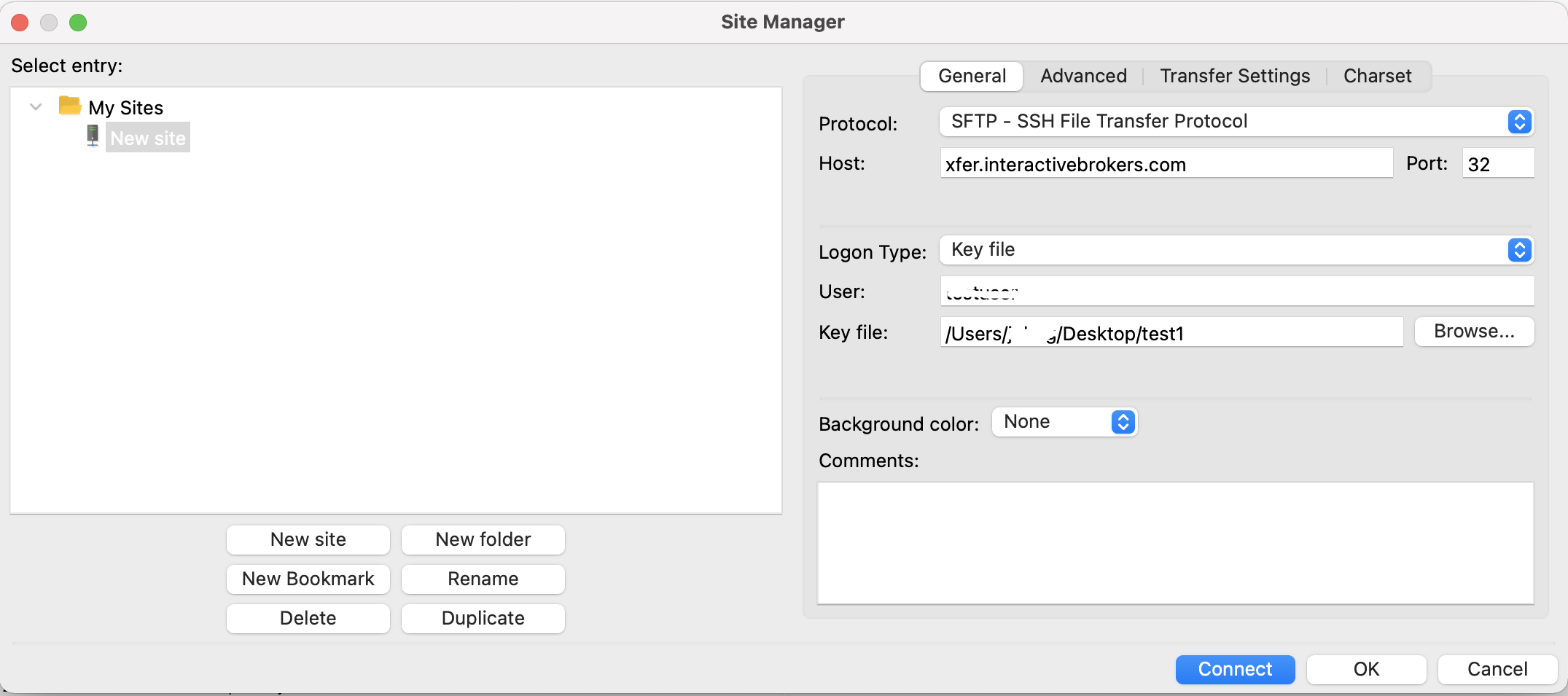
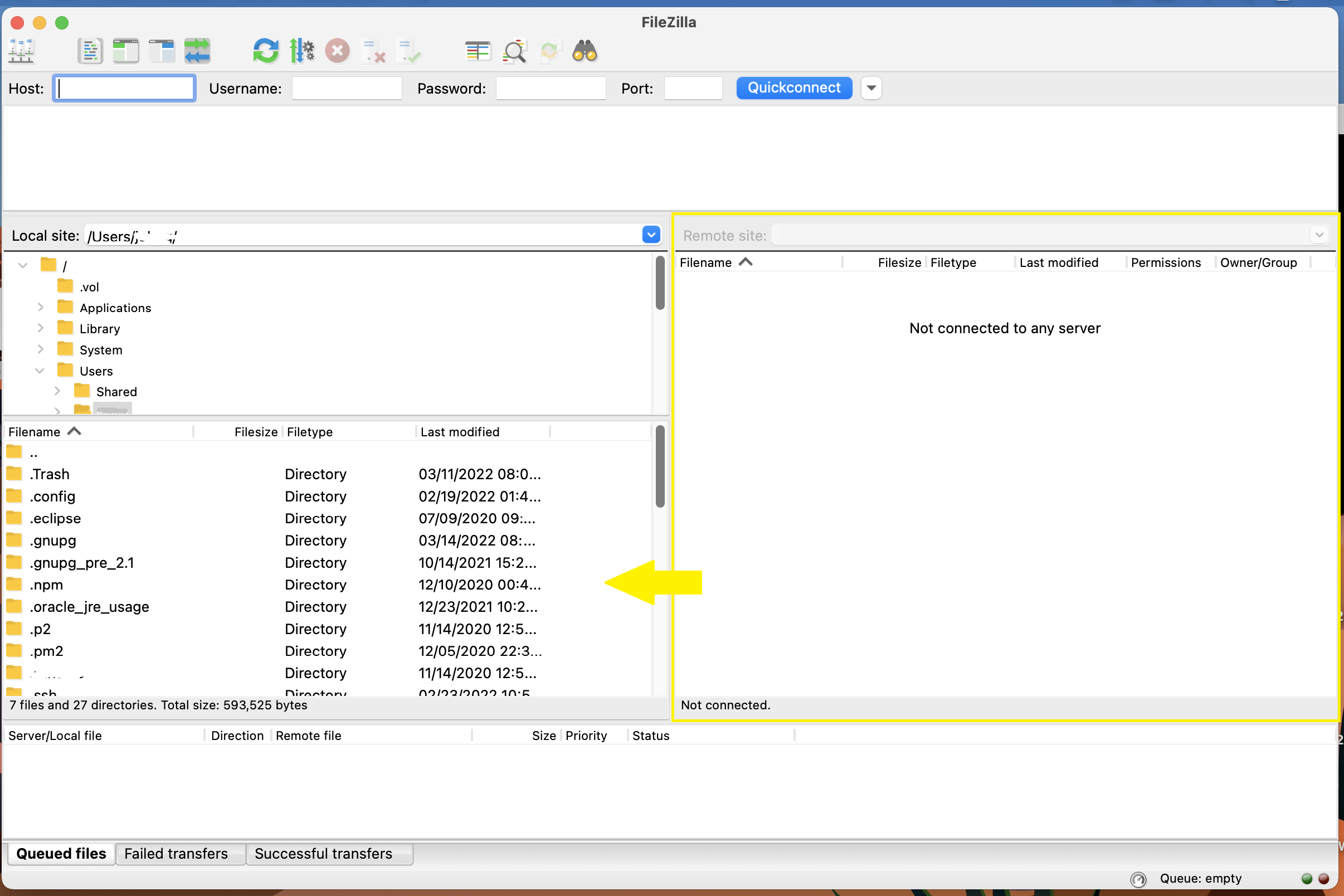
6. Click Connect. Once successfully connected, you will be able to drag files from the Remote site (right side panel) to the Local machine (left side panel). In this way you will download the files on your local machine.
Common issues and solutions
A. The Login Credentials Provided are Incorrect
-
Ensure the correct login details are being used to connect to the sFTP server. The username and password you are entering should match the ones you have received from the Reporting Integration Team.
-
Confirm you have configured your sFTP Client to use the Private Key file for the logon authentication (see step 4. of the above procedure.)
B. Server Refused Our Key
-
Try accessing the sFTP server using a different Client (FileZilla, WinSCP, CyberDuck, ect.)
-
Ensure the Private Key file being used to Authenticate the server login attempt is related to the Public Key you originally sent to the Reporting Integration Team.
-
Should the above checks be unable to resolve the issue, please generate a new RSA Public/Private Key pair and send only the Public part to the Reporting Integration Team, as per IBKB3842.
C. Connection Timed Out
-
In case you have an antivirus or a security software installed on your machine, make sure it is not blocking the FTP connection attempt. Normally, security software allows to set up exceptions for specific connections in order to whitelist them.
-
Verify that the public IP Address of the machine running the sFTP client, is the same you have originally provided to the Reporting Integration Team for being whitelisted. You can discover your public IP Address by searching the Internet for “what is my IP”. If your current IP Address is not the same you provided to us, please send it to our Reporting Integration Team for being whitelisted.
-
Ask your network administrator/s to confirm that your firewall allows both incoming and outgoing traffic from/to xfer.interactivebrokers.com on port TCP 32.
-
Should the above steps be unable to resolve the issue, please generate a new RSA Public/Private Key pair and send only the new Public part to our Reporting Integration Team, as per IBKB3842.
Related articles
KB3842 - Using GPG/RSA encryption keys to guarantee the privacy and security of your Reports
KB3968 - Generate a key pair using GPG for Windows
KB4205 - Generate a key pair using GPG Suite on macOS
KB4108 - Decrypt your Reports using GPG for Windows
KB4210 - Decrypting Reports using your PGP Key pair on macOS
KB4407 - Generate RSA Key Pair on Windows
KB4819 - How to set up sFTP for using Certificate Authentication on Linux
KB4578 - How to Access your Reports using FTP on Windows
KB4580 - How to Access your Reports using FTP on MacOS
How to Set Up sFTP for Using Certificate Authentication on Windows
These instructions apply to users who are receiving their statements via sFTP. If you elected to receive your statements that way, you would first need to generate an RSA Key pair. If you need guidance to set up the Key pair, please refer to this article, which is a prerequisite to the instructions below.
1. Start WinSCP.
2. Click on Session and select New Session.
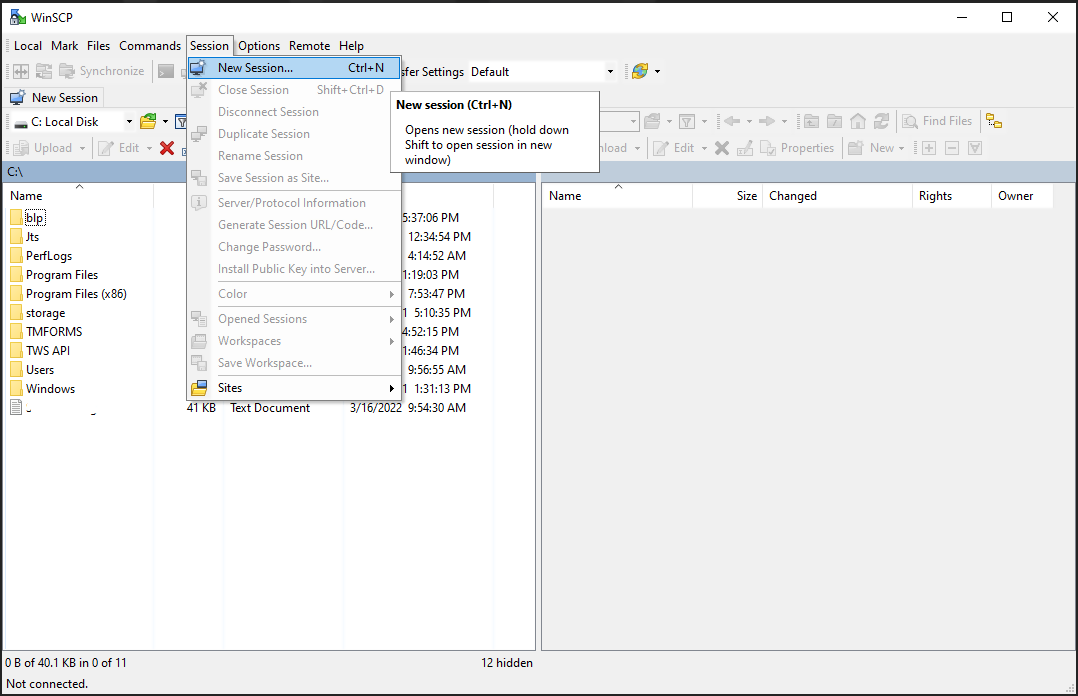
3. If you see an existing Interactive Brokers sFTP site in the list, select it and jump directly to point 5. If you do not have such site configured yet, enter:
- xfer.interactivebrokers.com in the Host name field.
- 32 in the Port number field.
- The username provided to you by Interactive Brokers in the User name field.
Select SFTP as File protocol:
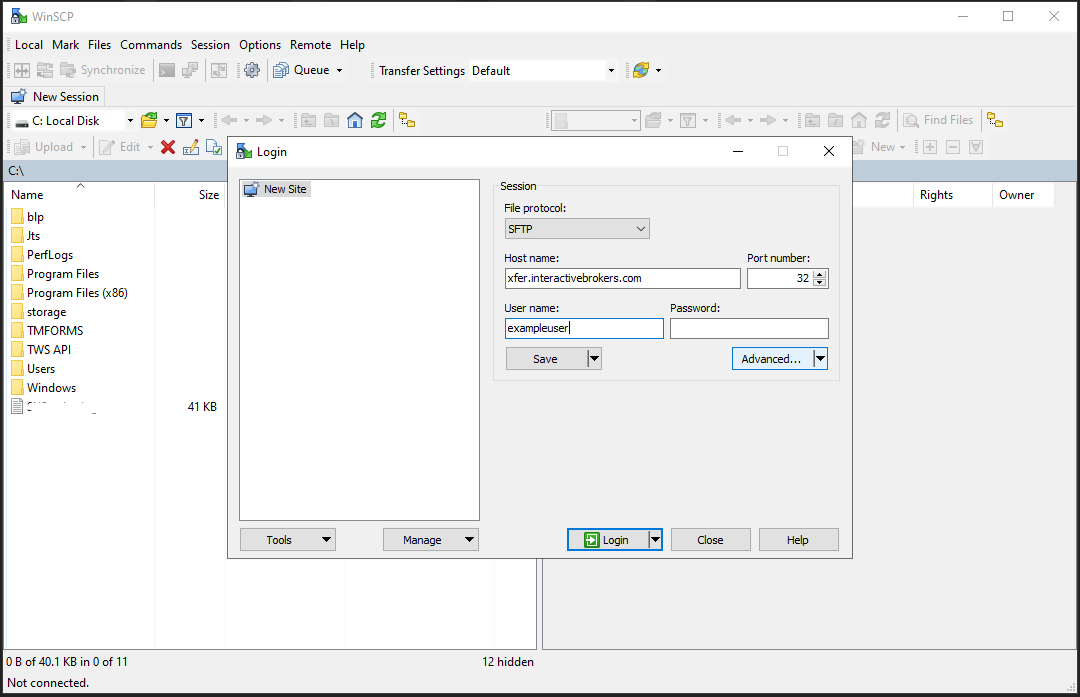
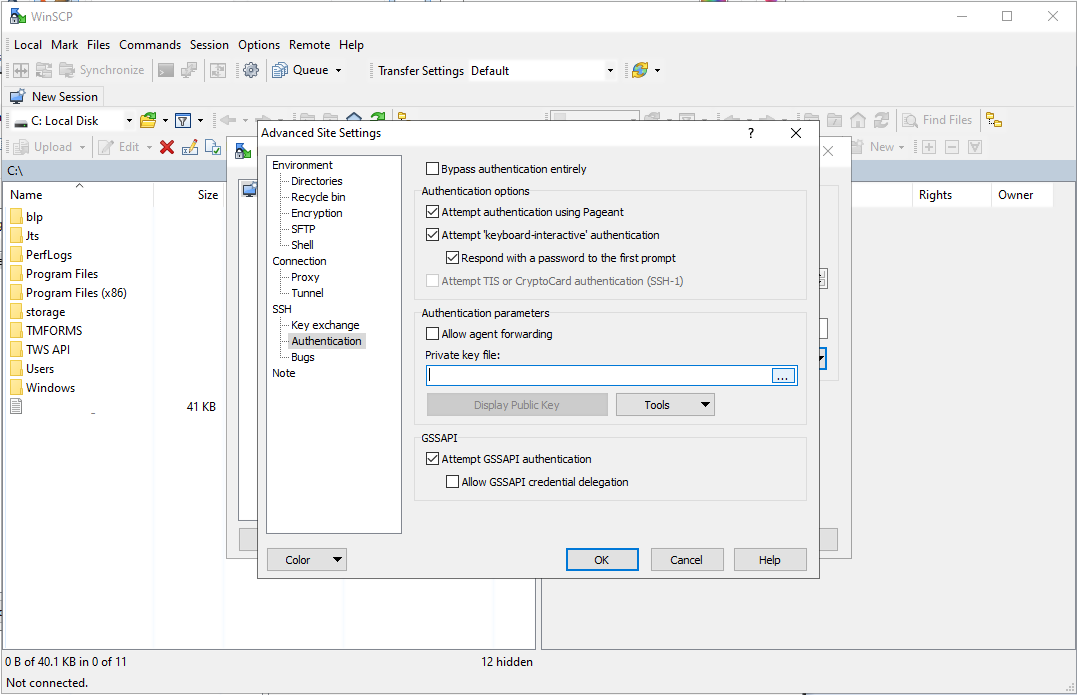
4. To ensure the session is using the appropriate Private Key file, Click Advanced > Authentication. Verify that the Private Key file field has the appropriate Key file selected. Click OK.
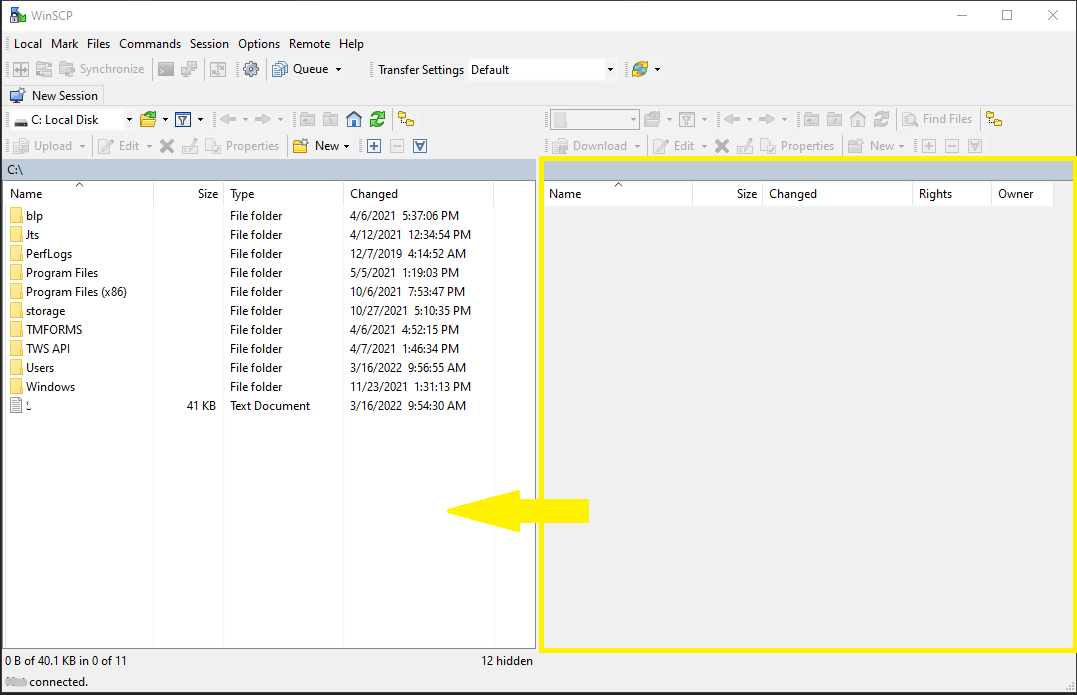
5. Click Login to connect with the sFTP host and retrieve reports in clear text.
6. Drag documents from the right side panel (sFTP host site) to the left side panel (local machine host).
Common issues and solutions
A. The Login Credentials Provided are Incorrect
-
Ensure the correct login details are being used to connect to the sFTP server. The username and password you are entering should match the ones you have received from the Reporting Integration Team.
-
Confirm you have configured your sFTP Client to use the Private Key file for the logon authentication (see step 4. of the above procedure.)
B. Server Refused Our Key
-
Try accessing the sFTP server using a different Client (FileZilla, WinSCP, CyberDuck, ect.)
-
Ensure the Private Key file being used to Authenticate the server login attempt is related to the Public Key you originally sent to the Reporting Integration Team.
-
Should the above checks be unable to resolve the issue, please generate a new RSA Public/Private Key pair and send only the Public part to the Reporting Integration Team, as per IBKB3842.
C. Connection Timed Out
-
In case you have an antivirus or a security software installed on your machine, make sure it is not blocking the FTP connection attempt. Normally, security software allows to set up exceptions for specific connections in order to whitelist them.
-
Verify that the public IP Address of the machine running the sFTP client, is the same you have originally provided to the Reporting Integration Team for being whitelisted. You can discover your public IP Address by searching the Internet for “what is my IP”. If your current IP Address is not the same you provided to us, please send it to our Reporting Integration Team for being whitelisted.
-
Ask your network administrator/s to confirm that your firewall allows both incoming and outgoing traffic from/to xfer.interactivebrokers.com on port TCP 32.
-
Should the above steps be unable to resolve the issue, please generate a new RSA Public/Private Key pair and send only the new Public part to our Reporting Integration Team, as per IBKB3842.
Related articles
KB3842 - Using GPG/RSA encryption keys to guarantee the privacy and security of your Reports
KB3968 - Generate a key pair using GPG for Windows
KB4205 - Generate a key pair using GPG Suite on macOS
KB4108 - Decrypt your Reports using GPG for Windows
KB4210 - Decrypting Reports using your PGP Key pair on macOS
KB4407 - Generate RSA Key Pair on Windows
KB4819 - How to set up sFTP for using Certificate Authentication on Linux
KB4578 - How to Access your Reports using FTP on Windows
KB4580 - How to Access your Reports using FTP on MacOS
SEC Tick Size Pilot Program FAQs
Tick Size Pilot ("TSP" or "Pilot") Program:
Under the TSP Program, if IBKR receives any order in a Pilot Security that does not conform to the designated pricing increment (e.g., a limit price in a $0.01 increment for a security designated as trading $0.05 increments), IBKR will REJECT that order, subject to limited exceptions. IBKR strongly encourages a thorough review of your software or your vendor’s software to understand the criteria for what causes an order in a Pilot Security to be rejected to permit you or your vendor to make changes to correctly handle orders in Test Group Pilot Securities.
FREQUENTLY ASKED QUESTIONS:
Q: Is the Tick Size Pilot program still ongoing?
A: On March 29, 2019 the data collection requirements under the National Market System (NMS) plan to implement a Tick Size Pilot Program (Tick Size Pilot) ended. As a result, the Pilot Security File and Change File will no longer be produced on a daily basis. At the conclusion of the pilot, a blank Tick Size Pilot Securities file will be produced and the Change File will be updated to show the deletion of securities from the Tick Pilot Size list.
Q: What is the Tick Size Pilot?
A: On May 6, 2015, the SEC approved an amended TSP NMS Plan. The Pilot will be two years in length. Data collection for the Pilot began on April 4, 2016, 6 months prior to the implementation of the trading and quoting rules for the Pilot. Implementation of the trading and quoting rules for the Pilot will begin on October 3, 2016.
The Pilot will be conducted using a Control Group and three Test Groups where variations in quoting and trading rules exist between each group. Please see the TSP NMS Plan for additional information.
Q: Will the Pilot quoting and trading rules apply during regular market hours, pre-market hours and post market hours?
A: The Pilot rules apply during all operational hours (pre-market, regular hours, and post market hours trading).
Q: Will the Pilot quoting and trading rules apply to odd-lot and mixed-lot sizes?
A: Yes, the Pilot rules to all order sizes.
Q: Will orders in Control Group Securities be accepted in price increments of less than $0.05?
A: Yes, orders submitted in price increments of less than $0.05 will continue to be accepted in Control Group securities.
Q: Will orders in a Test Group 1, 2 or 3 Pilot Securities be accepted in price increments of less than $0.05?
A: No, unless covered by an exception, orders submitted in price increments of less than $0.05 will be rejected.
Q: Which Pilot Security Orders in Test Groups will Interactive Brokers accept at other than $0.05 increments?
 Midpoint orders with no explicitly stated limit price or impermissible offsets will be accepted
VWAP orders that do not have an explicitly stated limit price or impermissible offsets will be accepted.
Interactive Brokers will accept Exchange operated Retail Price Improvement orders as follows:
 Test Group 1 in $0.001 price increments
Test Groups 2 and 3 in $0.005 price increments.
Q: Will there be any changes to the Opening / Closing processes on Exchanges?
A: Please refer to each of the exchange rules for details but in general, there will be no changes to the Opening / Closing process. All orders entered and eligible to participate in Exchange Opening / Closing Cross will be accepted in increments of $0.05. The Exchanges will begin publishing all quotes in increments of $0.05; however, Net Order Imbalance Indicator prices may be published in increments of $0.025.
Q: What will happen to my GTC order that was placed prior to October 3rd in a Pilot Stock that was priced in impermissible tick increments?
A: Interactive Brokers will adjust outstanding limit and stop GTC orders in Pilot stocks in Test Groups that are not in permissible tick increments (e.g., a buy limit order at $5.01 will be adjusted to $5.00 and a sell limit at $5.01 adjusted to $5.05).
Q: What will happen to my GTC order placed after October 3rd that was placed and accepted in a nickel tick increment but the Pilot Stock moves from a Test Group to the Control Group that permits non-nickel increments?
A: The GTC order will automatically be able to be revised by the user in non-nickel increments on the date the Pilot stock moves from the Test Group to the Control Group. Similarly, if a stock is added to Test Group due to a corporate action, IBKR will cancel the GTC order if it is priced in impermissible increments.
Q: Where can I find out more information?
A: See KB2752 or the FINRA website for additional details regarding the Pilot Program: http://www.finra.org/industry/tick-size-pilot-program
How to fix the error: "Library dbcapi.dll cannot be loaded"
Background:
TWS users may receive the following error message upon configuring TWS to use the eSignal data feed:
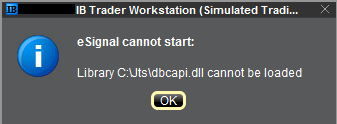
This error may appear for the following reasons:
Issue A - You are not using the 32 bit version of TWS and/or eSignal:
The 32-bit versions of both TWS and eSignal have to be installed for the integration to work. In the section below you will find the instructions for installing the 32-bit TWS. Should you need assistance with the installation of the 32-bit eSignal, we suggest you to contact the eSignal customer support.
Issue B - There is an incompatibility with the file C:\Jts\dbcapi.dll:
To use 32-bit eSignal version 12, an incompatibility with the C:\Jts\dbcapi.dll file must be fixed. This involves copying a file from the eSignal installation and renaming it to dbcapi.dll.
Note: On certain systems you will need to apply the fixes for both issue A and B. If you applied the fix for issue A (or if you are already sure you are using the 32 bit version of both platforms) and you are still receiving the error message, then please apply as well the fix for issue B.
Instructions to resolve issue A
Installing 32-bit TWS
Please open the page http://www.ibkr.com in your browser and perform the steps below:
1) Click on the Log In button at the top right corner of the page.
2) Click on Download Trader Workstation: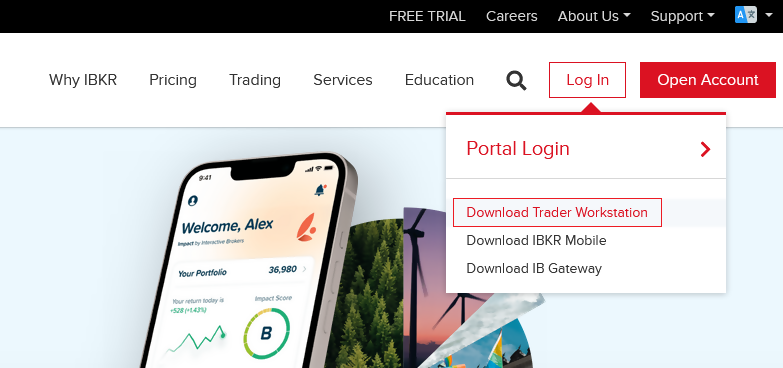
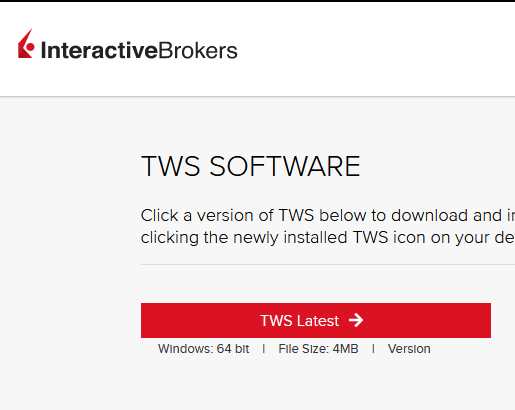
3) Click on the red button TWS Latest:
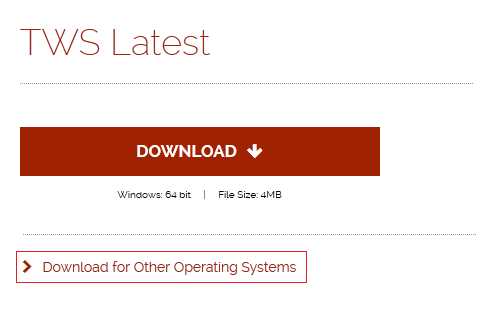
4) On the next page, click on the link Download for Other Operating Systems:
5) Click on the item Windows 32-bit:
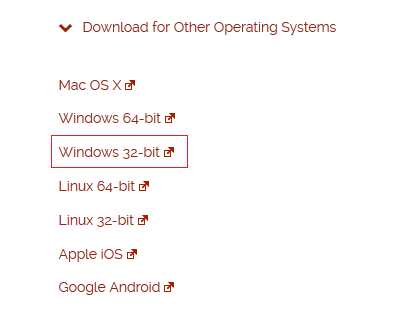
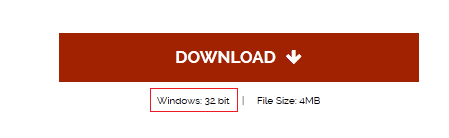
6) Make sure that the description under the DOWNLOAD button has changed to "Windows: 32 bit". Click now on DOWNLOAD:
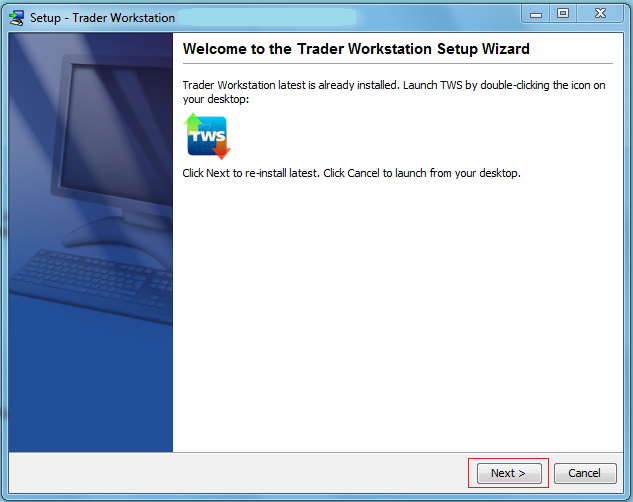
7) Launch the downloaded file. The Trader Workstation installation will start. At this point, you may see the warning message "Trader Workstation latest is already installed...". Ignore this warning and click on the button Next > to continue the installation:
8) Your "Trader Workstation" Desktop icon will be automatically updated. You can now launch the 32-bit Trader Workstation by a double click on that icon.
If you have launched the 32-bit TWS and the 32 bit version of eSignal but you still receive the same error message, please follow as well the instructions below.
Instructions to resolve issue B
Replacing dbcapi.dll for compatibility between 32-bit TWS and 32-bit eSignal 12
To correct an incompatibility with the dbcapi.dll file, we will replace that file with another version of it taken from the eSignal installation folder. Please follow the steps below to perform the substitution:
1) Navigate to C:\Jts and rename the file dbcapi.dll to dbcapi_old.dll
2) Navigate to the directory where 32-bit eSignal 12 is installed (most commonly C:\Program Files (x86)\Common Files\Interactive Data\DM).
3) Copy dbcapi_vc8.dll from that directory into the C:\Jts directory.
4) Move to the C:\Jts directory.
5) Right click on the dbcapi_vc8.dll file (now in the C:\Jts directory) and select rename. Type dbcapi.dll as the new filename.
.jpg)
6) TWS is now ready to accept the eSignal data feed.
How to install the TWS API Components on Mac / Unix
NOTE: If you have already agreed to the API License Agreement please start at Step 3 below.
Instructions
- Click directly on the button below to access the API software download page

- This will direct you to Interactive Brokers API License Agreement, please review it
- Once you have clicked "I Agree", refer to the Mac / Unix section to download the API Software version of your preference
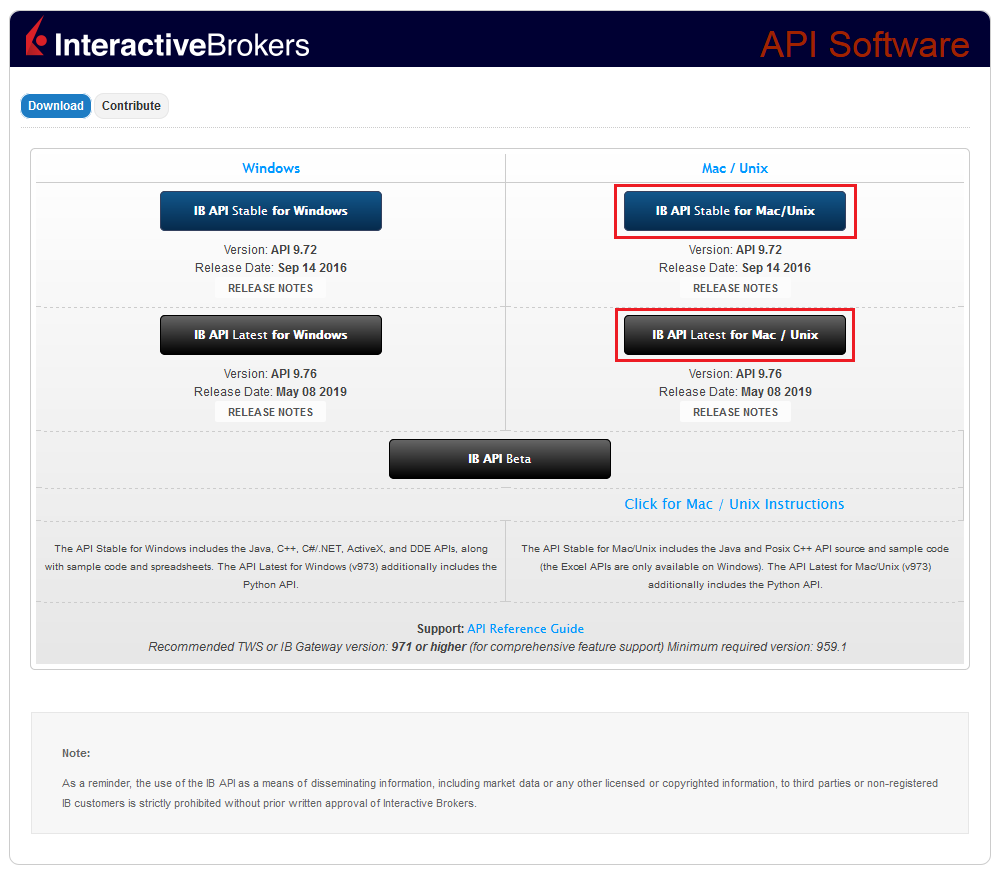
- This will download twsapi_macunix.n.m.zip to your computer
(where n and m are the major and minor version numbers respectively) - Open Terminal (Ctrl+Alt+T on most distributions)
(On Mac press Command+Space to launch Spotlight, then type terminal and press Return) -
Navigate to the directory where the installer has been downloaded (normally it should be the Download folder within your home folder) and confirm the file is present
$ cd ~/Downloads
$ ls
- Unzip the contents the installer into your home folder with the following command (if prompted, enter your password):
$ sudo unzip twsapi_macunix.n.m.zip -d $HOME/

- To access the sample and source files, navigate to the IBJts directory and confirm the subfolders samples and source are present
$ cd ~/IBJts
$ ls

Legacy Instructions - API Version ≤ 9.71
Note: IB only offers API Version 9.72+. In the event you already have an existing legacy version and need to install it, please refer to the directions below:
- locate the file twsapi_macunix.n.m.jar on your computer
(where n and m are the major and minor version numbers respectively.) - Open Terminal (Ctrl+Alt+T on most distributions)
(On Mac press Command+Space to launch Spotlight, then type terminal and press Return) - Navigate to the directory where the .jar file has been located (normally it should be the Download folder within your home folder) and confirm it is present
$ cd ~/Downloads
$ ls - Extract the contents of the .jar file into your home folder
$ jar xf twsapi_macunix.n.m.jar -d $ HOME/ - To access the sample and source files, navigate to the IBJts directory and confirm the subfolders samples and source are present
$ cd ~/IBJts
$ ls
How to fix the error: "Ddedll.dll file missing or out of date"
Background:
TWS users running add-on applications in Excel using DDE on a Windows 64-bit operating systems may receive the following error message upon log in or when enabling the DDE client:
.png)
This message is usually displayed for the following reasons:
Issue A - You are not using the 32-bit version of TWS
You are running an instance of TWS that is using the 64-bit version of the Java Virtual Machine while attempting to load the ddedll.dll library, which has been compiled for 32-bit Java. This error can be corrected by re-installing TWS 32-bit from IB website.
Issue B - The API components have not been installed
The API Components (and consequently the library ddedll.dll) have not yet been installed but you already enabled the DDE Client Connection for TWS. This error can be corrected by installing the API Components.
Note: On certain systems you will need to apply the fixes for both issue A and B. If you applied the fix for issue A (or if you are already sure you are using the 32 bit version of the TWS) and you are still receiving the error message, then please apply as well the fix for issue B.
Instructions to resolve issue A
Installing 32-bit TWS
Please open the page http://www.ibkr.com in your browser and perform the steps below:
1) Click on the Log In button at the top right corner of the page.
2) Click on Download Trader Workstation:
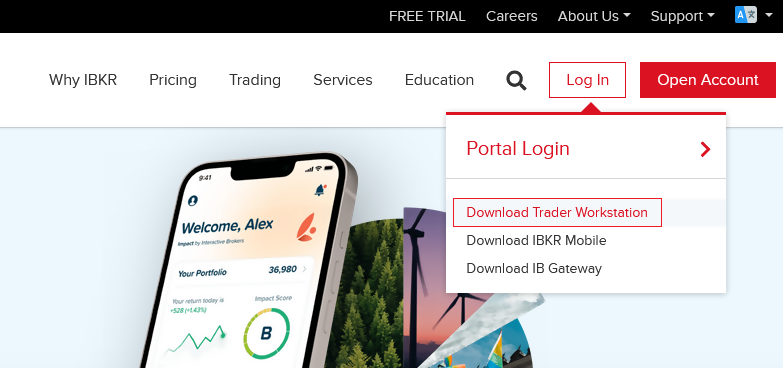
3) Click on the red button TWS Latest:
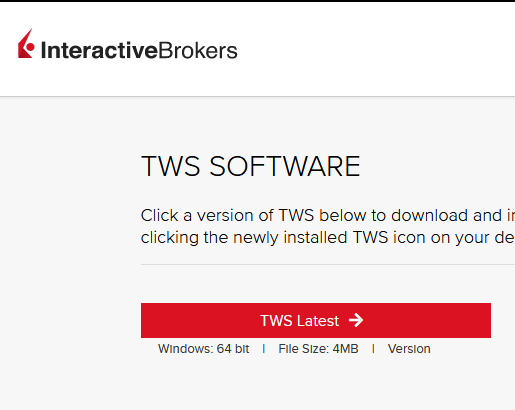
4) Click on the link Download for Other Operating Systems:
5) Click on the item Windows 32-bit:
6) Please make sure that the description under the DOWNLOAD button has changed to "Windows: 32 bit". Then click on DOWNLOAD:
7) Launch the downloaded file. The Trader Workstation installation will start. At this point you may see the warning message "Trader Workstation latest is already installed...". Ignore this warning and click on the button Next to continue the installation:
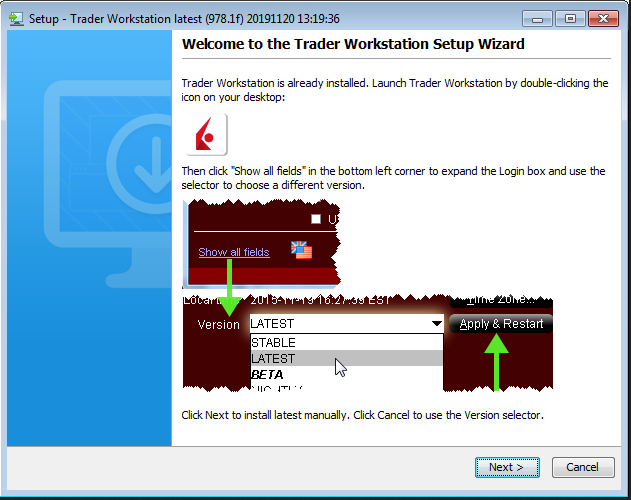
8) Your Trader Workstation Desktop icon will be automatically updated. You can now launch the 32-bit Trader Workstation by a double click on that same icon.
If you have installed and launched the 32-bit TWS but you are still receiving the same error message, please proceed with the instructions below.
Instructions to resolve issue B
Installing the API components
9) Click the GET API SOFTWARE button below:

10) This will direct you to Interactive Brokers API License Agreement, please review.
11) Click the I Agree button at the bottom:
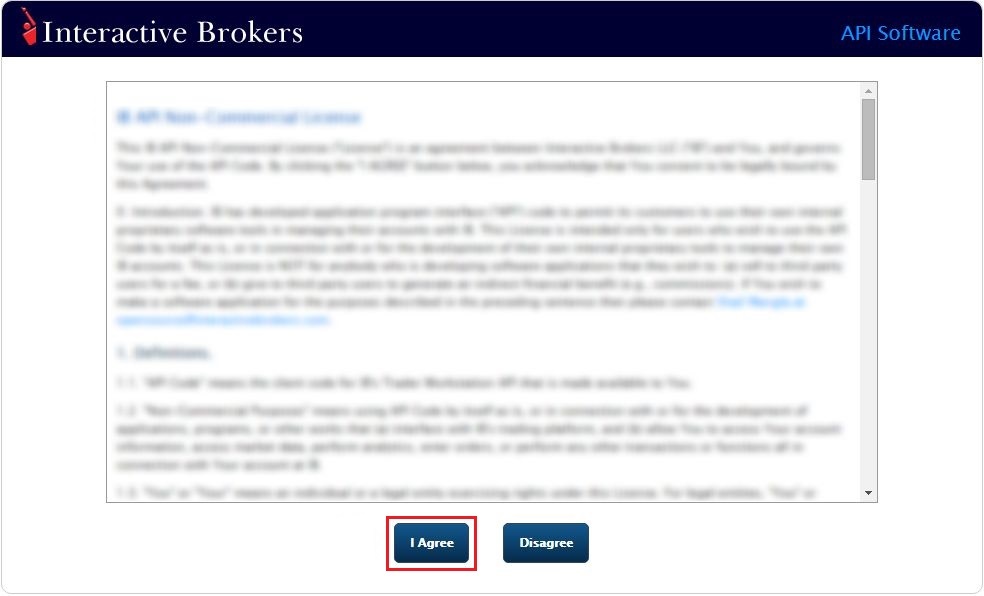
12) Under the section Windows on the left side, download one of the IB API packages listed and install it:
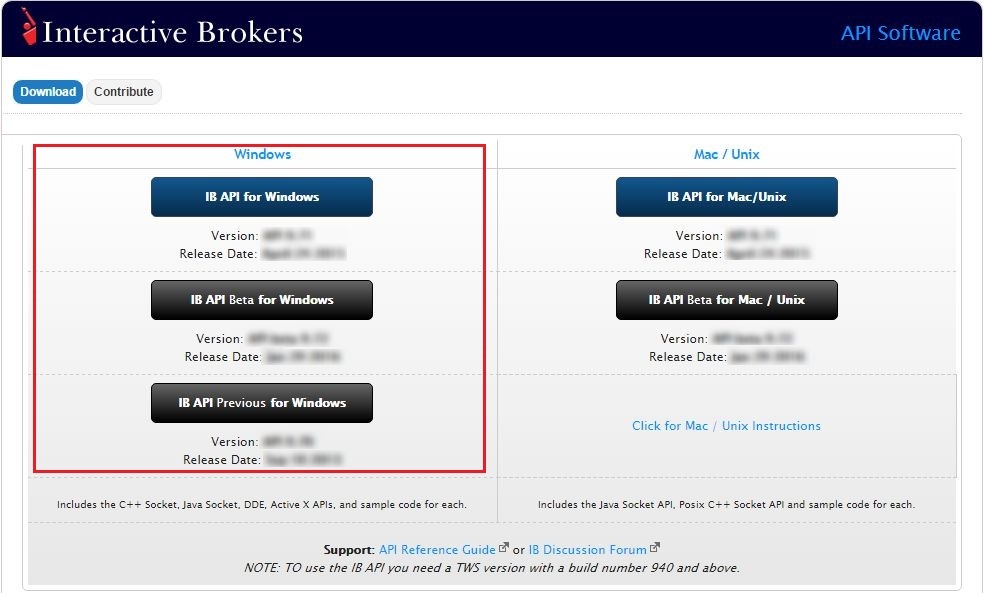
13) Once the installation has completed, log back into TWS.
Other Items:
Please be aware that there are some programs that can effect the legacy DDE Client connections, for example: Chrome, VLC Player, Adobe Creative Cloud or Microsoft One Drive. In case you are using these programs, please keep them closed while you are using the Excel DDE workbook.
The newer DDE version uses a Java socket based on 64-bit, and should no longer have any conflicting software.
Compatibility between MetaTrader and Interactive Brokers
Overview:
Interactive Brokers (IBKR) provides to its account holders a variety of proprietary trading platforms at no cost and therefore does not actively promote or offer the platforms or add-on software of other vendors. Nonetheless, as IBKR's principal trading platform, the TraderWorkstation (TWS), operates with an open API, there are numerous third-party vendors who create order entry, charting and various other analytical programs which operate in conjunction with the TWS for purposes of executing orders through IBKR. As these API specifications are made public, we are not necessarily aware of all vendors who create applications to integrate with the TWS but do offer a program referred to as the Investors Marketplace which operates as a self-service community bringing together third party vendors who have products and services to offer with IBKR customers seeking to fill a specific need.
While MetaQuotes Software is not a participant of IBKR's Investors Marketplace, they offer to Introducing Brokers the oneZero Hub Gateway so that MetaTrader 5 can be used to trade IBKR Accounts[1]. Clients interested would need to contact oneZero directly for additional assistance. Please refer to the Contact section from the following URL.
Note: Besides oneZero Hub Gateway, different vendors such as Trade-Commander, jTWSdata and PrimeXM also offer a software which they represent, acts as a bridge between MetaTrader 4/5 and the TWS. As is the case with other third-party software applications, IBKR is not in a position to provide information or recommendations as to the compatibility or operation of such software.
1: oneZero is not available for Individual Accounts, please click here for more information on Introducing Brokers.
Ninja Trader Integration with TWS - FAQs
Q: Is Ninja Trader Compatible with the Trader Workstation (TWS) / IB Gateway*?
A: TWS / IB Gateway Application Program Interface (API) accommodates connection to a variety of third-party vendors, including Ninja Trader, who offer complementary order entry, charting, back-testing and analytics software programs designed to expand the functionality of TWS. Please refer to the following Ninja Trader website link for details: http://www.ninjatrader.com/ConnectionGuides/Interactive-Brokers-Connection-Guide
* IB Gateway support is available with Ninja Trader 8+
Q: Can Ninja Trader be tested with the TWS platform demo* which IBKR makes available to prospective clients?
A: Yes, but only on a limited basis as the platform demo is solely intended to demonstrate the functionality of the TWS and its API. As background, the TWS demo provides only delayed market data and does not offer the historical data necessary to populate Ninja Trader charts requiring a combination of streaming and historical data. Once your live IBKR account is approved and funded a paper trading account may be requested, the market data subscriptions to which will accommodate full testing of the Ninja Trader application.
*Demo can be accessed from the login screen of TWS (No Username? Try the Demo or during the opening process of an Account.
Q: Is Ninja Trader compatible with all versions of TWS?
A: No. There is an inherent lag between the time IBKR releases a TWS update and that at which any third-party vendor can reasonably respond with a corresponding software upgrade. In the case of Ninja Trader, its application is compatible solely with the Offline TWS platform (not the automatic update) and to determine the particular version currently supported, please refer to the following Ninja Trader website link: http://www.ninjatrader.com/ConnectionGuides/Interactive-Brokers-Connection-Guide
Q: Can the free delayed market data feed from IBKR be used with Ninja Trader?
A: No. Though delayed market data is generally available through the API, some third-party vendors does not utilize these functions. Account holders seeking to use IBKR as a data source must subscribe to a real-time data feed through the Client Portal.
Q: Is there any distinction between the rate at which Ninja Trader seeks to load chart data and that which the IBKR market data feed supports?
A: As queries which request the same historical data within a short period of time may result in excessive back end server load, IBKR imposes pacing restrictions which, if violated, will generate error codes. In certain circumstances, the pacing of data requests through IBKR may delay the loading of the data through Ninja Trader, particularly when multiple charts and or symbols are loaded simultaneously. For details regarding the limitations IBKR imposes with respect to historical data queries, please refer to the following IB API guide link: https://interactivebrokers.github.io/tws-api/historical_limitations.html
Q: Does IBKR support the market data required to populate Ninja Trader Range Bar charts?
A: Range Bar charts generally depict the movement of price for a particular instrument over a defined time period (e.g. month, day, 5-minute, 3-minute, etc.) or tick increment. At this time many software vendors has not made the necessary updates to offer the tick-data provided by Interactive Brokers. Ninja Trader Bar charts require an alternate data source to eliminate data gaps.
Please refer to the following Ninja Trader website link for a list of supported connectivity providers as well as the historical and real-time data provided by each: http://www.ninjatrader.com/support/helpGuides/nt7/index.html?historical_data.htm
Q: It is possible to use different data source vendor between TWS and Ninja Trader interface?
A: Yes. It should be noted that Ninja Trader does not operate as a vendor of market data and use of this application requires provision of data by a third-party connectivity provider. While IBKR can serve as this provider for real time prices, these prices are not provided on an unfiltered tick-by-tick basis, a prerequisite for fully populating Ninja Trader charts. A common setup therefore, is to use Ninja Trader as a front-end order entry platform, routing orders to the TWS for execution and clearing by IBKR and bridge to a third-party vendor for market data.
Q: Is Ninja Trader compatible with IBKR’s paper trading (simulation) account?
A: Yes Ninja Trader connects to the paper trading account in the same manner as to the live account. To familiarize oneself with the configuration and operation of these applications, IBKR strongly recommends conducting test trades through the paper trading account prior to submitting orders through the live account.
Q: How can orders submitted through Ninja Trader for execution through TWS monitored with TWS?
A: Classic TWS contains a quote monitor page denoted by a tab marked “API” within the main window through which open orders submitted via Ninja Trader or any third party software application may be monitored.
Q: Is Ninja Trader compatible with IBKR’s Financial Advisor and Friends & Family account type?
A: Yes, although not with the full order allocation functionality provided directly through the TWS. While Ninja Trader can be used to submit orders for a client sub-account through the Advisor master account, it does not allow for a single order to be allocated to more than one sub-account: http://www.ninjatrader.com/support/helpGuides/nt7/account_groups.htm. This is in contrast to the TWS user interface which provides for multi-client trade allocations from a single order (through the Account Group or Allocation Profile options).
Q: How does one determine the cause of orders which have been submitted via Ninja Trader and subsequently canceled or rejected?
A: An order which has been canceled or rejected will be accompanied by an error message generated by Ninja Trader and/or TWS depending upon the source of the action. Order cancellations/rejections may be attributable to a variety of factors including IBKR credit policies, exchange restrictions or an invalid user request. In situations where the error message is not self explanatory, the user will need to contact the technical support teams of IBKR and Ninja Trader to diagnose and troubleshoot the problem.
