
System requirements for FaceKom interviews
Interactive Brokers Central Europe ZRt ("IBCE") is required, by regulation, to confirm applicant's identity via video interview. Interviews are conducted using a regulatory compliant remote client identification system offered by FaceKom. The minimum system requirements necessary to participate in the IBCE video interview are as follows:
- PC, laptop or mobile devices: Android OS 4+ and Chrome or Android 5+ with built-in Chrome, iOS Safari 11+.
- Supported browsers from PC / laptop: Google Chrome v44 or later, Mozilla Firefox v39 or later, Opera (since 2018), Microsoft Edge 15+ Safari 11.
- Hardware requirements: Intel Core i3, i5, or i7 (AMD or equivalent), RAM: minimum 2GB. Camera: HD (720p) is recommended.
FAQS: IBIE Account Transfer
Overview:
This is an important document regarding the proposed transfer of your account from IBUK and IBLLC to IBIE that requires your attention. Please read the entirety of this document ahead of taking any action referred to in the Covering Letter sent to you via email.
Background:
Please take time to read these FAQs, which summarise some of the key changes to the regulatory framework which will be brought about by the Proposed Transfer (as described below) and provide answers to some of the more general questions that you may have. The FAQs should be read in conjunction with the Covering Letter. If you require any further information, please get in touch with us using the contact details provided in the Covering Letter.
Discussion:
The FAQs are split into three parts.
- Part A sets out key information in relation to the Proposed Transfer (as described below).
- Part B covers key legal and regulatory topics that arise as a result of the Proposed Transfer (as described below).
- Part C aims to answer any other questions that you may have and provides some further and more practical information in relation to what will and will not be changing following the Proposed Transfer (as described below).
PART A – THE PROPOSED TRANSFER
1. What is the situation currently?
As you will be aware, at present, your relationship with Interactive Brokers is led by our entity based in the United Kingdom, specifically Interactive Brokers (U.K.) Limited (“IBUK”) and the services provided to you are provided by IBUK and, depending on the products you do business in, our US affiliate Interactive Brokers LLC (“IBLLC”).
2. What is Interactive Brokers requesting?
We are inviting all clients domiciled in the European Economic Area (“EEA”) to transfer their accounts to one of our brokers based in Europe.
We propose to transfer the relationship that you currently have with IBUK and IBLLC to Interactive Brokers Ireland Limited (“IBIE”), an Interactive Brokers investment firm located in Ireland. It is our intention that all of your accounts, investments and services currently provided to you by IBUK and IBLLC will instead be singularly provided by IBIE (for convenience we will refer to this as the “Proposed Transfer”).
3. Who is IBIE? What sort of a firm is it?
IBIE is an investment firm regulated by the Central Bank of Ireland and authorised pursuant to the second Markets in Financial Instruments Directive (Directive 2014/65/EU). IBIE is an affiliate of IBUK and IBLLC.
4. What are IBIE’s legal details?
Interactive Brokers Ireland Limited is registered as a private company limited by shares (registration number 657406) and is listed in the Register of Companies maintained by the Irish Companies Registration Office. Its registered address is 10 Earlsfort Terrace, Dublin 2, D02 T380, Ireland. IBIE can be contracted by telephone at 00800-42-276537 or electronically through the IBIE website at www.interactivebrokers.ie.
5. Who regulates IBIE and what are their contact details?
As set out above the Central Bank of Ireland is the competent regulator for IBIE (in the same way that the Financial Conduct Authority is the competent regulator for IBUK). IBIE is included in the Central Bank of Ireland’s register of authorised firms under number 423427. The Central Bank of Ireland’s contact details are set out below:
Location
The Central Bank of Ireland
New Wapping Street
North Wall Quay
Dublin 1
D01 F7X3
Contact Numbers
Phone: +353 (0)1 224 6000
Fax: +353 (0)1 224 5550
Postal Address
Central Bank of Ireland
P.O. Box 559
Dublin 1
Public Helpline
E-mail: enquiries@centralbank.ie
Lo-Call: 1890 777 777
Phone: +353 (0)1 224 5800
6. Where does IBIE fit with respect to the broader Interactive Brokers group?
IBIE is a wholly-owned subsidiary that sits within the broader Interactive Brokers Group.
7. What does the Proposed Transfer mean for me? Will there be any material impacts?
We do not anticipate any material impacts for you as a result of the Proposed Transfer. Nonetheless, it is very important that you read these FAQs carefully and in full and make sure that you understand what the changes are for you.
8. What do I have to do if I want to continue doing business with Interactive Brokers?
If you would like to continue to do business with Interactive Brokers, we require your cooperation and action.
Specifically, we need you to consent and agree to the Customer Agreement and other Documents available under the Important Information section of the Proposed Transfer process and to the regulatory matters outlined in the Covering Letter, the Important Information and Consent sections of the Proposed Transfer process. You can do this by following the instructions in the Covering Letter.
To be clear, you do not have to consent to the Proposed Transfer if you feel that you may be adversely affected by it. You have the option of transferring your positions to another broker or closing your positions and transferring any cash balance to another account.
If you do not take action by December 7, 2022, your account will be restricted from opening new transactions or transferring in new assets. You always have the ability to transfer your account to another broker. If you wish to decline, please follow the instructions in the Covering Letter.
In either case, we ask that you read the entirety of this FAQs and the Covering Letter before deciding to consent to or decline the Proposed Transfer.
9. What happens next?
If you consent to the transfer, please complete all actions detailed in the Covering Letter and we will prepare your account to be transferred to IBIE. Once your account is transferred, IBIE will write to you with further information about your new relationship with them.
PART B – LEGAL AND REGULATORY CHANGES THAT YOU SHOULD BE AWARE OF
1. What terms and conditions will govern my relationship with IBIE following the Proposed Transfer? Are these different to the ones that currently apply?
Trades that you conduct after the Proposed Transfer will be governed by the new Customer Agreement between you and IBIE. A copy of the IBIE Customer Agreement is available in the Important Information section of the Proposed Transfer process.
2. What conduct of business rules (including best execution) will apply to my relationship with IBIE? Are there any material differences that will apply to my relationship with IBIE compared to those that apply to my existing relationship with IBUK?
There are some changes to be aware of, which we explain below.
If you do business with IBUK on a “carried” basis (in other words, you trade index options, futures and futures options and IBUK carries your account and custodies your assets) then the Financial Conduct Authority’s conduct of business rules currently apply to you. These rules are based heavily on the recast Markets in Financial Instruments Directive, the Markets in Financial Regulation and various delegated directives and regulations (collectively, “MiFID”). In relation to best execution, where it applies, IBUK must take all sufficient steps to achieve the best possible result for you when we execute your order.
If you currently do business with IBUK on an “introduced” basis (in other words, you trade products outside of those mentioned in the previous paragraph and you have a relationship with both IBUK and its US affiliate, IBLLC) a mix of conduct of business rules will currently apply to you. For instance, with respect to the introduction of your business to IBLLC, the Financial Conduct Authority’s conduct of business rules will apply (see above in relation to these). Once introduced to IBLLC, the relevant U.S. Securities and Exchange Commission and U.S. Commodity Futures Trading Commission rules and regulations (among others) will apply to IBLLC’s role (including its obligations in relation to best execution and custody).
Please note that it is of course possible that your business is split across these two scenarios (in other words some of your business is conducted on a “carried” basis while some of it is conducted on an “introduced” basis).
Going forward, the distinction between “carried” and “introduced” business will no longer apply and in each case set out above, Irish conduct of business rules will exclusively apply to your relationship with IBIE. Similar to the UK Financial Conduct Authority’s rules, the Irish conduct of business rules are based on MiFID and IBIE’s obligations in relation to best execution will largely mirror those that currently apply to IBUK.
In our view, while the rules that apply to our relationship will change, we do not consider such changes to be material or to result in a lesser degree of protection being afforded to you.
3. How will my investments that I custody with IBIE be held from a legal/regulatory perspective? Are there any material differences that will apply to my relationship with IBIE compared to those that apply to my existing relationship with IBUK?
The rules that currently apply depends on the sort of business that you presently have with IBUK (please see the response to Question B2 above). Where you conduct “carried” business with IBUK, the Financial Conduct Authority’s client asset (or “CASS”) rules will apply. These rules are based heavily on MiFID. Where you conduct “introduced” business with IBUK and IBLLC, the US custody rules will apply to your custody assets.
Going forward, as set out above, the distinction between “carried” and “introduced” business will no longer apply and in each case set out above, Irish custody rules will exclusively apply to your relationship with IBIE. Like the UK Financial Conduct Authority’s rules, the Irish conduct of business rules are based on MiFID. Please consult the Client Assets Key Information Document provided in the Important Information section in relation to the Irish custody regime.
4. How am I protected against loss? Are there any material differences that will apply to my relationship with IBIE compared to those that apply to my existing relationship with IBUK?
Currently, your eligible assets are protected from loss either under the US Securities Investor Protection Corporation at an amount of up to USD 500,000 (subject to a cash sublimit of USD 250,000) or the UK Financial Services Compensation Scheme at an amount up to GBP 50,000 (which regime applies depends on the relevant segment of your IBUK account, as explained in the response to Question B2 above). After the Proposed Transfer, the Irish Investor Compensation Scheme, which is administered by The Investor Compensation Company DAC, may protect your assets from loss should IBIE default and be unable to meet its obligations to you.
Ireland’s compensation scheme is similar to the compensation scheme you have access to in the UK, albeit with a lower limit. The purpose of the Irish Investor Compensation Scheme is to pay compensation to you (subject to certain limits) if you have invested money or investment instruments in either of the following cases:
- A firm goes out of business and cannot return your investments or money; and
- A Central Bank of Ireland determination or a court ruling has been made under the Investor Compensation Act 1998.
The Investor Compensation Company DAC (ICCL) administers the scheme. IBIE will be a member of the scheme.
The scheme covers investment products including:
- Public and private company shares
- Units in collective investment schemes
- Life insurance policies (including unit-linked funds)
- Non-life insurance policies
- Tracker bonds
- Futures and options
Usually, you can only make a claim after a firm goes out of business and its assets have been liquidated and distributed to those who are owed money. Please check the details of the schemes for any limits that apply – not all losses will be covered as there are maximum levels of compensation. The ICCL will pay you compensation for 90% of the amount you have lost, up to a maximum of €20,000.
5. How do I make a complaint to IBIE? Are there any material differences that will apply to my relationship with IBIE compared to those that apply to my existing relationship with IBUK? What if my complaint relates to something that happened while I was a customer of IBUK?
The new Customer Agreement sets out how to lodge a complaint with IBIE. The complaints handling procedures are materially similar to those that apply to your existing relationship with IBUK. If the substance of your complaint relates to something that happened prior to the Proposed Transfer, then you should address your complaint to IBUK. Its current contact information will stay the same and can be found at interactivebrokers.co.uk should you need to contact IBUK.
6. After the Proposed Transfer, will I still have access to the Financial Ombudsman Service?
In case of complaint, investors should follow the complaints procedure as referred to in the Customer Agreement. Once your account is transferred to IBIE, the UK Financial Ombudsman Service will cease to have jurisdiction over any complaints that you may have in respect of IBUK. However, please be aware that Ireland has a dispute resolution scheme in the form of the Financial Services and Pensions Ombudsman (“FSPO”). The FSPO is a free and independent statutory dispute resolution scheme for financial services. You may be eligible to make a complaint to the FSPO if you are an “eligible complainant”. Details of who are “eligible complainants” can be found on www.fspo.ie. The FSPO can be contacted at:
Postal Address
Financial Services and Pensions Ombudsman
Lincoln House,
Lincoln Place
Dublin 2
D02 VH29
Telephone
+353 (0)1 567 7000
Email
Info@fspo.ie
7. How will my personal data be processed and protected? Are there any material differences that will apply to my relationship with IBIE compared to those that apply to my existing relationship with IBUK in this context?
Your data will be processed and protected in accordance with the Interactive Brokers Group Privacy Policy which can be found at: https://www.interactivebrokers.com/en/index.php?f=305. There will be no material change.
PART C – OTHER PRACTICAL QUESTIONS AND NEXT STEPS
1. Who should I contact before the Proposed Transfer takes place and after the Proposed Transfer if I have any questions in the ordinary course?
Generally speaking, you should contact IBUK with any questions that you may have prior to the Proposed Transfer, and you should contact IBIE with any questions that you may have following the Proposed Transfer taking place. Regardless of who you contact at Interactive Brokers, we will ensure your query is promptly dealt with and we will help you to connect with the right person or department.
2. Will the range of products offered be the same?
Our current expectation is that the same range of products will be offered by IBIE as are offered by IBUK.
There might be a restriction on Foreign Exchange transactions that would create a negative balance or would increase a preexisting negative balance in either component currency. However, the same currency pairs can be traded as Forex CFD. Contracts For Difference are complex instruments, and we invite you to carefully review the CFD risk warnings before trading these instruments following the transfer of your account.
Please note that IBIE offers financing for securities and commodities trades but cannot support withdrawals of borrowed funds. You will be free to withdraw any free cash not needed to support your open positions. If you would like to withdraw additional funds, you can sell positions and withdraw the proceeds.
In limited instances where clients hold restricted products, clients may transfer and maintain or close such positions but won’t be allowed to increase the position.
3. I currently trade OTC derivatives with IBUK – what will happen to my open positions?
Your open positions will be transferred to IBIE and you will face IBIE rather than IBUK. You will no longer have any legal relationship with IBUK in relation to those positions. We will separately provide you with an updated Key Investor Information Document (please follow the link to the PRIIPs KID landing page in the Covering Letter).
4. What happens to any security I have granted to IBUK/IBLLC as part of a margin loan?
If you have granted security or collateral to IBUK/IBLLC this will transfer to IBIE upon the Proposed Transfer taking place.
We do not anticipate you needing to take any steps to reflect the change in beneficiary, although we may need to take some administrative steps of our own to update security registers with the change in details. This should, however, not affect our priority or otherwise affect the date from which the security is valid.
5. Will I have access to the same trading platform or be subject to any software changes following the transfer of my account?
The transfer of your account will have no impact upon the software you use to trade or administer your account. The technology will remain the same as it is today.
6. Will all account balances be transferred at the same time?
All balances, with the exception of accruals (e.g., interest, dividends) will be transferred at the same time. Once accruals have been posted to cash, they will automatically be swept to the transferred account.
7. What will happen to my current account following the transfer of my account?
Once all accruals have been swept, your current account will be closed and inaccessible for trading purposes. You will still be able to access this closed account via the Client Portal for purposes of viewing and printing archived activity and tax statements.
8. Will IBKR’s commissions and fees change when my account is transferred?
No. IBKR commissions and fees do not vary by the broker your account is maintained with.
9. Will my trading permissions change when my account is transferred?
No. Your trading permissions will not change when your account is transferred.
10. Will open orders (e.g., Good-til-Canceled) be carried over when my account is transferred?
Open orders will not be carried over to the new account, and we recommend that clients review their orders immediately following the transfer of their account to ensure that the open orders are consistent with their trading intentions.
11. Will I be subject to the U.S. Pattern Day Trading Rule if my account is transferred?
Accounts maintained with IBUK are subject to the U.S. Pattern Day Trading (PDT) rule as the accounts are introduced to and carried by IBLLC, a U.S. broker. The PDT rules restricts accounts with equity below USD 25,000 to no more than 3 Day Trades within any 5-business day period.
As accounts transferred to IBIE will not be introduced to IBLLC, they will not be subject to the PDT rule.
12. Will I receive a single, combined annual activity statement at year end?
No. You will receive an annual statement of your existing account which will cover the period starting 1 January 2022 through the date your account was transferred and a second annual statement for your new account which will cover the period starting from the transfer date through the end of the year.
13. Will the current cost basis of positions be carried over when my account is transferred?
Yes, the transfer of your account will have no impact upon the cost basis of your positions.
14. Will the transferred account retain the same configuration as the current account?
The configuration of the account following transfer will match that of the current account to the extent permissible by regulation. This includes attributes such as margin capability, market data, additional users, and alerts.
15. Will my login credentials change?
No. Your username, password, and any 2-factor authentication process in place for your existing account will remain active following transfer. You will, however, be assigned a new account ID for your transferred account.
IB LLC Document Considerations for Individual Applicants
IB LLC is required to verify the identity and address of each applicant and, where we are unable to do so via electronic means, will instruct the applicant to submit copies of official documents as evidence (e.g., passport, driver’s license, national ID, bank statement utility statement). In most instances the applicant will need to submit two separate documents, one as proof of address and the other as proof of identity, even when a single document contains both. Individuals residing in certain countries, however, are eligible to submit a single qualifying document as proof of both their identity and address. A list of countries whose residents are eligible to submit a single qualifying document as proof of both their identity and address is listed below1.
| Country Name |
| United States |
| American Samoa |
| Anguilla |
| Antarctica |
| Aruba |
| Bahrain |
| Barbados |
| Bermuda |
| Bhutan |
| Bonaire, Sint Eustatius and Saba |
| British Indian Ocean Territory |
| Brunei Darussalam |
| Chile |
| China |
| Cook Islands |
| Curacao |
| East Timor |
| Faeroe Islands |
| Falkland Islands (Malvinas) |
| Fiji |
| French Polynesia |
| Greenland |
| Guam |
| Israel |
| Kiribati |
| Malawi |
| Marshall Islands |
| Martinique |
| Mauritius |
| Mayotte |
| Micronesia, Federated States of |
| New Caledonia |
| Norfolk Island |
| Northern Mariana Islands |
| Oman |
| Pitcairn |
| Puerto Rico |
| Qatar |
| Republic of Korea |
| Rwanda |
| Saint Barthelemy |
| Saint Helena |
| Saint Lucia |
| Saint Martin |
| Saint Vincent and the Grenadines |
| Samoa |
| Senegal |
| Singapore |
| Sint Maarten |
| Solomon Islands |
| South Africa |
| Svalbard and Jan Mayen Islands |
| Swaziland |
| Taiwain, ROC |
| Tokelau |
| Tonga |
| Turks and Caicos Islands |
| Tuvalu |
| United States Virgin Islands |
| Australia |
| French Guiana |
| Guadeloupe |
| New Zealand |
| Reunion |
| Saint Pierre and Miquelon |
1 Note that this list is subject to change and may not yet reflect the most recent updates.
How to use Voice callback for receiving login authentication codes
Background:
If you have SMS enabled as two-factor authentication method, you may use Voice callback to receive your login authentication codes. This article will provide you steps on how to select voice callback when logging in to our platforms.
How to use Voice callback
You may select Voice if you do not receive your login authentication code. You will then receive your login authentication code via an automated callback. Follow the instructions below, depending on which platform you are trying to login to.
Client Portal
1. Click on "Didn't receive a security code?"
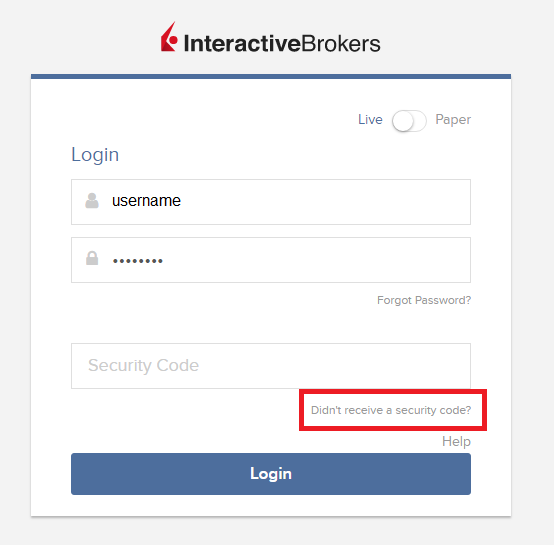
2. From the two options, select "Voice" and wait for the callback.
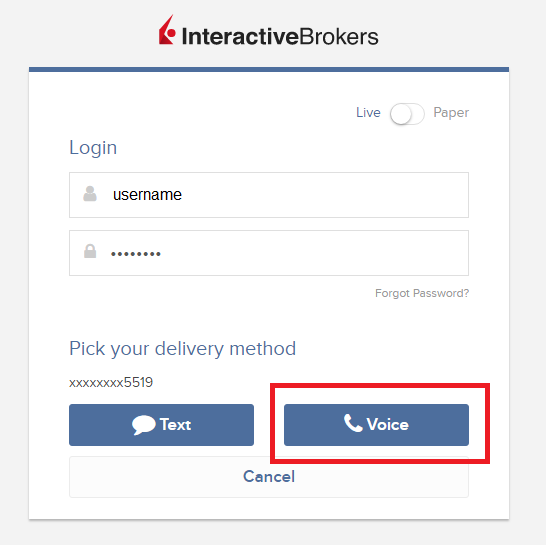
3. After selecting Voice, you should receive the callback within a minute. Please wait for the callback and be ready to write down the code that will be provided over the callback.
TWS
1. Click on "Request new Security Code"
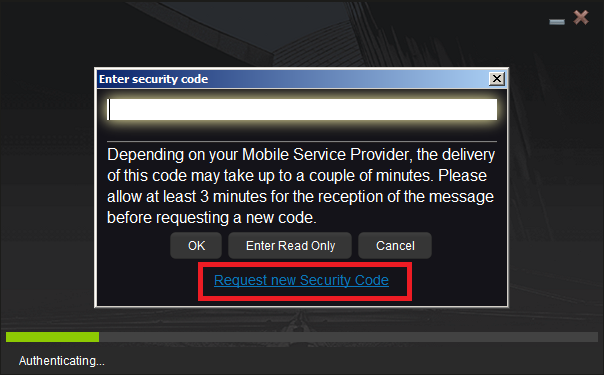
2. From the two options, select "Voice" and click on OK. Then wait for the callback.
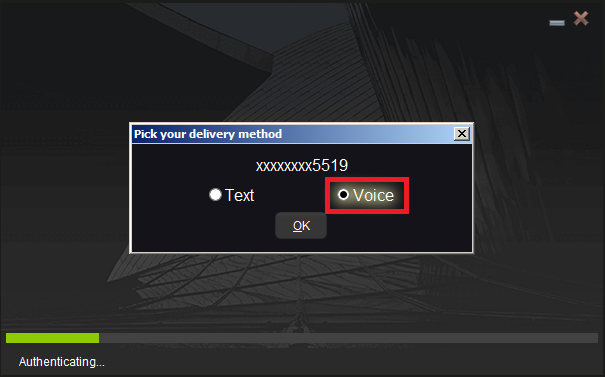
3. After selecting Voice, you should receive the callback within a minute. Please wait for the callback and be ready to write down the code that will be provided over the callback.
Note: Voice callback for the TWS is only available in the LATEST and BETA version.
IBKR Mobile - iOS
1. Click on "Request New Code"
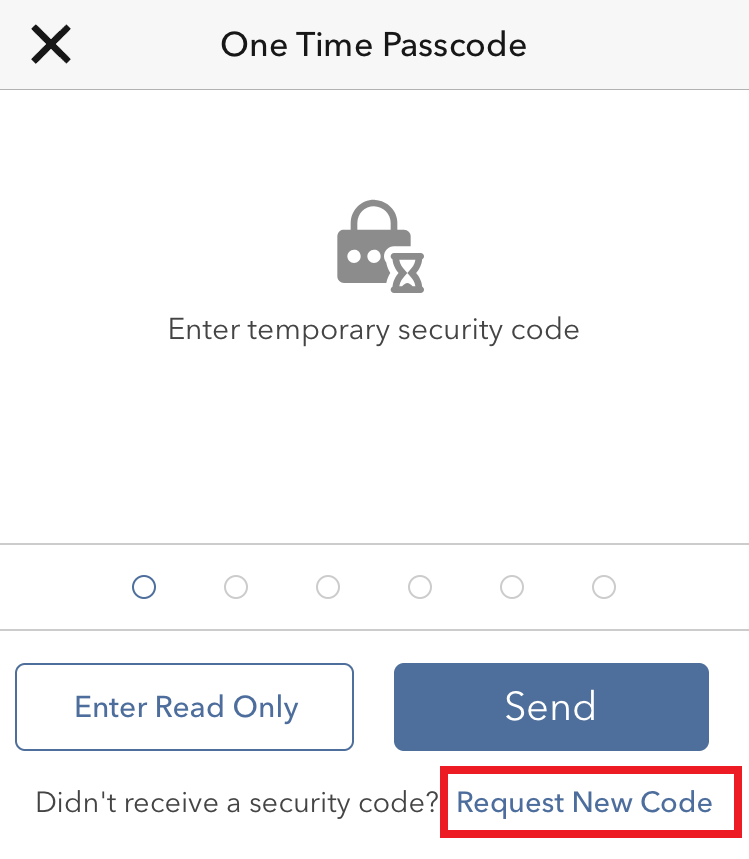
2. From the two options, select "Voice" and wait for the callback.
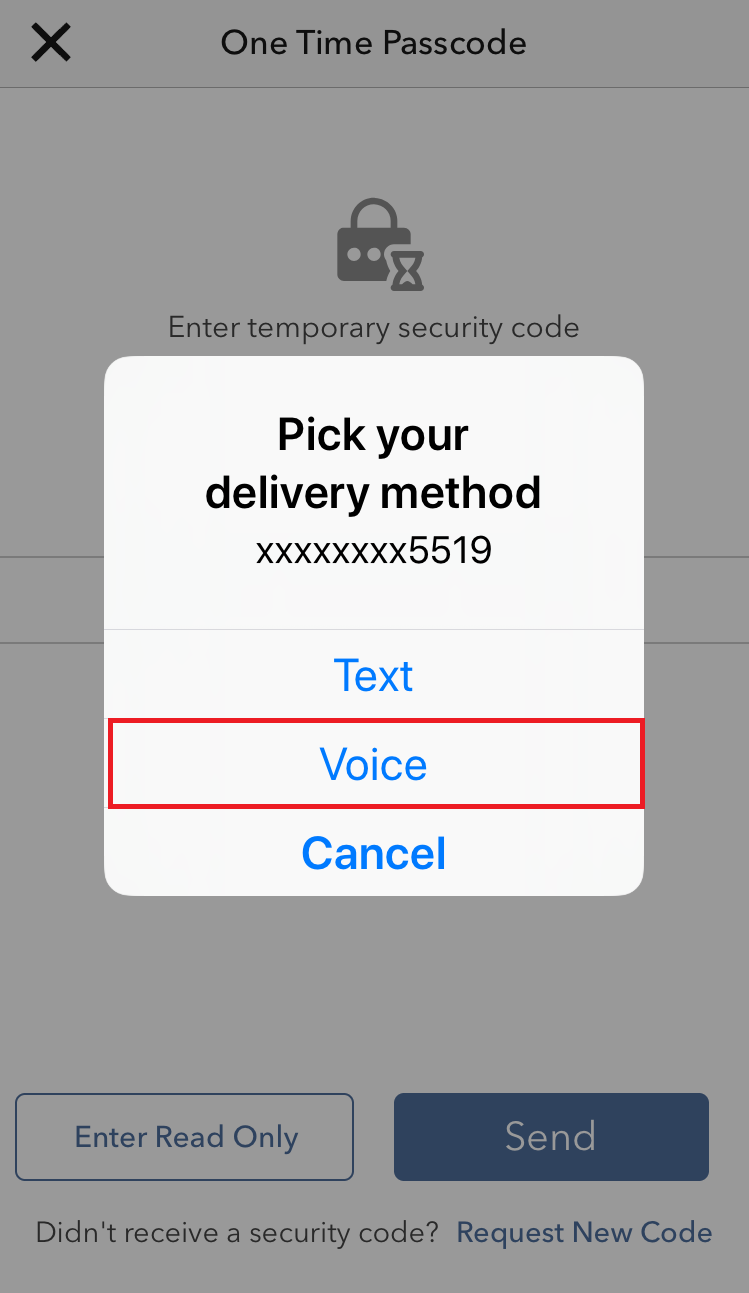
3. After selecting Voice, you should receive the callback within a minute. Please wait for the callback and be ready to write down the code that will be provided over the callback.
IBKR Mobile - Android
1. Click on "Request New Security Code"
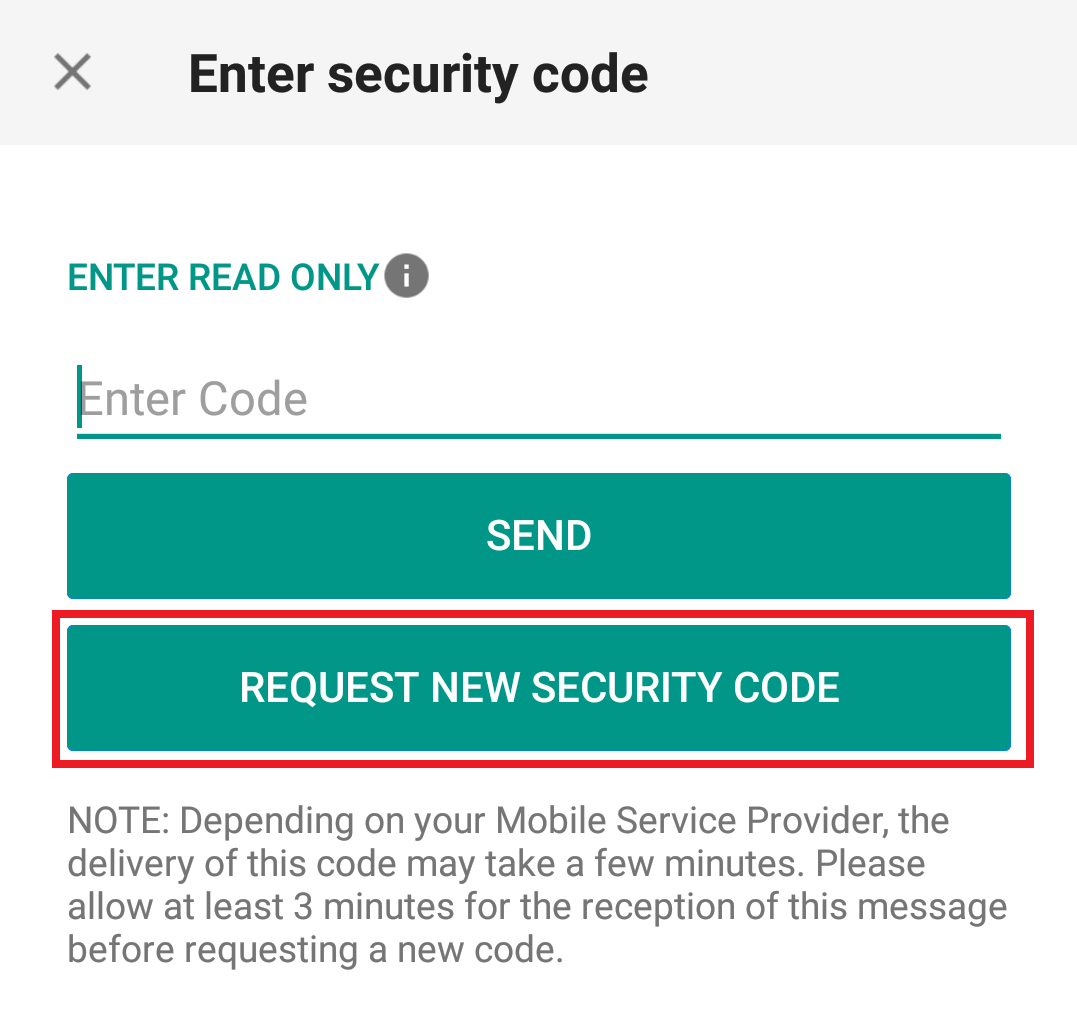
2. From the two options, select "Voice" and wait for the callback.
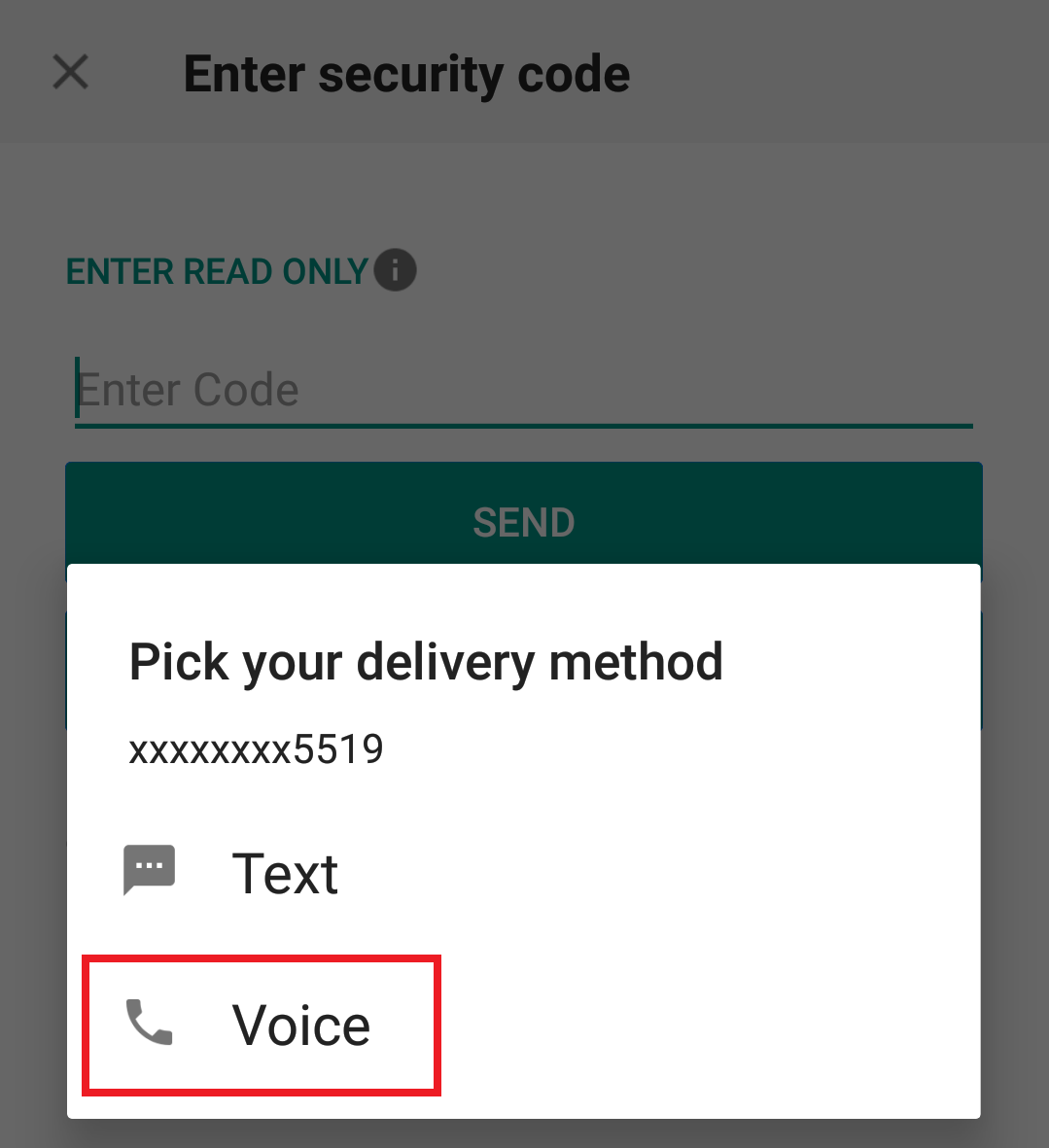
3. After selecting Voice, you should receive the callback within a minute. Please wait for the callback and be ready to write down the code that will be provided over the callback.
References:
- How to login using SMS authentication
- Overview of Secure Login System
- Information and procedures related to Security Devices
- IBKR Mobile Authentication
Converting From an Individual to Limited Liability Company Account
Overview:
The process of converting from an individual account to a Limited Liability Company (LLC) account is outlined below:
1. As the LLC account structure differs from that of the individual in terms of account holder information required, legal agreements and, in certain cases, taxpayer status, direct conversion is not supported and a new LLC account application must be completed online.
The online LLC application may be initiated by visiting www.ibkr.com and clicking the "Open Account" button. Be sure to request trading permissions and, if necessary, margin status, sufficient to maintain the positions currently carried in your individual account. Note that if your account is managed by a financial advisor or you are a client of an introducing broker, please contact your advisor or broker to initiate the new application (you may need to make arrangements with your advisor or broker for fees that have accrued but not yet paid when the individual account closes).
2. The LLC account application requires Compliance review and approval and documentation evidencing the creation of the LLC as well as the identity and address of each member may be required. If this is the case, notice as to the required documents and how to submit will be provided at the conclusion of the online application.
3. Once you have received an email confirming approval of the LLC account application, send a request from your Message Center authorizing IB to manually transfer positions from your Individual to LLC account. Prior to submitting the request, you should make sure to close all open orders in the individual account to ensure that no executions take place following the transfer.
Due to the manual steps and scheduling required, you should allow a minimum of one week after LLC account approval and submitting your request for the transfer to take effect.
IMPORTANT NOTES
1. Note that exchange regulations preclude ownership transfer of derivative contracts such as futures and options. If you are holding such positions you would either need to close them prior to the transfer taking place or request that they remain in your individual account.
2. Prior to processing the transfer, you should make sure to close all open orders in the individual account to ensure that no executions take place following the transfer.
3. The SMA (Special Memorandum Account) balance in your individual account will not transfer to the LLC account. In certain instances, this may impact your ability to open new positions in the LLC account on the first day after the transfer is completed.
4. Elective options such as market data subscriptions and participation in IB's Yield Enhancement Program will not be carried over to the LLC account and must be re-initiated to continue. Note that LLC’s are classified as Professionals for market data subscription purposes which generally implies higher subscription rates than that for Non-Professionals.
5. The cost basis of transferred positions as reported in the activity statements will remain unchanged for tax purposes. The cost basis as reported in your trading platform (which is not used for tax reporting purposes) will not transfer over to the LLC account but may be manually adjusted.
6. Once the transfer has been completed and assuming all positions have been transferred your individual account will be designated for automatic closure. Note that certain balances such as dividend accruals can’t be transferred until paid, after which they will then be transferred and your individual account closed.
7. You'll receive any applicable tax forms for the reportable activity transacted in each of your individual and LLC accounts at year end. Access to Account Management for your individual account will remain after it has been closed for the purpose of reviewing and printing activity statements and tax forms.
8. IBKR does not provide tax advice or investment guidance and recommends that account holder consult with qualified professionals to determine any legal, tax or estate planning consequences associated with individual to LLC transfer requests.
I am not receiving text messages (SMS) from IBKR on my mobile phone
Background:
Once your mobile phone number has been verified in the Client Portal, you should immediately be able to receive text messages (SMS) from IBKR directly to your mobile phone. This article will provide you with basic troubleshooting steps in case you are unable to receive such messages.
1. Activate the IBKR Mobile Authentication (IB Key) as 2-Factor security device
In order to be independent of wireless/phone carrier-related issues and have a steady delivery of all IBKR messages we recommend to activate the IBKR Mobile Authentication (IB Key) on your smartphone.
The smartphone authentication with IB Key provided by our IBKR Mobile app serves as a 2-Factor security device, thereby eliminating the need to receive authentication codes via SMS when logging in to your IBKR account.
Our IBKR Mobile app is currently supported on smartphones running either Android or iOS operating system. The installation, activation, and operating instructions can be found here:
2. Restart your phone:
Power your device down completely and turn it back on. Usually this should be sufficient for text messages to start coming through.
Please note that in some cases, such as roaming outside of your carrier's coverage (when abroad) you might not receive all messages.
3. Use Voice callback
If you do not receive your login authentication code after restarting your phone, you may select 'Voice' instead. You will then receive your login authentication code via an automated callback. Further instructions on how to use Voice callback can be found in IBKB 3396.
4. Check whether your phone carrier is blocking the SMS from IBKR
Some phone carriers automatically block IBKR text messages, as they are wrongly recognized as spam or undesirable content. According to your region, those are the services you can contact to check if a SMS filter is in place for your phone number:
In the US:
- All carriers: Federal Trade Commission Registry
- T-Mobile: Message Blocking settings are available on T-Mobile web site or directly on the T-Mobile app
In India:
- All carriers: Telecom Regulatory Authority of India
In China:
- Call your phone carrier directly to check whether they are blocking IBKR messages
References:
- How to login using SMS authentication
- Overview of Secure Login System
- Information and procedures related to Security Devices
- IBKR Mobile Authentication
How do I convert my individual or joint account to a grantor trust?
Background:
The process of converting an individual or joint account to grantor trust account is outlined below:
- As the trust account structure differs from that of the joint account in terms of account holder information required, legal agreements and, in certain cases, taxpayer reporting, direct conversion is not supported and a new trust account application must be completed online and the account balances transferred therafter. The application is available on our website at: https://www.interactivebrokers.com/inv/en/main.php#open-account. Be sure to request trading permissions and, if necessary, margin status, sufficient to maintain the positions currently carried in your individual account. Note that if your account is managed by a financial advisor or you are a client of an introducing broker, please contact your advisor or broker to initiate the new application (you may need to make arrangements with your advisor or broker for fees that have accrued but not yet paid if the individual account closes). The trust account application requires Compliance review and approval and documentation including Trustee Certification Form, proof of identity and address for trustees and grantors. A list of required documents and document submission instructions will be provided at the conclusion of the online application.
- Once you have received an email confirming approval of the joint account application, send a request from your Message Center authorizing IB to manually transfer positions from your individual or joint account to the trust account. Prior to submitting the request you should make sure to close all open orders in the individual account to ensure that no executions take place following the transfer.
Due to the manual steps and scheduling required, you should allow a minimum of one week after trust account approval and submitting your request for the transfer to take effect.
IMPORTANT NOTES
- Note that exchange regulations preclude ownership transfer of derivative contracts such as futures and options. If your trust results in a change in ultimate beneficial ownership and your individual or joint account is holding such positions, you would either need to close them prior to the transfer taking place or request that they remain in your individual or joint account.
- Prior to processing the transfer, you should make sure to close all open orders in the individual or joint account to ensure that no executions take place following the transfer.
- The SMA (Special Memorandum Account) balance in your individual or joint account will not transfer to the trust account. In certain cases this may impact your ability to open new positions in the trust account on the first day after the transfer is completed.
- Elective options such as market data subscriptions and participation in IB's Yield Enhancement Program will not be carried over to the trust account and must be reinitiated to continue.
- The cost basis of transferred positions as reported in the activity statements will remain unchanged for tax purposes. The cost basis as reported in your trading platform (which is not used for tax reporting purposes) will not transfer over to the trust account but may be manually adjusted.
- Once the transfer has been completed and assuming all positions have been transferred, your individual or joint account will be designated for automatic closure. Note that certain balances such as dividend accruals can’t be transferred until paid, after which they will then be transferred and your individual or joint account closed.
- You'll receive any applicable tax forms for the reportable activity transacted in each of your individual or joint and trust accounts at year end. Access to Account Management for you individual or joint account will remain after it has been closed for the purpose of reviewing and printing activity statements and tax forms.
- IBKR does not provide tax advice or investment guidance and recommends that account holders consult with qualified professionals to determine any legal, tax or estate planning consequences associated with account transfer requests.
Information regarding the transfer of accounts from IB LLC to IB Australia
Introduction
Following the establishment of Interactive Brokers Australia Pty Ltd (IB Australia), who holds an Australian Financial Services License, number 453554, Australian residents maintaining an account with Interactive Brokers LLC (IB LLC) will have their account transferred to IB Australia as IB LLC intends to cease business in Australia. Outlined below are the steps required to initiate the transfer and information regarding the account holder's relationship with IB Australia following the transfer.
How To Transfer Your Account To IB Australia
Moving your account to IB Australia is easy. The process is simple because we will use the information and documents we already have on file for you. The transfer process is initiated once you sign the online authorisation form. This form will be presented to you immediately upon log in to Account Management. Once the form has been signed your account will be scheduled for transfer, with the transfer typically taking effect over a weekend (with consideration given to weekends which coincide with option expiration processing).
Click Here to Authorise the Transfer of Your Account
We encourage you to complete the application to transfer to IB Australia as soon as possible.
Products offered by IB Australia
As a client of IB Australia, you will continue to be able to trade all of the exchange traded products you currently have access to (including local and global stocks, bonds, options, futures, etc.) through Interactive Brokers’ award winning trading platform and software. For further information on IB Australia's products and services, please see our website.
Australian regulatory status
Upon transfer of your account to IB Australia, you will automatically be designated as a retail client. However, if it appears that you may qualify as a wholesale investor or as a professional investor, or if you believe that you would qualify for either, you will have the option to complete and submit the required documentation for IB Australia to consider.
Offering margin under IB Australia
IB Australia have decided that they will not be offering margin accounts to a corporate entity which is designated as a retail client. As a result, if you currently have a margin account and you have not submitted the required documentation to allow IB Australia to categorize you as either a wholesale client or a professional investor, upon transfer of your account to IB Australia, you will not be able to use your margin account for any new purchases. If you think that you might qualify as either a wholesale client or a professional investor, and you would like to retain the benefits of a margin account with IB Australia, please ensure that you complete and submit the required documentation as soon as possible.
You should also note that IB Australia only offers risk based margin accounts, similar to our Portfolio Margin accounts under IB LLC. If you currently have a Reg T margin account and would like to simulate and review the margin changes after the migration, please login to our TWS trading platform, go to the Account window and select Margin Requirements then Portfolio Margin.
Client Money Considerations
Transfer Of Money From IB LLC To IB Australia: IB LLC and IB Australia are separate legal companies. When you complete the application to transfer your account to IB Australia, you will be directing IB LLC to close your account, transfer your positions, and pay to IB Australia all of the cash currently in your account. Upon receiving these funds, IB Australia will pay the funds into an IB Australia Client Money Account (discussed in more detail below). The actual transfer will occur as soon as practicable following the opening of your account with IB Australia.
Money To Be Held On Trust By IB Australia: IB Australia is required to handle all money that it receives from you or on your behalf in accordance with Part 7.8 of the Corporations Act. In other words, IB Australia is required to maintain one or more trust/segregated client money accounts (Client Money Accounts) with a bank for the holding of monies it receives for or from its clients. This money is held on trust for IB Australia's clients. IB Australia will initially only hold client money in Australian dollars (AUD), U.S. dollars (USD), British Pounds (GBP), or Euros (EUR).
For the purposes of this article, these currencies will be referred to as IBA supported currencies.
Conversion Or Withdrawal Of Non IBA supported currency Balances Before Transfer: You will be given a choice in the IB Australia application process as to which of these supported currencies you would like as your base currency. If you have cash balances in currencies other than IBA supported currencies (AUD, USD, GBP or EUR) these will to be converted into your nominated base currency upon the transfer of your account to IB Australia. The exchange rate that will apply to such a conversion will be the best rate that is reasonably available to IB LLC through its existing liquidity providers when it performs the conversion.
Client Assets And Positions – Transition
When you transfer your account to IB Australia, IB Australia will be your service provider, not IB LLC. When you trade through your IB Australia account, IB Australia will execute Australian market transactions for you, and will arrange for offshore brokers to execute transactions in offshore markets, including IB LLC and other Interactive Broker Group affiliates, as appropriate. In those markets, the offshore brokers will treat IB Australia as their client (and IB Australia will operate omnibus client accounts with those brokers to cover transactions for IB Australia's clients).
IB Australia will replace IB LLC as your custodian. IB Australia will hold all assets that you purchase through IB Australia on your behalf subject to IB Australia’s General Terms, which are available here.
Please refer to IB Australia’s Financial Services Guide, which provides important information about the custody services that IB Australia provides and the sub-custodians that IB Australia uses.
The following is a brief summary of the asset and position holding arrangements going forward:
| Assets/Positions | Past IB LLC Arrangement | Future IB Australia Arrangement |
| Australian securities | IB LLC as custodian (and IB Australia as sub-custodian and executing broker) |
IB Australia as custodian and BNP Paribas Securities Services (as sub-custodian and clearing participant) |
| Foreign securities | Foreign sub-custodian (including IB LLC affiliates) | IB Australia as custodian and IB LLC as sub-custodian. |
| Australian exchange traded derivatives |
IB Australia (clearing participant) | IB Australia (clearing participant) |
| International exchange traded derivatives |
Foreign broker/clearing participant in relevant market |
Foreign broker/clearing participant in relevant market |
| FX positions | Contract with IB LLC | Contract with IB Australia |
When you agree to transfer your account to IB Australia, you will be instructing and authorising IB Australia and IB LLC to do all things reasonably required to facilitate the transfer of all assets and positions from your IB LLC account to your new IB Australia account, including to amend their books and records to reflect the transition, and to give appropriate instructions and directions to sub-custodians, clearing participants and other external providers.
Please note that if you hold positions in products that IBA does not support, such as OTC Metals, these positions will be closed out prior to transfer by IBA at the prevailing price. It is recommended that you close these out prior to completing the transfer form.
In addition, if you participate in the Stock Yield Enhancement Program (SYEP), IB Australia does not as yet support this service. You will not be able to participate in this once your account is transferred to IB Australia.
In order to ensure continued compliance with our regulatory obligations, Interactive Brokers Australia has decided that we will NOT accept any other form of collateral except cash for the purposes of determining whether you can trade or hold ASX24 products. If the margin requirements of ASX24 products cannot be met using cash, an account will be subject to automated liquidation.
A new IB account number will be assigned and our deposit Instructions may change. Prior to making any new deposits, we ask that you obtain the new deposit instructions through Account Management.
The Insured Bank Deposit Sweep Program is available to only those non-U.S. residents whose account is carried with IBLLC, the U.S. broker, or IB-UK, the introducing broker. If your account was previously carried by IBLLC, but is now carried by IB Australia, your account is no longer eligible for the Insured Bank Deposit Sweep Program. Further information is available at this link:
What If I Choose Not To Transfer My Account To IB Australia or Don't Act?
You are not required to transfer your account to IB Australia but you will need to close or transfer you account ASAP as IB LLC intends to cease providing financial services in Australia very soon. This means IB LLC will cease offering financial services and products to Australian residents, including you. This will impact you as follows:
If your account remains open and you have not opened a new account with IB Australia before a
nominated date of which we will be informed, then IB LLC (U.S.) will, under the terms of its Customer
Agreement with you, impose trading restrictions on your account, including prohibiting you from
opening new positions and may transfer your account to IB Australia.
What Happens When IB LLC (U.S.) Transfers My Account To IB Australia?
Please note the following information is only relevant if you do not apply to transfer your Account(s) to IB Australia prior to a date we will inform you of.
If you have NOT applied to transfer your account(s) to IB Australia, then IB LLC (U.S.) will be forced to assign your account(s) to IB Australia. When this happens, IB Australia will be holding your account under the same agreement that you held the account with IB LLC (U.S.).
You will be prohibited from opening new positions until you accept the legal terms that govern and the disclosures that relate to IB Australia’s account offering; you can, however, apply to withdraw your funds and transfer positions to 3rd party brokers.
Please also note the following:
- If the base currency of your IB LLC (U.S.) is other than AUD, USD, GBP or EUR (IBA supported currencies), you will be provided the option to nominate one of these currencies as your base currency when you complete the transfer, otherwise we will default the base currency of the account prior to the transfer to IB Australia to AUD;
- Any currency balances currently held that are not denominated in either of the IBA supported currencies will be converted into your Base Currency at the prevailing exchange rate; and,
- If you close any open positions after the transfer and the settlement proceeds (if any) are in a currency other than the IBA supported currencies, IB Australia will convert the proceeds into the base currency of your account. If, at a later date, you still have not accepted IB Australia’s new legal terms and disclosures, then IB Australia may transfer out positions into issuer sponsored holdings (where it deems reasonable to do so) and liquidate any other open positions that you hold in the account and return the resulting funds to you. IB Australia will provide you notice should we decide to take this action.
Other
- For a full list of the disclosure documents and legal terms which govern the services IB Australia will make available please refer to the IB website.
- For further information on IB Australia, click on our Financial Services Guide.
- For more information or assistance, please contact IB Client Services.
Mobile Phone Verification during the account application
Introduction
IB requires that clients verify their mobile phone in order to receive account and trade related communication directly via SMS. Clients who fail to verify their phone will be subject to trade restrictions pending completion of this process. Verification is performed online and the steps for doing so are outlined below.
In case your account has been already opened but your mobile number has not been yet verified, please jump directly to KB2552 to complete the verification process.
Phone Verification
When completing your Interactive Brokers Account Application, you will see a blue bar at the top of the page that says "CONFIRM MOBILE NUMBER."
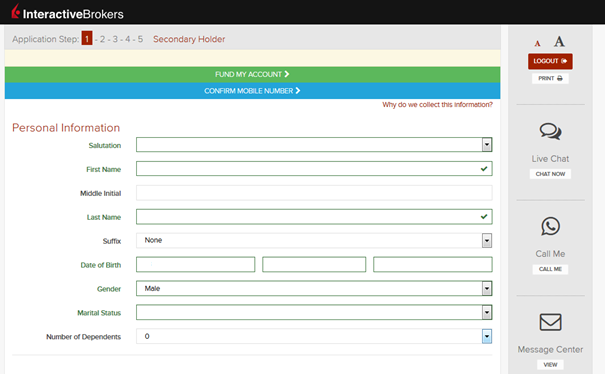
You can click on that bar any time during steps 1-4. Once you do, you will see this window:
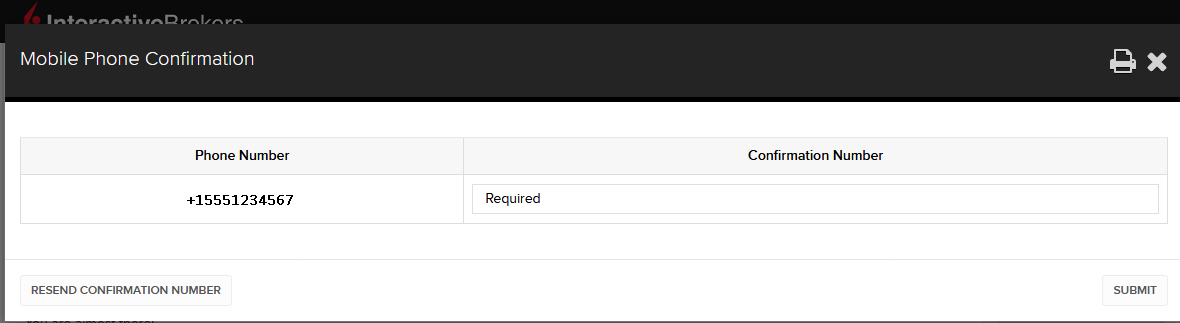
Once you have entered your full number, it will be recognized and a confirmation message is sent immediately. Validate your phone number by entering the SMS Code received in the Confirmation Code field and click Submit.
If you are unable to do this during the application process, you can always confirm it on the Application Status page
.png)
Please consider the following as certain restrictions may apply:
- SMS messages may be blocked if you participate in your Countries NDNC (National Do Not Call) registry.
- Due to fraud prevention measures, virtual number providers may be blocked.
- Some carriers may restrict the Hours of delivery for SMS messages.
