
IBSJ Multi Currency
Can I trade foreign products in supported currencies at Interactive Brokers Securities Japan (IBSJ)?
Yes, clients can trade in any currency that has a product listed in.
For example: Client with a cash account wants to buy a US stock. Our system will check if the client has sufficient available funds in USD or other supported currencies to cover 100% of the trade and, if so, the order will be sent to the exchange.
- If client has enough balance in USD, it will be used for execution of the order.
- If not, IBSJ will automatically convert an equivalent amount of USD from other supported currencies with a positive balance.
- If the same client wishes to sell his USD denominated security at a later date, IBSJ will NOT convert the proceeds back to one of the supported currencies.
- Client can use proceeds in USD for purchasing US stocks or withdraw them.
- Conversion to other currencies not connected to withdrawing funds is not allowed.
- Client can withdraw funds in supported cashiering currencies (JPY, USD, EUR, GBP). If the client wants to withdraw funds, the system checks first if there is sufficient available funds in the requested or other supported currencies to cover 100% of the withdrawal amount. If there is no sufficient funds in the requested currency, IBSJ will automatically convert positive balances in the supported currencies to the requested one.
Please Note
- IBSJ does NOT charge a commission to clients for automatic currency conversion.
- Commissions for currency conversion used for closing a non-JPY cash balance are presented on our website.
- Supported cashiering currency is a currency in which client can make deposits and withdrawals.
Can I trade Forex and convert currencies at Interactive Brokers Securities Japan (IBSJ)?
Currency conversion at IBSJ must be connected to an investment service transaction (purchasing a stock, for instance) and its resulting cash flows. To comply with this regulation, clients can make a currency conversion in a trading platform only to close the negative balance from borrowing. In other cases, IBSJ makes a conversion automatically.
- The client CANNOT open long positions that create cash debits (loans). Nevertheless, client can open long positions in any foreign product regardless of the currency in which it is denominated. IBSJ will auto convert the value of the transaction from the positive balance in supported currencies held in the account.
- Any positive cash that is generated as the result of a trade or cash flows from a position you hold (e.g. dividends, coupon, interest) will NOT be auto-converted.
- The client can withdraw funds in JPY, EUR, USD, GBP. If the client wants to withdraw funds, the system checks first if there is sufficient available funds in the requested or other supported currencies to cover 100% of the withdrawal amount. If there is no sufficient funds in the requested currency, IBSJ will automatically convert positive balances in the supported currencies to the requested one.
- The client can use the option “Withdraw All Available Cash”, which allows to withdraw all available funds in one currency: supported currencies or base currency. IBSJ will automatically convert positive balances to the requested one without leaving residuals.
For further information please see the IBSJ Multi-Currency Account Foreign Exchange Restrictions Disclosure.
Please Note
- IBSJ does NOT charge clients commissions for automatic currency conversion.
- Commissions for currency conversion used for closing a non-JPY cash balance are presented on our website.
- Supported cashiering currency is a currency in which client can make deposits and withdrawals.
- Base currency: JPY.
- System shows the projected Cash Available for Withdrawal. The final withdrawal amount may differ from the requested due to fluctuation in currency exchange rates.
What currencies are available for deposits and withdrawals at Interactive Brokers Securities Japan (IBSJ)?
IBSJ clients can make deposits in four Supported Cashiering Currencies.
Withdrawals are allowed in base currency and positive balances held in the account. If the client wants to withdraw funds, the system checks first if there is sufficient available funds in the requested or other supported currencies to cover 100% of the withdrawal amount. If there is no sufficient funds in the requested currency, IBSJ will automatically convert positive balances in the supported currencies to the requested one.
Client can use the option “Withdraw All Available Cash”, which allows to withdraw all available funds in one currency: supported currencies or base currency. IBSJ will automatically convert positive balances to the requested one without leaving residuals.
For further information please see the IBSJ Multi-Currency Account Foreign Exchange Restrictions Disclosure.
Please Note
- IBSJ does NOT charge clients commissions for automatic currency conversion.
- Commissions for currency conversion used for closing a non-JPY cash balance are presented on our website.
- Supported cashiering currency is a currency in which client can make deposits and withdrawals.
- Base currency: JPY.
- System shows the projected Cash Available for Withdrawal. The final withdrawal amount may differ from the requested due to fluctuation in currency exchange rates.
Multi-Currency Trading at IBKR Central Europe
For Cash accounts (one without investment loan permissions), client can trade foreign products in all 10 supported currencies.
For example: Client with a cash account wants to buy a US stock. Our system will check if the client has sufficient available funds in USD or other supported currencies to cover 100% of the trade and, if so, the order will be sent to the exchange.
- If client has enough balance in USD, it will be used for execution of the order.
- If not, IBCE will automatically convert an equivalent amount of USD from other supported currencies with a positive balance.
- If the same client wishes to sell his USD denominated security at a later date, IBCE will NOT convert the proceeds back to one of the supported currencies.
- Client can use proceeds in USD for purchasing US stocks or withdraw them.
- Conversion to other currencies not connected to withdrawing funds is not allowed.
- Client can withdraw funds in Major Currencies, Home currency and positive balances held in the account. If the client wants to withdraw funds, the system checks first if there is sufficient available funds in the requested or other supported currencies to cover 100% of the withdrawal amount. If there is no sufficient funds in the requested currency, IBCE will automatically convert positive balances in the supported currencies to the requested one.
For Margin accounts (investment loan accounts), you can trade foreign products in supported currencies and have transactions that result in negative cash balances.
For example: Client with a margin account wants to buy an EU stock. Our system will check if the client has sufficient available funds in EUR or other supported currencies to meet initial margin requirements, and, if so, the order will be sent to the exchange.
- If client borrows EUR, he can decide what to do with the negative EUR balance. This negative balance can be closed by converting from any other supported currency or remain in the account.
- If the same client wishes to sell his EUR denominated security at a later date, IBCE will NOT convert the proceeds back to one of the supported currencies.
- Client can use proceeds in EUR for purchasing EU stocks or withdraw them.
- Conversion to other currencies not connected to withdrawing funds is not allowed.
- Client can withdraw funds in Major Currencies, Home currency and positive balances held in the account. If the client wants to withdraw funds, the system checks first if there is sufficient available funds in the requested or other supported currencies to cover 100% of the withdrawal amount. If there is no sufficient funds in the requested currency, IBCE will automatically convert positive balances in the supported currencies to the requested one.
For further information please see the IBCE Multi-Currency Account Foreign Exchange Restrictions Disclosure.
Please Note:
- IBCE does NOT charge clients for automatic currency conversion.
- Commissions for currency conversion used for closing a negative balance are presented on our website.
- Supported currency is a currency in which client can make deposits and hold a positive balance: EUR, USD, CHF, GBP, HUF, CZK, PLN, NOK, DKK and SEK.
- Major currencies: USD and EUR.
- Home currency: Currency of client’s country of legal residence.
For Cash accounts (one without investment loan permissions), you can trade foreign products in non-supported currencies. IBCE will auto convert the value of the transaction from the positive balance in supported currencies held in the account.
For example: Client with a cash account wants to buy a CAD stock. Our system will check if the client has sufficient available funds in the supported currencies to cover 100% of the trade and, if so, the order will be sent to the exchange.
On trade date, IBCE will automatically convert an equivalent amount of CAD from the positive balance in supported currencies held in the account, leaving no residual CAD cash balance in the account at the end of the day.
- If the same client wishes to sell his CAD denominated security at a later date, IBCE will auto convert the proceeds back to the base currency.
- The same process occurs when cash flows are generated from positions (e.g. dividends, interest). Conversion takes place when the cash is credited to or debited from the account, not when it is accrued.
For Margin accounts (one without investment loan permissions), you can trade foreign products in non-supported currencies and have transactions that result in negative cash balances. Proceeds and all positive balances in non-supported currencies will be automatically converted back to the base currency.
For example: Client with a margin account wants to buy a CAD stock. Our system is checking if the client has sufficient available funds in supported currencies to meet initial margin requirements and, if so, the order will be sent to the exchange.
- Client can decide what to do with the negative CAD balance. This negative balance can be closed by converting from any other supported currency or remain in the account.
- If the same client wishes to sell his CAD stock at a later date, IBCE will automatically convert the proceeds to the base currency as CAD is not a supported currency.
For further information please see the IBCE Multi-Currency Account Foreign Exchange Restrictions Disclosure.
Please Note:
- IBCE does NOT charge clients for automatic currency conversion.
- Commissions for currency conversion used for closing a negative balance are presented on our website.
- Supported currency is a currency in which client can make deposits and hold a positive balance: EUR, USD, CHF, GBP, HUF, CZK, PLN, NOK, DKK and SEK.
Currency conversion at IBCE must be connected to an investment service transaction (purchasing a stock, for instance) and its resulting cash flows. To comply with this regulation, clients can make a currency conversion in a trading platform only to close the negative balance from borrowing. In other cases, IBCE makes a conversion automatically.
- For Margin accounts, the client can open long positions that create cash debits (loans) in any currency. IBCE will not auto-convert your transaction but will create an investment loan in the currency of the trade. It will be the client’s discretion when to initiate a currency conversion to close the negative balance in part or in full.
- For Cash accounts, the client CANNOT open long positions that create cash debits (loans). Nevertheless, client can open long positions in any foreign product regardless of the currency in which it is denominated. IBCE will auto convert the value of the transaction from the positive balance in supported currencies held in the account.
- For both Margin and Cash accounts, any positive cash that is generated as the result of a trade or cash flows from a position you hold (e.g. dividends, coupon, interest) will NOT be auto-converted if it is the supported currency (EUR, USD, CHF, GBP, HUF, CZK, PLN, DKK, SEK and NOK).
- For both Margin and Cash accounts, any positive cash that is generated as the result of a trade or cash flows from a position you hold (e.g. dividends, coupon, interest) will be auto-converted if it is NOT the supported currency.
- For both Margin and Cash accounts, the client can withdraw funds in Major Currencies, Home currency and positive balances held in the account. If the client wants to withdraw funds, the system checks first if there is sufficient available funds in the requested or other supported currencies to cover 100% of the withdrawal amount. If there is no sufficient funds in the requested currency, IBCE will automatically convert positive balances in the supported currencies to the requested one.
- For both Margin and Cash accounts, the client can use the option “Withdraw All Available Cash”, which allows to withdraw all available funds in one currency: Major Currencies or Home currency. IBCE will automatically convert positive balances in the supported currencies to the requested one without leaving residuals.
For further information please see the IBCE Multi-Currency Account Foreign Exchange Restrictions Disclosure.
Please Note:
- IBCE does NOT charge clients for automatic currency conversion.
- Commissions for currency conversion used for closing a negative balance are presented on our website.
- Supported currency is a currency in which client can make deposits and hold a positive balance: EUR, USD, CHF, GBP, HUF, CZK, PLN, NOK, DKK and SEK.
- Major currencies: USD and EUR.
- Home currency: Currency of client’s country of legal residence.
- System shows the projected Cash Available for Withdrawal. The final withdrawal amount may differ from the requested due to fluctuation in currency exchange rates.
- Interactive Brokers Central Europe accounts are not allowed to withdraw funds on margin due to regulatory reasons.
- The same currency pairs can be traded as Forex CFD. Contracts For Difference are complex instruments, and we invite you to carefully review the CFDs risk warnings before trading these instruments.
IBCE clients can make deposits in all 10 Supported Currencies.
Withdrawals are allowed in Major currencies, Home currency and positive balances held in the account. If the client wants to withdraw funds, the system checks first if there is sufficient available funds in the requested or other supported currencies to cover 100% of the withdrawal amount. If there is no sufficient funds in the requested currency, IBCE will automatically convert positive balances in the supported currencies to the requested one.
Client can use the option “Withdraw All Available Cash”, which allows to withdraw all available funds in one currency: Major Currencies or Home currency. IBCE will automatically convert positive balances in the supported currencies to the requested one without leaving residuals.
For further information please see the IBCE Multi-Currency Account Foreign Exchange Restrictions Disclosure.
Please Note:
- IBCE does NOT charge clients for automatic currency conversion.
- Supported currency is a currency in which client can make deposits and hold a positive balance: EUR, USD, CHF, GBP, HUF, CZK, PLN, NOK, DKK and SEK.
- Major currencies: USD and EUR.
- Home currency: Currency of client’s country of legal residence.
- System shows the projected Cash Available for Withdrawal. The final withdrawal amount may differ from the requested due to fluctuation in currency exchange rates.
- Interactive Brokers Central Europe accounts are not allowed to withdraw funds on margin due to regulatory reasons.
- The changes mentioned above are effective since October 17, 2022.
IMPORTANT NOTICE REGARDING THE RUSSIAN RUBLE (RUB)
In line with many financial institutions, IBKR has reduced exposure to the Russian Ruble, (“RUB”) and has discontinued all cashiering services for Russian Rubles, including all withdrawals and currency conversions.
Specifically:
Deposits in RUB: IBKR is no longer accepting deposits of RUB. Any deposit in RUB will be rejected.
IBKR will periodically convert RUB balances to USD or EUR, depending on the IBKR entity with which you have an account.
|
IBKR Entity |
Target Currency |
|
IBLLC |
USD |
|
IBCE |
EUR |
|
IBUK |
EUR |
|
IBIE |
EUR |
|
All Others |
USD |
Withdrawals in RUB: IBKR is not able to accommodate RUB withdrawals at this time.
Base Currency: IBKR does not currently allow clients to maintain RUB as their base currency. If you previously used RUB as your base currency, we converted it to USD or EUR depending on which IBKR entity your account is with (see chart above).
IBKR is fully committed to complying with all applicable sanctions laws. We appreciate your cooperation and your business.
IBKR Metals CFDs – Facts and Q&A
Overview:
The following article is intended to provide a general introduction to London Gold and Silver Contracts for Differences (CFDs) issued by IBKR.
Please follow these links for information on IBKR Share CFDs, Index CFDs and Forex CFDs.
Risk Warning
CFDs are complex instruments and come with a high risk of losing money rapidly due to leverage.
61% of retail investor accounts lose money when trading CFDs with IBKR.
You should consider whether you understand how CFDs work and whether you can afford to take the
high risk of losing your money.
ESMA Rules for CFDs (Retail Clients only)
The European Securities and Markets Authority (ESMA) has enacted new CFD rules effective 1st August
2018.
The rules include: 1) leverage limits on the opening of a CFD position; 2) a margin close out rule on a per
account basis; and 3) negative balance protection on a per account basis.
The ESMA Decision is only applicable to retail clients. Professional clients are unaffected.
Please refer to the following articles for more detail:
ESMA CFD Rules Implementation at IBKR (UK) and IBKR LLC
ESMA CFD Rules Implementation at IBIE and IBCE
Introduction
A London Gold CFD enables you to have exposure to price movements of physical Gold without actually owning it. A London Gold CFD is an agreement between you and IBKR to exchange the difference in price of the underlying over a period of time. The difference to be exchanged is determined by the change in the reference price of the underlying. Thus, if the price of physical Gold traded on the London bullion market rises and you are long the CFD, you receive cash from IBKR and vice versa. A London Gold CFD can be bought long or sold short to suit your view of market direction in the future.
Contract Specifications
| Contract | IBKR Symbol | Per Trade Fee | Minimum per Order | Multiplier |
| London Gold | XAUUSD | 0.015% | USD 2.00 | 1 |
| London Silver | XAGUSD | 0.03% | USD 2.00 | 1 |
Price Determination
The IBKR London Gold and Silver CFDs reference physical Gold and Silver traded on the London bullion market. The London bullion market is a wholesale over-the-counter market for the trading of precious metals. Trading is conducted among members of the London Bullion Market Association (LBMA). Most of the members are major international banks.
IBKR receives quote streams from approximately 10 such major banks, in much the same way it does for cash forex. IBKR Smart routes between the banks, and the best available price at any given time becomes the reference price for the CFDs. IBKR does not add a spread to the banks’ quotes.
Low Commissions and Financing Rates: Unlike other CFD providers IBKR charges a transparent
commission, rather than widening the spread. Commission rates are only 0.015% for London Gold and 0.03% for London Silver. Overnight financing rates are just benchmark +/- 1.5% (an additional 1% surcharge is added for retail accounts).
Transparent Quotes: Because IBKR does not widen the spread, the Metals CFD quotes accurately
represent the spreads and price movements of the related cash metal, as described above.
Margin Efficiency: IBKR establishes house-margin requirements based on historic volatility of the
underlying and other factors. Retail clients are subject to regulatory minimum initial margins of 5% for
London Gold or 10% for London Silver.
Trading Permissions: Same as for Share and Index CFDs.
Market Data Permissions: Metals CFD market data is free, but a permission is required for system
reasons.
Worked Trade Example (Professional Clients):
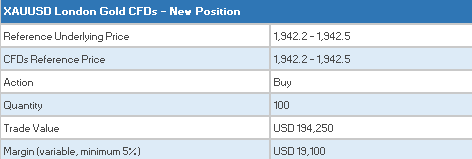
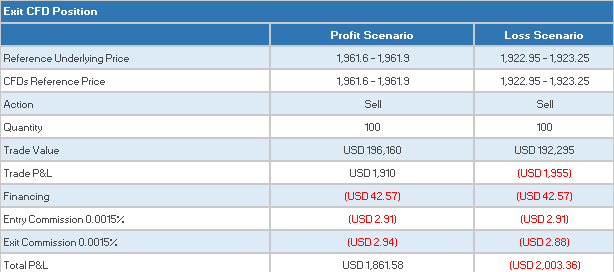
You purchase 100 XAUUSD CFDs at $1,942.5 for USD 194,250 which you then hold for 5 days.

Closing the Position
CFD Resources
Below are some useful links with more detailed information on IB’s CFD offering:
Frequently asked Questions
Are short Metals CFDs subject to forced buy-in?
No.
Can I take delivery of the underlying metal?
No, IBKR does not support physical delivery for Metals CFDs.
Are there any market data requirements?
The market data for Metal CFDs is free, and is included the market data for Index CFDs. However, you need to subscribe to the permission for system reasons. To do this, log into Account Management, and click through the following tabs: Settings/User Settings/Trading Platform/Market Data Subscriptions. Alternatively you can set up an Index or Metals CFD in your TWS quote monitor and click the “Market Data Subscription Manager” button that appears on the quote line.
How are my CFD trades and positions reflected in my statements?
If you are a client of IBKR (U.K.) or IBKR LLC, your CFD positions are held in a separate account segment identified by your primary account number with the suffix “F”. You can choose to view Activity Statements for the F-segment either separately or consolidated with your main account. You can make the choice in the statement window in Account Management.
If you are a client of other IBKR entities, there is no separate segment. You can view your positions normally alongside your non-CFD positions.
In what type of IB accounts can I trade CFDs e.g., Individual, Friends and Family,
Institutional, etc.?
All margin and cash accounts are eligible for CFD trading.
Can I trade CFDs over the phone?
No. In exceptional cases we may agree to process closing orders over the phone, but never opening
orders.
Can anyone trade IB CFDs?
All clients can trade IB CFDs, except residents of the USA, Canada, Hong Kong, New Zealand and
Israel. There are no exemptions based on investor type to the residency-based exclusions.
Leveraged FX Currency Restrictions for Israeli Retail Clients
Due to a June 2018 ruling by the Israeli financial court, Interactive Brokers is no longer permitted to offer spot forex trading to Israeli retail clients. While IBKR's forex offering is a deliverable "spot" transaction, the ruling interpreted a 2014 amendment to Israeli Securities Law 5728-1968 to cover spot/cash transactions in addition to derivative/contract style transactions.
The restriction applies only to clients deemed to be "retail" investors. Non-retail investors (i.e. Qualified Investors and clients who are included in the First Schedule of the Israeli Securities Law 1968) are exempt from this restriction.
The new forex restriction goes into effect on 1 August 2018:
- Forex transactions that would create a negative balance or would increase a pre-existing negative balance in either component currency will not be allowed to Israeli retail clients.
- The negative cash balance test applies only to the component currencies and for the cash movements created directly by the forex trade. There is no restriction regarding the creation of negative balances by other means such as cashiering activity or trading activities in securities (stocks, bonds, options, etc).
The relevant Israel Securities Authority (ISA) regulation can be found here (ISA_6025) with sections 44L-M defining the relevant issues.
Example: Prohibited Transaction
An account is not allowed to go negative cash upon execution of a cash conversion or FX trade.
Have USD 1,000 and try to buy EUR 3,000 @ 1.17 USD-EUR (USD Value of 3,510) would create a negative balance of USD -4,510.
| Currency | Cash | Cash |
| ILS | 10,000 | 10,000 |
| USD | 1,000 | -2,510 |
| EUR | 0 | 3,000 |
Example: Permitted Transaction
The rule will not prevent you from trading on margin or engaging in any other investment transaction on the IBKR Platform.
Example: Having USD 1,000 and buying stocks worth USD 3,000 USD would create a balance of
USD -2,000.
USD -2,000.
| Currency | Cash | Stock | Cash | Stock |
| USD | 1,000 | 0 | -2,000 | 3,000 |
Example: Having USD 1,000 and converting to ILD, value of ILS 3,600 (1 USD = 3.6 ILS)
|
Currency
|
Cash
|
Cash
|
|
ILS
|
0
|
3,600
|
|
USD
|
1,000
|
0
|
Example: Have USD 1,000 USD and withdraw EUR 600
|
Currency
|
Cash
|
Cash
|
|
EUR
|
0
|
-600
|
|
USD
|
1,000
|
1,000
|
Procedure
In order to be consider a "Qualified Investor" IB requires client to meet the following criteria and procedural requirements.
Qualified Investor qualification need to be recertified every 3 years.
For Individuals
Individuals, which comply with at least one of the following alternatives:
- Total value of Liquid Assets greater than NIS 8 million; or
- Annual income in each preceding two years is greater than NIS 1.2 million or the income of the Household to which he belongs is greater than NIS 1.8 million.; or
- Total value of Liquid Assets greater than NIS 5 million and the annual income in each proceeding two years is greater than NIS 600,000 or such annual income of the Household to which he belongs is greater than NIS 900,000.
"Liquid Assets" means cash, deposits, securities, equities and funds.
"Household" means an individual and the persons living with him or who are dependent on him for their living.
The client must:
- compete the Qualified Investor Representation form and
- provide a written signed confirmation from a registered attorney or accountant certifying their qualification. This certification should be no older than 3 months.
For Corporates
The following entities can be exempted:
- Authorized mutual funds or fund managers
- Provident funds or fund managers
- Insurers
- Banking corporations
- Portfolio managers
- Investment advisors, who acquire for themselves
- Stock Exchange members
- Underwrites, who buy for themselves
- Venture capital funds
- Corporations (including funds, partnerships) other than corporations which were incorporated for the purpose of purchasing securities in a specific offer, with equity exceeding 50 million NIS
- Corporations, wholly owned by one of the aforementioned investors
Entities qualifying under exemptions 1-9 must provide confirmation of their status from a governmental register.
Entities that wish to be considered under exemptions 10 and 11 must:
- complete the Qualified Investor Representation form and
- provide a written signed confirmation from a registered attorney or accountant certifying their qualification. This certification should be no older than 3 months.
Forex Execution Statistics
Overview:
IBKR clients can now analyze the quality of their forex executions in comparison to forex trades by other IBKR customers through the FX Browser tool in Client Portal. The tool provides transaction data for the 15 forex transactions that occur immediately before and after in the same currency pair of the client's transaction.
Note:
The number of transactions may be limited to fewer than the stated 15 as the NFA also has placed a 15 minute window on the query. Meaning, if within a 15 minute window before and after the customer's execution there are fewer than 15 executions the customer's query will return only those executions which occurred within the time window.
Accessing the FX Browser Tool
To Access the FX Browser tool, login to Client Portal using the Login button on our website. Click the Help menu (question mark icon in the top right corner) followed by Support Center. Please note, at this time only data for the live account will be provided.
.png)
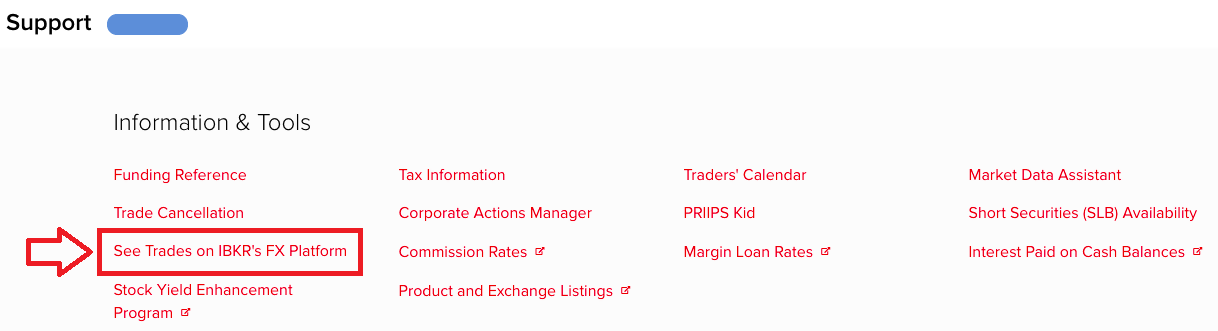
From there, select "See Trades on IBKR's FX Platform" from the list of Information & Tools:
Submitting a Query
When the FX Browser is launched, you will be presented with the following screen:
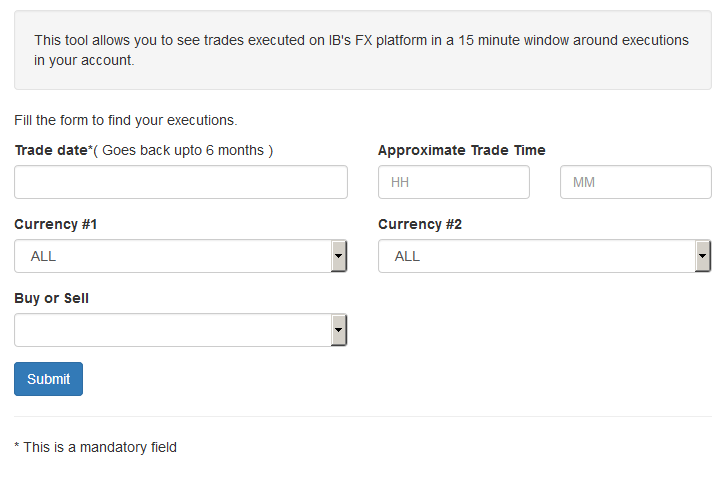
Please note that only Trade Date is a mandatory field in the query. When clicking on the Trade Date field, a calendar widget will populate and allow you to select your trade date. Only transactions from the last 6 months will be available to search.
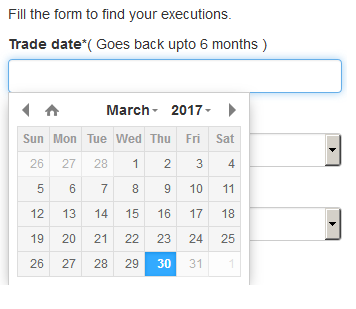
Active customers may wish to limit the results by further selecting the currency pair, side or time of the execution.
Once the desired query has been entered, click on the Submit button.
The next screen will display the list of executions for the given account on the specified day. From there, you may select the execution you wish to receive the execution statistics on.
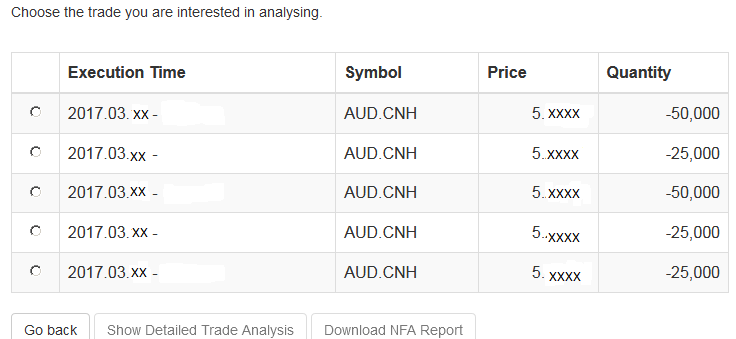
Once the execution you wish to view has been selected, click the "Download NFA Report" button.

Reading the Report
The results will be returned in a new tab and will contain the 15 executions before and 15 executions after the trade you selected on the previous screen. Per the note above, if fewer than 15 executions occurred in the 15 minute time frame only those executions will be displayed.
The query results will include the following information:
- Execution date and time, as expressed in Eastern time
- Side (buy or sell)
- Quantity (of Transaction Currency)
- Currency pair
- Execution price
- Commissions and other charges assessed by the FDM
- Currency denomination of commissions
Your trade will be marked as Trade Number "0" and the trades before and after your trade will be numbered from 1 to 15.
Error Messages
If the search criteria you enter does not bring up any trade information, you will be presented with the following error message:

Automatic Forex Swap
OVERVIEW
In general, interest on account balances are credited/debited at benchmark rates plus/minus a spread as shown on our web pages. For qualified clients with substantial forex positions, however, IB has created a mechanism to carry large gross FX positions with higher efficiency with respect to carrying costs. We refer to it as the “auto swap program”. The design allows clients to benefit from IB’s participation in the interbank forex swaps market where implied interest rate spreads are usually much narrower than the spreads available in the retail deposit market.
a. Concept
Interest is charged on settled balances, so the intent of a Forex swap as used here is to defer the settlement of a currency position from one day to the next business day. This is done by a simultaneous sell and buy of the same amount of base (first) currency but for two different value dates e.g. on T you go long 10 mio. EUR.USD for value date T+2. By example, on T+1 the position is swapped T+2 to T+3, here a sell of 10 mio EUR.USD for T+2 and a purchase of 10 mio. EUR.USD for T+3. As a result you have deferred settlement from T+2 to T+3, with the difference in prices of the two trades representing the financing cost from T+2 to T+3.
b. Cost
This service is provided as a free service and no commission or markup is charged by Interactive Brokers. The interbank market bid/ask spread inherent in the swap prices may be regarded as a cost but is not determined by Interactive Brokers. Interactive Brokers provides the service on a best efforts basis to our large Forex clients.
c. Position Criteria
Swap activity is only applied to accounts with gross FX positions larger than 10 mio. USD or approximate equivalent of other currencies. Positions are swapped (rolled) in increments or multiples of USD 1 mio. (or equivalent). The residual settled balances are traded under IB‘s standard interest model1. Positions that are swapped (rolled) are real positions, i.e. the projected T+1 settled cash balances.
The so-called “Virtual Positions” are not considered; the virtual position is only a representation of the original trades expressed as currency pairs, for example EUR.CHF.
Settled cash balances are a single currency concept, e.g. EUR or CNH. IB executes all swaps against USD as it is the most efficient funding currency. Should you have a position in a cross, e.g. EUR against CHF, two swaps, one in EUR.USD and one in USD.CHF will be done. The threshold(s) and increment(s) may change at any time without notice.
d. Client Eligibility
As we offer this service for free, only clients with substantial currency positions are eligible for inclusion in the service. US legal residents need to be an Eligible Contract Participant (ECP) and be in the possession of an LEI number (legal entity identifier). Interactive Brokers cannot guarantee a client’s inclusion in the program and all inquiries require compliance approval prior to become active.2
e. Swap Price Recognition
Interactive Brokers may conduct a series of swaps in a currency during a day. Interactive Brokers will use average bid and ask prices at which it executed, respectively average bid and asks as quoted in the interbank market. Swap prices are not published but can be seen (or calculated) in the statement after execution. The swaps are applied in the account at the end of the day.
f. Recognition in the Statement
You will find the swap transaction(s) in the Trades section of the statement. The swap are represented as simultaneous purchase/sale or vice versa, do not have a time stamp and shows an M (manual entry) in the code column. The actual swap prices are the difference in between the two prices.
Here an example for cob 20150203 that shows a swap from 20150203 to 20150204.
.jpg)
.jpg)
g. Examples of Swap Prices
Here a couple of examples that use swap prices from a major interbank provider. Often bid/ask spreads are even tighter.
|
Currency Pair |
Spot Bid |
Spot Ask |
Tenor |
Days in Period (TN) |
Swap Points Bid |
Swap Points Ask |
Implied Currency |
Implied Rate Bid |
Implied Rate Ask |
|
EUR.USD |
1.04481 |
1.04483 |
TomNext(TN) |
1 |
0.00004220 |
0.00004280 |
EUR |
-0.77% |
-0.75% |
|
USD.HKD |
7.76810 |
7.76810 |
TomNext(TN) |
1 |
-0.00011500 |
-0.00011000 |
HKD |
0.17% |
0.19% |
|
USD.JPY |
117.050 |
117.052 |
TomNext(TN) |
1 |
-0.0038 |
-0.0032 |
JPY |
-0.47% |
-0.47% |
|
USD.CNH |
6.93101 |
6.93105 |
TomNext(TN) |
1 |
0.0021 |
0.0028 |
CNH |
11.77% |
15.46% |
In more detail, let’s assume you want to calculate the implied CNH rate resulting from a USD.CNH swap. We are looking for the implied rate of the quote currency CNH (Currency 2). Therefore the following formula is used:

| Description | Variable | Value |
| Currency Pair (Currency1.Currency2) | USD.CNH | |
| day count convention Currency 1 (base Currency), i.e. USD | dayCountCurr1 | 360 |
| day count convention Currency 2 (quote Currency), i.e. CNH | dayCountCurr2 | 365 |
| Tenor | TomNext | |
| number of days in the Tenor | noDays | 1 |
| interest rate of Currency 1 (in decimals, i.e. 1% = 0.01) | inRateCurr1 | 0.0070 |
| Currency rate (Spot) | currencyRate | 6.939500 |
| swap Points expressed in decimals | swapPoints | 0.0012 |
| near Currency Rate (Spot - swap points) | nearCurrencyRate | 6.938300 |
| far Currency Rate (in a Tomnext swap this is the spot rate) | farCurrencyRate | 6.939500 |
| implied interes rate of Currency2, i.e. CNH | impliedRateCurrncy2(quoteCurrency) | 0.0702 |
So using above figures, this results in a 7.02% implied interest rate for CNH.
Now if you wanted to calculate the implied rate for the base currency (Currency 1) the formula would change slightly. Here an example using EUR.USD:

| Description | Variable | Value |
| Currency Pair (Currency1.Currency2) | EUR.USD | |
| day count convention Currency 1 (base Currency), i.e. EUR | dayCountCurr1 | 360 |
| day count convention Currency 2 (quote Currency), i.e. USD | dayCountCurr2 | 360 |
| Tenor | TomNext | |
| number of days in the Tenor | noDays | 1 |
| interest rate of Currency 2 (in decimals, i.e. 1% = 0.01) | inRateCurr2 | 0.0070 |
| Currency rate (Spot) | currencyRate | 1.039900 |
| swap Points expressed in decimals | swapPoints | 0.000042 |
| near Currency Rate (Spot - swap points) | nearCurrencyRate | 1.039858 |
| far Currency Rate (in a Tomnext swap this is the spot rate) | farCurrencyRate | 1.039900 |
| implied interes rate of Currency1, i.e. EUR | impliedRateCurrncy1(baseCurrency) | -0.0075 |
Using above example, this results in a -0.75 % implied interest rate for EUR.
1. For example, in the case of a USD 20.3 mio. position only 20 mio. will be swapped. USD 0.3 remains in the account and interest using benchmark and spreads will be applied. A USD 300k position will not be considered for swapping at all. The position by currency is taken as the reference, regardless of the overall position.
2 US, Australian and Israeli domiciled residents are currently not eligible for inclusion in the Automated Forex Swap Program.
Summary of Risks relating to Forex CFDs issued by Interactive Brokers Securities Japan, Inc.
Overview:
This summary highlights the principal risks associated with trading Forex CFDs issued by IBSJ (“IB FXCFDs"). It is not a risk disclosure for regulatory purposes.
- Trading of IB FXCFDs is not suitable for all investors, and you should not trade them unless you are an experienced investor with a high risk tolerance and the capability to sustain losses if they occur
- The volatility of foreign exchange rates and interest rates may quickly cause significant losses. Forex CFDs employ leverage that further amplifies the volatility relative to your investment and you may lose more than you have invested. In addition, IB FXCFD roll over interest may turn from a credit to a debit due to changes in interest rates
- You are required to maintain sufficient equity in your account at all times to cover IBSJs maintenance margin requirement. There are no grace-periods and IBSJ does not issue margin calls. Your equity is calculated in real time and should it become insufficient, IBSJ will immediately and automatically liquidate positions to bring your account into margin compliance. Real time liquidations aim to minimize the risk that your account equity becomes negative, but they cannot eliminate that risk. Should your equity become negative you are required to deposit additional funds to cover the deficit
- The price IBSJ displays to you for IB FXCFDs is based on the prevailing foreign exchange market. However there is no guarantee for executions at that price. Slippage may occur for large trades or in fast moving markets and during heavily traded hours
- Moreover, your ability to establish or close positions on a timely basis is not guaranteed. It may become difficult to display quotes during major holidays or during hours when foreign exchange trading is not active. IBSJ may display prices that deviate from a fair market due to system-malfunctions or failures, or erroneous quotes that IBSJ may receive from market participants or for other reasons (off-market prices). IBSJ will adjust or cancel trades executed with off-market prices
- IB FXCFDs are over-the-counter trades between you and IBSJ. They are not traded on any exchange or cleared by any central counterparty. You are therefore exposed to counterparty risk and should IBSJ become insolvent you may not be able to fully recoup your investment, or at all
Please contact IBSJs Client Service Department should you have questions about the content of this summary and read the full risk disclosure carefully before commencing trading. The risk disclosure is available in Account Management when you request IB FXCFD trading permissions, and on IBSJs web site.
Allocation of Partial Fills
How are executions allocated when an order receives a partial fill because an insufficient quantity is available to complete the allocation of shares/contracts to sub-accounts?
Overview:
From time-to-time, one may experience an allocation order which is partially executed and is canceled prior to being completed (i.e. market closes, contract expires, halts due to news, prices move in an unfavorable direction, etc.). In such cases, IB determines which customers (who were originally included in the order group and/or profile) will receive the executed shares/contracts. The methodology used by IB to impartially determine who receives the shares/contacts in the event of a partial fill is described in this article.
Background:
Before placing an order CTAs and FAs are given the ability to predetermine the method by which an execution is to be allocated amongst client accounts. They can do so by first creating a group (i.e. ratio/percentage) or profile (i.e. specific amount) wherein a distinct number of shares/contracts are specified per client account (i.e. pre-trade allocation). These amounts can be prearranged based on certain account values including the clients’ Net Liquidation Total, Available Equity, etc., or indicated prior to the order execution using Ratios, Percentages, etc. Each group and/or profile is generally created with the assumption that the order will be executed in full. However, as we will see, this is not always the case. Therefore, we are providing examples that describe and demonstrate the process used to allocate partial executions with pre-defined groups and/or profiles and how the allocations are determined.
Here is the list of allocation methods with brief descriptions about how they work.
· AvailableEquity
Use sub account’ available equality value as ratio.
· NetLiq
Use subaccount’ net liquidation value as ratio
· EqualQuantity
Same ratio for each account
· PctChange1:Portion of the allocation logic is in Trader Workstation (the initial calculation of the desired quantities per account).
· Profile
The ratio is prescribed by the user
· Inline Profile
The ratio is prescribed by the user.
· Model1:
Roughly speaking, we use each account NLV in the model as the desired ratio. It is possible to dynamically add (invest) or remove (divest) accounts to/from a model, which can change allocation of the existing orders.
Basic Examples:
Details:
CTA/FA has 3-clients with a predefined profile titled “XYZ commodities” for orders of 50 contracts which (upon execution) are allocated as follows:
Account (A) = 25 contracts
Account (B) = 15 contracts
Account (C) = 10 contracts
Example #1:
CTA/FA creates a DAY order to buy 50 Sept 2016 XYZ future contracts and specifies “XYZ commodities” as the predefined allocation profile. Upon transmission at 10 am (ET) the order begins to execute2but in very small portions and over a very long period of time. At 2 pm (ET) the order is canceled prior to being executed in full. As a result, only a portion of the order is filled (i.e., 7 of the 50 contracts are filled or 14%). For each account the system initially allocates by rounding fractional amounts down to whole numbers:
Account (A) = 14% of 25 = 3.5 rounded down to 3
Account (B) = 14% of 15 = 2.1 rounded down to 2
Account (C) = 14% of 10 = 1.4 rounded down to 1
To Summarize:
A: initially receives 3 contracts, which is 3/25 of desired (fill ratio = 0.12)
B: initially receives 2 contracts, which is 2/15 of desired (fill ratio = 0.134)
C: initially receives 1 contract, which is 1/10 of desired (fill ratio = 0.10)
The system then allocates the next (and final) contract to an account with the smallest ratio (i.e. Account C which currently has a ratio of 0.10).
A: final allocation of 3 contracts, which is 3/25 of desired (fill ratio = 0.12)
B: final allocation of 2 contracts, which is 2/15 of desired (fill ratio = 0.134)
C: final allocation of 2 contract, which is 2/10 of desired (fill ratio = 0.20)
The execution(s) received have now been allocated in full.
Example #2:
CTA/FA creates a DAY order to buy 50 Sept 2016 XYZ future contracts and specifies “XYZ commodities” as the predefined allocation profile. Upon transmission at 11 am (ET) the order begins to be filled3 but in very small portions and over a very long period of time. At 1 pm (ET) the order is canceled prior being executed in full. As a result, only a portion of the order is executed (i.e., 5 of the 50 contracts are filled or 10%).For each account, the system initially allocates by rounding fractional amounts down to whole numbers:
Account (A) = 10% of 25 = 2.5 rounded down to 2
Account (B) = 10% of 15 = 1.5 rounded down to 1
Account (C) = 10% of 10 = 1 (no rounding necessary)
To Summarize:
A: initially receives 2 contracts, which is 2/25 of desired (fill ratio = 0.08)
B: initially receives 1 contract, which is 1/15 of desired (fill ratio = 0.067)
C: initially receives 1 contract, which is 1/10 of desired (fill ratio = 0.10)
The system then allocates the next (and final) contract to an account with the smallest ratio (i.e. to Account B which currently has a ratio of 0.067).
A: final allocation of 2 contracts, which is 2/25 of desired (fill ratio = 0.08)
B: final allocation of 2 contracts, which is 2/15 of desired (fill ratio = 0.134)
C: final allocation of 1 contract, which is 1/10 of desired (fill ratio = 0.10)
The execution(s) received have now been allocated in full.
Example #3:
CTA/FA creates a DAY order to buy 50 Sept 2016 XYZ future contracts and specifies “XYZ commodities” as the predefined allocation profile. Upon transmission at 11 am (ET) the order begins to be executed2 but in very small portions and over a very long period of time. At 12 pm (ET) the order is canceled prior to being executed in full. As a result, only a portion of the order is filled (i.e., 3 of the 50 contracts are filled or 6%). Normally the system initially allocates by rounding fractional amounts down to whole numbers, however for a fill size of less than 4 shares/contracts, IB first allocates based on the following random allocation methodology.
In this case, since the fill size is 3, we skip the rounding fractional amounts down.
For the first share/contract, all A, B and C have the same initial fill ratio and fill quantity, so we randomly pick an account and allocate this share/contract. The system randomly chose account A for allocation of the first share/contract.
To Summarize3:
A: initially receives 1 contract, which is 1/25 of desired (fill ratio = 0.04)
B: initially receives 0 contracts, which is 0/15 of desired (fill ratio = 0.00)
C: initially receives 0 contracts, which is 0/10 of desired (fill ratio = 0.00)
Next, the system will perform a random allocation amongst the remaining accounts (in this case accounts B & C, each with an equal probability) to determine who will receive the next share/contract.
The system randomly chose account B for allocation of the second share/contract.
A: 1 contract, which is 1/25 of desired (fill ratio = 0.04)
B: 1 contract, which is 1/15 of desired (fill ratio = 0.067)
C: 0 contracts, which is 0/10 of desired (fill ratio = 0.00)
The system then allocates the final [3] share/contract to an account(s) with the smallest ratio (i.e. Account C which currently has a ratio of 0.00).
A: final allocation of 1 contract, which is 1/25 of desired (fill ratio = 0.04)
B: final allocation of 1 contract, which is 1/15 of desired (fill ratio = 0.067)
C: final allocation of 1 contract, which is 1/10 of desired (fill ratio = 0.10)
The execution(s) received have now been allocated in full.
Available allocation Flags
Besides the allocation methods above, user can choose the following flags, which also influence the allocation:
· Strict per-account allocation.
For the initially submitted order if one or more subaccounts are rejected by the credit checking, we reject the whole order.
· “Close positions first”1.This is the default handling mode for all orders which close a position (whether or not they are also opening position on the other side or not). The calculation are slightly different and ensure that we do not start opening position for one account if another account still has a position to close, except in few more complex cases.
Other factor affects allocations:
1) Mutual Fund: the allocation has two steps. The first execution report is received before market open. We allocate based onMonetaryValue for buy order and MonetaryValueShares for sell order. Later, when second execution report which has the NetAssetValue comes, we do the final allocation based on first allocation report.
2) Allocate in Lot Size: if a user chooses (thru account config) to prefer whole-lot allocations for stocks, the calculations are more complex and will be described in the next version of this document.
3) Combo allocation1: we allocate combo trades as a unit, resulting in slightly different calculations.
4) Long/short split1: applied to orders for stocks, warrants or structured products. When allocating long sell orders, we only allocate to accounts which have long position: resulting in calculations being more complex.
5) For non-guaranteed smart combo: we do allocation by each leg instead of combo.
6) In case of trade bust or correction1: the allocations are adjusted using more complex logic.
7) Account exclusion1: Some subaccounts could be excluded from allocation for the following reasons, no trading permission, employee restriction, broker restriction, RejectIfOpening, prop account restrictions, dynamic size violation, MoneyMarketRules restriction for mutual fund. We do not allocate to excluded accountsand we cancel the order after other accounts are filled. In case of partial restriction (e.g. account is permitted to close but not to open, or account has enough excess liquidity only for a portion of the desired position).
Footnotes:
Additional Information Regarding the Use of Stop Orders
U.S. equity markets occasionally experience periods of extraordinary volatility and price dislocation. Sometimes these occurrences are prolonged and at other times they are of very short duration. Stop orders may play a role in contributing to downward price pressure and market volatility and may result in executions at prices very far from the trigger price.
Investors may use stop sell orders to help protect a profit position in the event the price of a stock declines or to limit a loss. In addition, investors with a short position may use stop buy orders to help limit losses in the event of price increases. However, because stop orders, once triggered, become market orders, investors immediately face the same risks inherent with market orders – particularly during volatile market conditions when orders may be executed at prices materially above or below expected prices.
While stop orders may be a useful tool for investors to help monitor the price of their positions, stop orders are not without potential risks. If you choose to trade using stop orders, please keep the following information in mind:
· Stop prices are not guaranteed execution prices. A “stop order” becomes a “market order” when the “stop price” is reached and the resulting order is required to be executed fully and promptly at the current market price. Therefore, the price at which a stop order ultimately is executed may be very different from the investor’s “stop price.” Accordingly, while a customer may receive a prompt execution of a stop order that becomes a market order, during volatile market conditions, the execution price may be significantly different from the stop price, if the market is moving rapidly.
· Stop orders may be triggered by a short-lived, dramatic price change. During periods of volatile market conditions, the price of a stock can move significantly in a short period of time and trigger an execution of a stop order (and the stock may later resume trading at its prior price level). Investors should understand that if their stop order is triggered under these circumstances, their order may be filled at an undesirable price, and the price may subsequently stabilize during the same trading day.
· Sell stop orders may exacerbate price declines during times of extreme volatility. The activation of sell stop orders may add downward price pressure on a security. If triggered during a precipitous price decline, a sell stop order also is more likely to result in an execution well below the stop price.
· Placing a “limit price” on a stop order may help manage some of these risks. A stop order with a “limit price” (a “stop limit” order) becomes a “limit order” when the stock reaches or exceeds the “stop price.” A “limit order” is an order to buy or sell a security for an amount no worse than a specific price (i.e., the “limit price”). By using a stop limit order instead of a regular stop order, a customer will receive additional certainty with respect to the price the customer receives for the stock. However, investors also should be aware that, because a sell order cannot be filled at a price that is lower (or a buy order for a price that is higher) than the limit price selected, there is the possibility that the order will not be filled at all. Customers should consider using limit orders in cases where they prioritize achieving a desired target price more than receiving an immediate execution irrespective of price.
· The risks inherent in stop orders may be higher during illiquid market hours or around the open and close when markets may be more volatile. This may be of heightened importance for illiquid stocks, which may become even harder to sell at the then current price level and may experience added price dislocation during times of extraordinary market volatility. Customers should consider restricting the time of day during which a stop order may be triggered to prevent stop orders from activating during illiquid market hours or around the open and close when markets may be more volatile, and consider using other order types during these periods.
· In light of the risks inherent in using stop orders, customers should carefully consider using other order types that may also be consistent with their trading needs.
