
How can I exercise long options?
Account holders have the ability to exercise equity options they hold long in their account.
From Trader Workstation, go to the Trade menu and select Option Exercise.
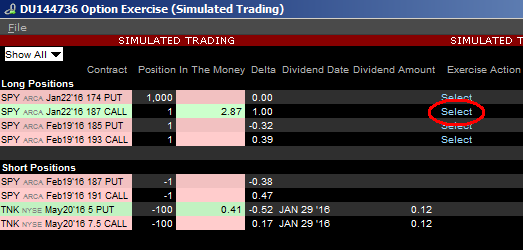
The Option Exercise window will appear and any long options you are holding will populate under the Long Positions column header. To exercise one of them, left-click on the light blue “Select” link under the Exercise Option column header for that particular option.
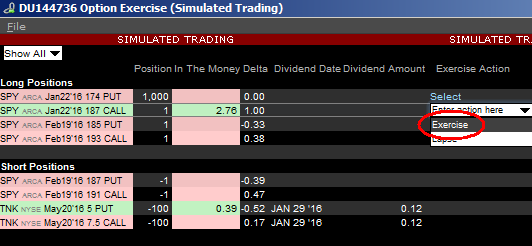
Select "Exercise" from the drop down menu.
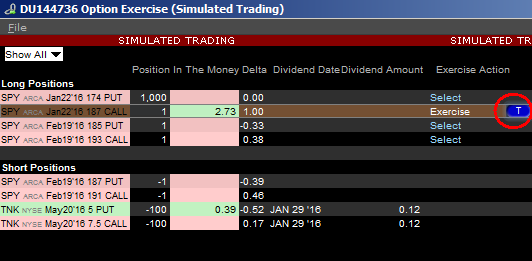
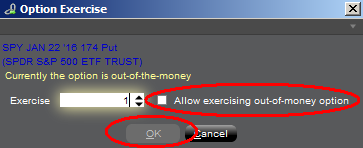
Your Exercise request will now show as an order line on your Trader Workstation until the clearinghouse processes the request. If the option is out-of-the-money, a warning message will appear. To submit the Exercise request, check the box to “Allow exercising out-of-money option” and click OK.
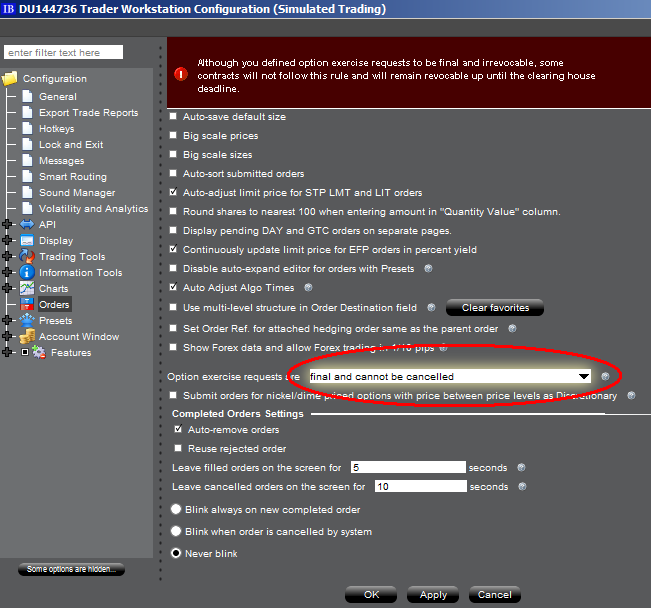
Please note, you have the option of selecting whether you would like your option exercise request to be final and unable to be cancelled, or editable until cutoff time (varies by clearing house). If you select "final and cannot be cancelled", some contracts will not follow this rule and will remain revocable up until the clearing house deadline. You can make this selection in Trader Workstation by going to Edit followed by Global Configuration and selecting Orders from the configuration tree on the left side.
In the event that an option exercise cannot be submitted via the TWS, an option exercise request with all pertinent details (including option symbol, account number and exact quantity), should be created in a ticket via the Client Portal window. In the Client Portal window, click on "Inquiry/Problem Ticket". The ticket should include the words "Option Exercise Request" in the subject line. Please provide a contact number and clearly state in your ticket why the TWS Option Exercise window was not available for use.
Option Exercise Requests (whether received through the TWS Option Exercise window or by a ticket sent via Client Portal / Message Center) must be submitted as follows:
| For Equity Option Contracts Traded Upon: | IBKR must receive an Exercise Request by: | ||||||
| North America | US Options Exchanges | 17:25 EST | |||||
| Montreal Exchange | 16:30 EST | ||||||
| Europe | Euronext | 17h50 CET | |||||
| Eurex (German and Swiss) | 17h50 CET | ||||||
| IDEM | 17h50 CET | ||||||
| LIFFE | 17h50 CET | ||||||
| MEFF | 17h50 CET | ||||||
| Sweden | 17h50 CET | ||||||
| Asia Pacific | Australia | 16:25 Australia/NSW | |||||
| Japan | 15:30 JST | ||||||
| (Send a ticket and call Client Services) | |||||||