
The Hungarian Social Contribution Tax
Overview:
The Hungarian Government passed a new bylaw, Government Decree 205/2023 (V.31) on 31 May, 2023, that requires Hungarian financial providers to withhold a Social Contribution Tax on certain capital gains and interest payments and remit these amounts directly to the government.
You will find the answers to the main questions below:
What type of interest is subject to the Hungarian Social Contribution Tax (TAX)?
Interest coupon payments on Bonds, ETFs, closed-end ETFs and mutual funds purchased after July 1, 2023 are subject to the TAX.
Bonds – on both the coupon payment and the capital gains.
ETFs, Closed End Funds and Mutual Funds – The dividend payment is considered as interest and therefore subject to this tax.
ETFs, Closed End Funds and Mutual Funds that are traded in non-EEA or other countries that do not have a tax treaty with Hungary are subject to the Capital Gain Tax.
What is the standard TAX Rate?
The standard TAX rate is 13%.
If I earn interest through Bond Coupons, am I required to pay the TAX?
Yes.
When is the 13% TAX rate applied to my account?
The 13% TAX rate is applied to your account on the date when the interest coupon or the proceeds on the sale of certain types of ETFs and mutual funds (see above) are credited to your account. You will find the withheld TAX amount as a separate line item in your Activity Statement.
What currency is used for the TAX?
The TAX is withheld in the same currency in which the interest coupon or proceeds have been credited.
I am not a Hungarian resident. Do I have to pay the TAX?
Non-Hungarian residents are not affected by the TAX. The TAX is withheld based on the declaration provided by you on your tax residency.
Does the TAX apply to clients who are companies?
No.
Does the TAX apply to interest I earn through the Cash Yield Enhancement Program?
No.
Does the TAX apply to interest I earn through the Stock Yield Enhancement Program?
Under the existing rules, the TAX may apply to your interest earned through the Stock Yield Enhancement Program.
Why is trading of tax-impacted instruments limited?
Due to the duration between the announcement of the bylaw and its effective date, IB is unable to deploy the required tax withholding properly across its full global product set. To ensure correct adherence to the regulation, we must temporarily limit the ability to open new positions in affected products. Closing transactions in pre-existing positions will not be impacted. We will inform you as soon as the trading restrictions for the tax-impacted instruments have been removed.
Irish Tax Withholding Reclaim Process
Overview:
Interactive Brokers Ireland Limited (IBIE) must apply Irish withholding tax of 20% on credit interest paid to certain clients, including natural persons. However, you may be able to reclaim some or all of the tax withheld, if you are resident in a country with a Double Taxation Treaty (DTT) with Ireland, which includes all EEA countries.
To reclaim withholding tax, you must complete Form IC7. This article explains how to do this. You can find the form at this link:
https://www.revenue.ie/en/self-assessment-and-self-employment/documents/form-ic7.pdf
You may also be interested in our explanation on how to apply for an exemption from or reduction in the rate of withholding tax applicable to your future credit interest payments, which you can find here.
How to Reclaim Withholding Tax
Step 1: Complete the following information:
1. Under section entitled Name of claimant – please fill in full Capital Letters.
Full Name,
Foreign Tax Ref. No.
Revenue File Ref. No. (If known.)
Address:
Tel No.:
E-mail:
2. Under section entitled Agent – only complete this section if you would like enquiries to be sent to your Agent.
Name:
Address:
Tel No.:
E-mail:
Step 2: Answer and complete questions numbered 1-6,
|
|
QUESTION |
ANSWER |
|
1 |
Please state the name, address and Irish tax reference number of the Irish entity making the payments. |
Interactive Brokers Ireland Limited North Dock One, 91/92 North Wall Quay, Dublin 1 D01 H7V7, Ireland TRN: 3674050HH |
|
2 |
State the relationship, if any, between you and the Irish entity making the payments. |
Client |
|
3 |
Please confirm that the payments are made on ‘an arms length Basis’ |
Confirmed: All credit interest payments made by IBIE to clients are on an arm’s length basis |
|
4 |
Please state the rate of the payments |
Variable |
|
5 |
Please state the date of the first payment |
Please refer to the annual statement to determine date of first payment (available on client portal). |
|
6 |
Please state the term of the Agreement. |
Indefinite |
|
7 |
Is the payment in question arising from a Permanent Establishment (P.E.) or fixed base maintained by you in Ireland |
Please complete |
Step 3: Complete the declaration with your country of residence in both blank sections.
Step 4: Sign and date the Form underneath the declaration.
Step 5: Insert the amount you are claiming following “Amount Claimed”.
You can find the amount claimed on Form R185, which is available in IBIE’s client portal in the Tax Forms (see the section marked Tax Deducted).
“Amount Claimed in €________: if claiming a refund of Irish tax on payments already made”
Step 6: Complete the section on payment details in the next box, include details of the account to which you wish to receive the payment from Revenue.
Step 7: Ensure the last section is completed and stamped by the tax authority in your country of residence.
Note: If your tax authority will not stamp the form, Irish Revenue may accept a certificate of tax residence, which can be attached instead of having that section completed.
Step 8:
Post or email the following to International Claims Section, Office of the Revenue Commissioners, Nenagh, Co Tipperary, E45 T611, Ireland or intclaims@revenue.ie:
i) Form IC7,
ii) Form R185 (which is available in IBIE’s client portal in the Tax Forms section),
iii) The IBIE Customer Agreement found at this link or alternatively you can just send the link to the customer agreement (in the email or in a cover letter via post), https://www.interactivebrokers.ie/en/accounts/forms-and-disclosures-client-agreements.php, and
iv) Your certificate of tax residence (if required):
How to Contact Irish Revenue
If you have any questions regarding the form, please contact Irish Revenue (Tel No.: +353 1 7383634 E-email: intclaims@revenue.ie).
Withholding on Publicly Traded Partnerships (“PTPs”) Effective Jan 2023
Background:
As a result of U.S. Internal Revenue Regulations taking effect 1 January 2023, new withholding charges will be applied to sales proceeds from certain Publicly Traded Partnerships ("PTPs”) held by investors who are not U.S. taxpayers. The IRS withholding charges are substantial, therefore, Interactive Brokers has taken steps to limit access to these products for investors who might be unaware of the risks of investing in these PTP products.
Instructions on How to Access PTP Products are available below in this document.
What you need to know:
Amount of Withholding: 10% of sale or distribution proceeds. This means 10% of the amount of funds that would settle resulting from any transaction or distribution, not just 10% on any calculated profit.
Example of PTP withholding:
Buy 200 shares @ 50.
Transaction value = $10,000
Sell 200 shares @ 51.
Transaction value = $10,200
Profit = $200.
Withholding = $1020 USD
Assuming no tax reclaim requests, the loss in value to the investor would be $820
Affected Instruments: Please see the list at the end of this article. The list is maintained on a best efforts basis and there may be some timing issues as information is refreshed. Listed deliverable securities are in scope of the new regulation. Options and other derivative instruments with a PTP as the underlying security are not subject to withholding. However, if the option or derivative is converted into a PTP interest, a subsequent sale of such PTP security would be subject to withholding.
Special Exemptions: The IRS regulation provides issuers the ability to get an exemption from the PTP withholding requirement. The exemption is valid for 92 days, and issuers are required to re-certify with the IRS to extend the duration of the exemption. IBKR will try, on a best-efforts basis, to publish which of the affected instruments have an operating exemption, but investors should ensure they are choosing products whose withholding conditions they fully understand. The issuer document that provides for a withholding exemption is generally referred to as a "Qualified Notice"
What Investors are affected: All investors who are not considered ‘resident’ for U.S. tax purposes, i.e. investors who are not subject to U.S. taxation and tax reporting (and therefore doesn't file a W-9 IRS tax form).
Reporting: Withholding will be reported on the year-end Form 1042-S, Foreign Person's U.S. Source Income Subject to Withholding.
How to Access PTP Products as a Non-US Taxpayer: Please login to Client Portal and select the User menu (head and shoulders icon in the top right corner) followed by Settings. Then under Account Settings find the Trading section and click on the “PTP Trading Opt In/Out” link. The webpage allows you to request the ability to trade PTP securities. Once the request is submitted, it may take up to one hour for the ability to be activated.
Note that clients who no longer desire to trade PTP securities may request to deactivate the PTP trading ability via the same “PTP Trading Opt In/Out” link.
Additional Resources: For those interested in understanding additional information about the new regulation, please see the IRS website for IRC Sec. 1446(f): http://www.irs.gov/individuals/international-taxpayers/partnership-withholding
PTP Instruments
This list identifies PTP securities which may be subject to withholding under the IRS Regulation referenced above. The products are presented in 2 groups: those with a "Qualified Notice” exemption, and those "without Qualified Notice". The lists are shown on a best-efforts basis for convenience only. IBKR does not guarantee the accuracy or timeliness of the information, and investors should independently verify that products in which they are invested in, or intend to invest, have the necessary exemptions to avoid punitive withholding outcomes. Duration of the exemptions should also be monitored by position holders in the instruments.
PTP Securities with known Qualified Notice
Last updated 22-01-2024
| ISIN | Symbol | Description |
| US3152931008 | FGPRQ | FERRELLGAS PARTNERS-LP |
| US7328571077 | POPE | POPE RESOURCES |
| US7265031051 | PAA | PLAINS ALL AMER PIPELINE LP |
| US87233Q1085 | TCP | TC PIPELINES LP |
| BMG540501027 | LAZ.OLD | LAZARD LTD-CL A |
| US89376V1008 | TLP | TRANSMONTAIGNE PARTNERS LP |
| US01861G1004 | AHGP | ALLIANCE HOLDINGS GP LP |
| US46428R1077 | GSG | ISHARES S&P GSCI COMMODITY I |
| US16411Q1013 | CQP | CHENIERE ENERGY PARTNERS LP |
| US4511001012 | IEP | ICAHN ENTERPRISES LP |
| BMG162521014 | BIP | BROOKFIELD INFRASTRUCTURE PA |
| US74347W8828 | EUO | PROSHARES ULTRASHORT EURO |
| US74347W6012 | UGL | PROSHARES ULTRA GOLD |
| US161239AC25 | IBCID66377068 | 161239AC2 11/30/50 |
| US161239AE80 | IBCID66377074 | 161239AE8 6.8 11/30/50 |
| US161239AN89 | IBCID66419451 | 161239AN8 12/31/45 |
| US161239AB42 | IBCID67286679 | 161239AB4 06/30/49 |
| US161239AM07 | IBCID67287230 | 161239AM0 6.3 12/31/45 |
| USU3595KAA52 | MIZUHO | MIZUHO 9.87 PERP |
| US9126132052 | DNO | UNITED STATES SHORT OIL FUND |
| US91288X1090 | UNL | UNITED STATES 12 MONTH NATUR |
| US26827L1098 | ECTM | ECA MARCELLUS TRUST I |
| US9117171069 | USCI | UNITED STATES COMMODITY INDE |
| US38349K1051 | GDVTZ | GOULD INVESTORS LP |
| US88166A6073 | SOYB | TEUCRIUM SOYBEAN FUND |
| US88166A5083 | WEAT | TEUCRIUM WHEAT FUND |
| US9117181043 | CPER | UNITED STATES COPPER INDEX |
| BMG162581083 | BEP.UN | BROOKFIELD RENEWABLE PARTNER |
| US88166A7063 | TAGS | TEUCRIUM AGRICULTURAL FUND |
| US9117831084 | UHN | UNITED STATES DIESEL-HEATING |
| US74347W3951 | GLL | PROSHARES ULTRASHORT GOLD |
| BMG162581083 | BEP | BROOKFIELD RENEWABLE PARTNER |
| US84130C1009 | SXEEQ | SOUTHCROSS ENERGY PARTNERS L |
| US24664T1034 | DKL | DELEK LOGISTICS PARTNERS LP |
| CA3874371147 | GRT.UN | GRANITE REAL ESTATE INVESTME |
| CA3874371147 | GRP U | GRANITE REAL ESTATE INVESTME |
| CA16141A1030 | CSH.UN | CHARTWELL RETIREMENT RESIDEN |
| US86722Y1010 | SXCP | SUNCOKE ENERGY PARTNERS LP |
| US48248A6038 | KFN PRCL | KKR FINANCIAL HOLDINGS |
| JP3047550003 | 3283 | NIPPON PROLOGIS REIT INC |
| BMG162491077 | BPY | BROOKFIELD PROPERTY PARTNERS |
| US03879N1019 | ARCX | ARC LOGISTICS PARTNERS LP |
| US29336U1079 | ENLK | ENLINK MIDSTREAM PARTNERS LP |
| US2574541080 | DM.OLD | DOMINION ENERGY MIDSTREAM PA |
| MXCFFI170008 | FIBRAPL14 | PROLOGIS PROPERTY MEXICO SA |
| US7628191006 | RMP | RICE MIDSTREAM PARTNERS LP |
| CA76090H1038 | RSTRF | RESTAURANT BRANDS-EXCH UNITS |
| BMG162521279 | BIP.PR.A | BROOKFIELD INFRASTRUCTUR |
| US09225M1018 | BSM | BLACK STONE MINERALS LP |
| US74347W2888 | UCD | PROSHARES ULTRA BLOOMBERG CO |
| US91831H1068 | VPRB | VPR BRANDS LP |
| GG00BYV2ZQ34 | RGL | REGIONAL REIT LTD |
| BMG162581323 | BEP.PR.G | BROOKFIELD RENEWABLE POW |
| BMG162521436 | BIP.PR.B | BROOKFIELD INFRASTRUCTUR |
| BMG162341090 | BBU | BROOKFIELD BUSINESS PT-UNIT |
| SG1CI1000004 | BTOU | MANULIFE US REAL ESTATE INV |
| CA70214T1194 | PVF.UN.OL | PARTNERS VALUE INVESTMENTS I |
| BMG162521683 | BIP.PR.C | BROOKFIELD INFRASTRUCTUR |
| US85814R2067 | SPLP PRA | STEEL PARTNERS HOLDINGS LP |
| US74347W2219 | OILU.OLD | PROSHARES ULTRAPRO 3X CRUDE |
| US29278N1037 | ETP | ENERGY TRANSFER OPERATING LP |
| US67420T2069 | OMP | OASIS MIDSTREAM PARTNERS LP |
| US85814R3057 | SPLP PRT | STEEL PARTNERS HLDS LP |
| US0556EL1098 | BPMP | BP MIDSTREAM PARTNERS LP |
| US20855T1007 | CCR | CONSOL COAL RESOURCES LP |
| SG1EA1000007 | CMOU | KEPPEL PACIFIC OAK US REIT |
| US29278NAB91 | ETP | ETP 6 5/8 PERP |
| US9123183009 | UNG.OLD | US NATURAL GAS FUND LP |
| BMG162584053 | BEP.PR.M | BROOKFIELD RENEWABLE PAR |
| US74347Y8057 | OILD.OLD1 | PROSHARES ULTRAPRO 3X SHORT |
| US46140H2058 | DBS | INVESCO DB SILVER FUND |
| US46140H6018 | DGL | INVESCO DB GOLD FUND |
| US46140H5028 | DBP | INVESCO DB PRECIOUS METALS F |
| US46139B1026 | DBV | INVESCO DB G10 CURRENCY HARV |
| US46140H4039 | DBO | INVESCO DB OIL FUND |
| US46141D2036 | UUP | INVESCO DB US DOLLAR INDEX B |
| US46141D1046 | UDN | INVESCO DB US DOLLAR INDEX B |
| US6740014096 | OAK PRB | OAKTREE CAPITAL GRP LLC |
| US19237JAB98 | IBCID352663531 | 19237JAB9 0 08/01/54 |
| BMG162582156 | BEP.PR.O | BROOKFIELD RENEWABLE PAR |
| BMG162522269 | BIP.PR.F | BROOKFIELD INFRASTRUCTUR |
| SGXC28500103 | LIW | EAGLE HOSPITALITY TRUST |
| SGXC75818630 | OXMU | PRIME US REIT |
| BMG162491564 | BPYPO | BROOKFIELD PROPERTY PART |
| KYG9325C1050 | VTDRF | VANTAGE DRILLING INTERNATION |
| BMG162581083 | BXE.EUR | BROOKFIELD RENEWABLE PARTNER |
| US29278NAS27 | ETP | ETP 6 3/4 PERP |
| US29278NAT00 | ETP | ETP 7 1/8 PERP |
| BMG162491648 | BPYPN | BROOKFIELD PROPERTY PART |
| BMG162582313 | BEP PRA | BROOKFIELD RENEWABLE PAR |
| US74347Y8883 | UCO | PROSHARES ULTRA BLOOMBERG CR |
| US91232N2071 | USO | UNITED STATES OIL FUND LP |
| US55406N1037 | MYTH | MYT HLDG LLC BE+ |
| BMG162522756 | BIP PRB | BROOKFIELD INFRASTRUCTUR |
| US36761Q1058 | GWYGU | GATEWAY GARAGE PARTNERS LLC |
| CA85554C1041 | SCPT.A | STRLIGHT US MLTI-FAM 2 CORE |
| US29273VAL45 | ET | ET 6 3/4 PERP |
| US29273VAM28 | ET | ET 7 1/8 PERP |
| US29273VAJ98 | ET | ET 6 5/8 PERP |
| US29273VAH33 | ET | ET Float PERP |
| US29273VAN01 | ET | ET 6 1/42 PERP |
| US74347Y8396 | UVXY.OLD | PROSHARES ULTRA VIX ST FUTUR |
| BMG1624R1079 | BPYPM | NEW LP PREFERRED UNITS CAD |
| BMG1624R1079 | BPYP.PR.A | NEW LP PREFERRED UNITS CAD |
| US86943V2097 | AGO | AGO Float PERP |
| US86943X2053 | AGO | AGO Float PERP |
| US86943W2070 | AGO | AGO Float PERP |
| US93964X1063 | WPG. | WASHINGTON PG INC UNRESTRICTED SHARES |
| SGXC50067435 | DCRU | DIGITAL CORE REIT MANAGEMENT |
| US74347Y7976 | SCO | PROSHARES ULTRASHORT BLOOMBE |
| BMG162582644 | BEP.PR.R | BROOKFIELD RENEWABLE PAR |
| US88166A8053 | DEFI.OLD | HASHDEX BITCOIN FUTURES ETF |
| US74347Y7638 | BOIL | PROSHARES ULTRA BLOOMBERG NA |
| US74347Y7893 | VIXY | PROSHARES VIX SHORT-TERM FUT |
| US74347Y7711 | UVXY | PROSHARES ULTRA VIX ST FUTUR |
| BMG6936M1001 | PVF.UN | PARTNERS VALUE INVESTMENTS L |
| US88634V1008 | DEFI | HASHDEX BITCOIN FUTURES ETF |
PTP Securities without Qualified Notices
Last updated 22-01-2024
| ISIN | Symbol | Description |
| US1182301010 | BPL | BUCKEYE PARTNERS LP |
| US3152931008 | FGPRQ | FERRELLGAS PARTNERS-LP |
| US1501851067 | FUN | CEDAR FAIR -LP |
| US29250R1068 | EEP | ENBRIDGE ENERGY PARTNERS LP |
| US0309751065 | APU | AMERIGAS PARTNERS-LP |
| US40636T2033 | HRY | HALLWOOD RLTY PARTNERS L P |
| US8644821048 | SPH | SUBURBAN PROPANE PARTNERS LP |
| US3719271047 | GEL | GENESIS ENERGY L.P. |
| US8810052014 | TNH | TERRA NITROGEN COMPANY LP |
| US6442061049 | NEN | NEW ENGLAND REALTY ASSOC-LP |
| US7328571077 | POPE | POPE RESOURCES |
| US2937921078 | EPD | ENTERPRISE PRODUCTS PARTNERS |
| US7265031051 | PAA | PLAINS ALL AMER PIPELINE LP |
| US87233Q1085 | TCP | TC PIPELINES LP |
| US01877R1086 | ARLP | ALLIANCE RESOURCE PARTNERS |
| US5733311055 | MMLP | MARTIN MIDSTREAM PARTNERS LP |
| US25820R1059 | DMLP | DORCHESTER MINERALS LP |
| US29273R1095 | ETP.OLD | ENERGY TRANSFER PARTNERS LP |
| US4357631070 | HEP | HOLLY ENERGY PARTNERS LP |
| US89376V1008 | TLP | TRANSMONTAIGNE PARTNERS LP |
| US37946R1095 | GLP | GLOBAL PARTNERS LP |
| US0966271043 | BWP | BOARDWALK PIPELINE PARTNERS |
| US23311P1003 | DCP | DCP MIDSTREAM L.P. |
| US1314761032 | CLMT | CALUMET SPECIALTY PRODUCTS |
| US29273V1008 | ET | ENERGY TRANSFER LP |
| US01881G1067 | AB | ALLIANCEBERNSTEIN HOLDING LP |
| US01861G1004 | AHGP | ALLIANCE HOLDINGS GP LP |
| US68268N1037 | OKS | ONEOK PARTNERS LP |
| US26926V1070 | EVEPQ | EV ENERGY PARTNERS LP |
| US1067761072 | BBEPQ | BREITBURN ENERGY PARTNERS LP |
| US34958B1061 | FIG.OLD | FORTRESS INVESTMENT GRP-CL A |
| US16411Q1013 | CQP | CHENIERE ENERGY PARTNERS LP |
| US67058H1023 | NS | NUSTAR ENERGY LP |
| US67059L1026 | NSH.OLD | NUSTAR GP HOLDINGS LLC |
| US84756N1090 | SEP | SPECTRA ENERGY PARTNERS LP |
| US55608B1052 | MIC.USD | MACQUARIE INFRASTRUCTURE HOL |
| US4511001012 | IEP | ICAHN ENTERPRISES LP |
| US92205F1066 | VNRSQ | VANGUARD NATURAL RESOURCES |
| US9582541044 | WES.OLD | WESTERN GAS PARTNERS LP |
| US30242M1062 | XXFPL | FFP PARTNERS -LP-CL A |
| US9126132052 | DNO | UNITED STATES SHORT OIL FUND |
| US09625U1097 | BKEP | BLUEKNIGHT ENERGY PARTNERS L |
| US6546781013 | NKA | NISKA GAS STORAGE PARTNERS-U |
| US2128491030 | CWPS | CONWEST PARTNERSHIP LP-UNITS |
| US0548071028 | AZLCZ | AZTEC LAND & CATTLE LTD |
| US26827L1098 | ECTM | ECA MARCELLUS TRUST I |
| US38349K1051 | GDVTZ | GOULD INVESTORS LP |
| US5053461068 | LAACZ | LAACO LTD-UNITS OF LTD PRTNS |
| US1534231089 | ENGY | CENTRAL ENERGY PARTNERS LP |
| US80007T1016 | SDTTU | SANDRIDGE MISSISSIPPIAN TRUS |
| US62913M1071 | NGL | NGL ENERGY PARTNERS LP |
| US12547R1059 | CIFC | CIFC LLC |
| US02752P1003 | AMID.OLD | AMERICAN MIDSTREAM PARTNERS |
| US09625U2087 | BKEPP | BLUEKNIGHT ENERGY PARTNERS - SERIES A PREF UNIT |
| US1651851099 | CHKR | CHESAPEAKE GRANITE WASH TRUS |
| US5860481002 | MEMPQ | MEMORIAL PRODUCTION PARTNERS |
| US0293162055 | ICTPU.OLD | AMERICAN RESTAURANT PRTNR LP |
| US04941A1016 | ARPJQ | ATLAS RESOURCE PARTNERS LP |
| US6740012017 | OAK | OAKTREE CAPITAL GROUP LLC |
| US26885B1008 | EQM | EQM MIDSTREAM PARTNERS LP |
| US74347W7424 | EUFX.OLD | PROSHARES SHORT EURO ETF |
| US74347W4603 | CROC | PROSHARES ULTRASHORT AUD |
| US6658261036 | NTI | NORTHERN TIER ENERGY LP |
| US9117831084 | UHN | UNITED STATES DIESEL-HEATING |
| US4283371098 | HCRSQ | HI-CRUSH INC |
| US55336V1008 | MPLX | MPLX LP |
| US84130C1009 | SXEEQ | SOUTHCROSS ENERGY PARTNERS L |
| US24664T1034 | DKL | DELEK LOGISTICS PARTNERS LP |
| US02052T1097 | ALDW | ALON USA PARTNERS LP |
| US90290N1090 | USAC | USA COMPRESSION PARTNERS LP |
| US86722Y1010 | SXCP | SUNCOKE ENERGY PARTNERS LP |
| US12663P1075 | CVRR | CVR REFINING LP |
| US48248A6038 | KFN PRCL | KKR FINANCIAL HOLDINGS |
| US64881E1091 | NSLPQ | NEW SOURCE ENERGY PARTNERS L |
| BMG162491077 | BPY | BROOKFIELD PROPERTY PARTNERS |
| US8746971055 | TEP | TALLGRASS ENERGY PARTNERS LP |
| US92205F2056 | VNRAQ | VANGUARD NATURAL RESOU |
| US5327711025 | LIN.OLD1 | LIN MEDIA LLC - A |
| US7185492078 | PSXP | PHILLIPS 66 PARTNERS LP |
| US98159G1076 | WPT | WORLD POINT TERMINALS LP |
| US2921022099 | OGCP | EMPIRE STATE REALTY OP-S60 |
| US2921023089 | FISK | EMPIRE STATE REALTY OP -S250 |
| US2921021000 | ESBA | EMPIRE STATE REALTY OP LP-ES |
| US8493431089 | SRLP | SPRAGUE RESOURCES LP |
| US03879N1019 | ARCX | ARC LOGISTICS PARTNERS LP |
| US59564N1037 | MEP | MIDCOAST ENERGY PARTNERS LP |
| US91914J1025 | VLP | VALERO ENERGY PARTNERS LP |
| US29336U1079 | ENLK | ENLINK MIDSTREAM PARTNERS LP |
| US92205F3047 | VNGBQ | VANGUARD NATURAL RESOURCES LLC RED |
| US2924801002 | ENBL | ENABLE MIDSTREAM PARTNERS LP |
| US69318Q1040 | PBFX | PBF LOGISTICS LP |
| US9604171036 | WLKP | WESTLAKE CHEMICAL PARTNERS L |
| US92205F4037 | VNRCQ | VANGUARD NATURAL RESOU |
| US22758A1051 | CAPL | CROSSAMERICA PARTNERS LP |
| US9033181036 | USDP | USD PARTNERS LP |
| US2574541080 | DM.OLD | DOMINION ENERGY MIDSTREAM PA |
| US86765K1097 | SUN | SUNOCO LP |
| US8226341019 | SHLX | SHELL MIDSTREAM PARTNERS LP |
| US12637A1034 | CCLP | CSI COMPRESSCO LP |
| US7628191006 | RMP | RICE MIDSTREAM PARTNERS LP |
| US96108P1030 | WMLPQ | WESTMORELAND RESOURCE PARTNE |
| US96949L1052 | WPZ | WILLIAMS PARTNERS LP |
| US04929Q1022 | ATLS.OLD | ATLAS ENERGY GROUP LLC |
| US26923H1014 | RISE | SIT RISING RATE ETF |
| US09225M1018 | BSM | BLACK STONE MINERALS LP |
| US74347W2888 | UCD | PROSHARES ULTRA BLOOMBERG CO |
| US64881E3071 | NUSPQ | NEW SOURCE ENG PARTNERS LP 11%SR A |
| US3932211069 | GPP | GREEN PLAINS PARTNERS LP |
| US4038291047 | GYRO | GYRODYNE LLC |
| US91831H1068 | VPRB | VPR BRANDS LP |
| US87611X2045 | NGLS PRA | TARGA RESOURCES PARTNERS |
| US1724641097 | SIRE | SISECAM RESOURCES LP |
| US03957U1007 | APLP | ARCHROCK PARTNERS LP |
| US2263442087 | CEQP | CRESTWOOD EQUITY PARTNERS LP |
| US97718W1080 | GCC.USD | WISDOMTREE CONTINUOUS COMMOD |
| US63900P6088 | NRP | NATURAL RESOURCE PARTNERS LP |
| US51508J2078 | LMRKP | LANDMARK INFRASTRUCTURE |
| CA70214T1194 | PVF.UN.OL | PARTNERS VALUE INVESTMENTS I |
| BMG162521683 | BIP.PR.C | BROOKFIELD INFRASTRUCTUR |
| US976ESC3018 | FUR.ESC | WINTHROP REALTY TRUST - ESCROW |
| US65506L1052 | NBLX | NOBLE MIDSTREAM PARTNERS LP |
| US67058H2013 | NS PRA | NSUS 8 1/2 12/31/49 |
| BMG162521840 | BIP.PR.D | BROOKFIELD INFRASTRUCTUR |
| US74347W2219 | OILU.OLD | PROSHARES ULTRAPRO 3X CRUDE |
| US67058H3003 | NS PRB | NSUS 7 5/8 PERP PFD |
| US29278N1037 | ETP | ENERGY TRANSFER OPERATING LP |
| US62913M2061 | NGL PRB | NGL 9 PERP PFD |
| US67420T2069 | OMP | OASIS MIDSTREAM PARTNERS LP |
| US85814R3057 | SPLP PRT | STEEL PARTNERS HLDS L |
| US0556EL1098 | BPMP | BP MIDSTREAM PARTNERS LP |
| US20855T1007 | CCR | CONSOL COAL RESOURCES LP |
| US67058H4092 | NS PRC | NUSTAR ENERGY LP |
| US12654A1016 | CNXM | CNX MIDSTREAM PARTNERS LP |
| US59140L1008 | IDIV | METAURUS US EQUITY CUMULATIV |
| US59140L2097 | XDIV.OLD | METAURUS US EQUITY EX DIVIDE |
| US74347Y8057 | OILD.OLD1 | PROSHARES ULTRAPRO 3X SHORT |
| US26923H2004 | BDRY | BREAKWAVE DRY BULK SHIPPING |
| US29278N3017 | ETP PRC | ENERGY TRANSFER PARTNERS |
| US23311P2092 | DCP PRB | DCP MIDSTREAM LP |
| US46140H2058 | DBS | INVESCO DB SILVER FUND |
| US46140H6018 | DGL | INVESCO DB GOLD FUND |
| US46139B1026 | DBV | INVESCO DB G10 CURRENCY HARV |
| US29278N4007 | ETP PRD | ENERGY TRANSFER PARTNERS |
| US37946R2085 | GLP PRA | GLOBAL PARTNERS LP |
| US23311P3082 | DCP PRC | DCP 7.95 PERP PFD - DCP MIDSTREAM LP |
| US64ESC19977 | NYRT.ESC | NEW YORK REIT INC - ESCROW |
| US9586691035 | WES | WESTERN MIDSTREAM PARTNERS L |
| US62913M3051 | NGL PRC | NGL ENERGY PARTNERS LP |
| US29278N5095 | ETP PRE | ENERGY TRANSFER OPERATNG |
| SGXC28500103 | LIW | EAGLE HOSPITALITY TRUST |
| US2263443077 | CEQP PR | CRESTWOOD EQUITY PARTNER |
| KYG9325C1050 | VTDRF | VANTAGE DRILLING INTERNATION |
| US59560V2088 | MCEP | MID-CON ENERGY PARTNERS LP |
| US55406N2027 | PFDM | PFD MYT HLDG CO BE+ |
| US55406N1037 | MYTH | MYT HLDG LLC BE+ |
| US8661424098 | SMLP | SUMMIT MIDSTREAM PARTNERS LP |
| US1266332055 | UAN | CVR PARTNERS LP |
| US36761Q1058 | GWYGU | GATEWAY GARAGE PARTNERS LLC |
| US37946R3075 | GLP PRB | GLOBAL PARTNERS LP |
| US29273V6056 | ET PRE | ENERGY TRANSFER LP 7.6% PERP PFD U |
| US29273V5066 | ET PRD | ENERGY TRANSFER LP 7.625% PERP PFD |
| US29273V4077 | ET PRC | ENERGY TRANSFER LP |
| US3152932097 | FGPR | FERRELLGAS PARTNERS-LP |
| US3152933087 | FGPRB | FERRELLGAS PARTNERS LP-B |
| US74347Y8396 | UVXY.OLD | PROSHARES ULTRA VIX ST FUTUR |
| US0806941029 | OZ | BELPOINTE PREP LLC |
| US93964X1063 | WPG. | WASHINGTON PG INC UNRESTRICTED SHARES |
| CA70214T2002 | PVI.II | PARTNERS VALUE INVESTMENTS LP |
| CA70214T3091 | PVI.III | PARTNERS VALUE INVESTMENTS LP SERIES 3 |
| CA70214T4081 | PVI.IIII | PARTNERS VALUE INVESTMENTS LP SERIES 4 |
| US092ESC0377 | BGIO.ESC | ESC BGIO LIQUIDATION TRUST |
| US90205J1025 | TESLU | 286 LENOX PARTNERS LLC |
| US02364V2060 | GHI | GREYSTONE HOUSING IMPACT INV |
| US21258A2015 | SPKX | CONVXTY SHS 1X SPIKES FUTUR |
| US21258A1025 | SPKY | CONVXTY SHS DAILY 1.5X SP FU |
| US41988L2025 | NNUTU | HAWAIIAN MACADAMIA NUT ORCHA |
| US87313P1030 | TXO | TXO PARTNERS LP |
| US26923H3093 | BWET | BREAKWAVE TANKER SHIP ETF |
| US30053M2035 | SNMP | EVOLVE TRANSITION INFRASTRUC |
| US28252B8871 | EFSH.OLD | 1847 HOLDINGS LLC |
| US55285N1090 | MDBH | MDB CAPITAL HOLDINGS LLC |
| US55445L1008 | MNR | MACH NATURAL RESOURCES LP |
| US29273V7047 | ET PRI | ENERGY TRANSFER LP |
| BMG6936M1001 | PVF.UN | PARTNERS VALUE INVESTMENTS L |
| BMG6936M1183 | PVF.PR.U | PARTNERS VALUE INVEST LP |
| BMG6936M1266 | PVI.II.SP | PARTNERS VALUE INVESTMENTS LP - PREF UNIT LTD PRTNS SR 2 CL |
| BMG6936M1423 | PVIIII.P | PARTNERS VALUE INVESTMENTS LP - PREF UNIT LTD PRTNS SR 4 CL |
| BMG6936M1340 | PVIIII.P | PARTNERS VALUE INVESTMENTS LP - PREF UNIT LTD PNTRS SR 3 CL |
| US28252B8798 | EFSH | 1847 HOLDINGS LLC |
| US88634V1008 | DEFI | HASHDEX BITCOIN FUTURES ETF |
Information on Irish Interest Withholding
Overview:
The Irish Tax Authority requires IBKR to collect withholding tax on interest earned in Ireland. This withholding is at a rate of 20% and must be deducted from interest payments to your account.
Please note withholding tax applies to all clients who are resident in Ireland, whether individuals (including partnerships) or companies.
Withholding tax does not apply to clients who are companies in countries that are members of the European Union (excluding Ireland) or companies in countries that have a Double Tax Agreement (DTA) with Ireland.
For other clients in the EU (excluding Ireland) or if you are a non-resident of Ireland but tax resident in a country with a Double Tax Agreement (DTA) with Ireland, you may complete Form 8-3-6, that will reduce or eliminate your withholding tax. In addition to providing your information, you will need to have the form completed by the tax authority in the country where you are a tax resident.
You will require the following information in order to complete Form 8-3-6.
1. Client name (please ensure this matches the name on your IBKR account).
2. Client address.
3. Tax reference number in country of residence.
4. The country in which the client is resident for tax.
5. The rate of withholding tax between the country of tax residence and Ireland (see below).
6. Signature.
7. Date.
On completion of the form, you should submit it to the local tax authority in the country of your residence. The local tax authority must sign and stamp the form. As per below, Form 8-3-6 has been translated into French, German, Spanish, Italian and Dutch.
Once you receive the completed form from your local tax authority, please email a PDF or JPEG copy of the fully signed form to tax-withholding@interactivebrokers.com.
Please note, the withholding tax rate depends on the DTA between Ireland and your country of tax residence which can be found on the Irish Revenue website https://www.revenue.ie/en/tax-professionals/tax-agreements/rates/index.aspx
For your convenience, we have prepared the forms to include items 3 to 5 above for all countries in the European Economic Area (“EEA”). Clients will need to complete the other items in 1 to 7 above.
For clients outside the EEA please use this form when the withholding tax rate is 0% and this form in all other cases.
1. EEA countries with 0% Withholding Tax.
2. EEA countries with rates above 0% Withholding Tax.
|
|
3. Other countries with a DTA with Ireland (* denotes where there is 0% withholding tax in all situations).
|
Georgia |
Moldova |
Singapore |
|
|
Armenia |
Ghana |
Montenegro |
South Africa* |
|
Australia |
Hong Kong |
Morocco |
South Korea* |
|
Bahrain* |
India |
New Zealand |
Switzerland* |
|
Belarus |
Israel |
North Macedonia* |
Thailand |
|
Bosnia & Herzegovina* |
Japan |
Norway |
Turkey |
|
Botswana |
Kazakhstan |
Pakistan |
Ukraine |
|
Canada |
Kenya |
Panama |
United Arab Emirates* |
|
Chile |
Kosovo |
Qatar* |
United Kingdom* |
|
China |
Kuwait* |
Russian Federation* |
United States of America* |
|
Egypt |
Malaysia |
Saudi Arabia* |
Uzbekistan |
|
Ethiopia |
Mexico |
Serbia |
Vietnam |
|
|
|
|
Zambia* |
|
|
|
|
Connecticut Sales and Use Tax
The state of Connecticut imposes a sales and use tax which is applicable to online access to information including all data and access fees.
The tax rate as of 2017 is 1% and is applicable to clients with the state of legal residency of Connecticut or a Connecticut permanent/resident address.
The sales and use tax will be applied to all research and market data subscriptions as well as special connections such as VPN, IB Gateway, Extranet and Dedicated Leased Lines.
The sales and use tax will be passed through to client accounts at the time of the subscription billing. The tax is only applicable if a monthly fee is charged, therefore should an account receive a waiver the sales and use tax will similarly be waived.
Chicago Personal Property Tax
Chicago has a personal property tax which applies to a non-possessory computer lease by a Chicago resident. The Chicago tax authorities have ruled that tax is to be applied in cases where a customer pays for electronic research/use of an interactive site. The passive receipt or streaming of information is not subject to the tax.
Clients whose permanent residential address or principal business address is Chicago will have this tax passed through to their accounts.
The tax rate, as of October 2017, is 9%. The tax will be charged on the research and news feeds a client is subscribed to. Should a research and news feed be eligible to a waiver based upon commissions generated, the tax will not be applied.
As of October 2017, research and news subscriptions which would be subject to the tax would include
Base IBIS Research Platform and the IBIS Research Essentials Subscription Bundle
Cusip
Dow Jones News Service
Dow Jones Real Time News
US Press Release Feed
Reuters Global Newswire
Reuters StreetEvents Calendars
Reuters Fundamentals
Reuters Basic Newfeed
Morningstar Equity, ETF and Credit Reports
Wall Street Horizons
Zacks Equity Research Reports
The above list is provided on a best efforts basis and is subject to change. Clients will be responsible for any pass through tax regardless of any discrepancy from the list provided above.
How to update the US Social Security Number (SSN) or Individual Taxpayer Identification Number (ITIN) on your account
Background:
If you have been informed or believe that your account profile contains an incorrect US SSN/ITIN, you may simply log into your Account Management to update this information. Depending on your taxpayer status, you can update your US SSN/ITIN by modifying one of the following documents:
1) IRS Form W9 (if you are a US tax resident and/or US citizen holding a US SSN/ITIN)
2) IRS Form W-8BEN (if you are a Non-US tax resident holding a US SSN/ITIN)
Please note, if your SSN/ITIN has already been verified with the IRS you will be unable to update the information. If however the IRS has not yet verified the ID, you will have the ability to update through Account Management.
How to Modify Your W9/W8
1) To submit this information change request, first login to Account Management
2) Click on the Settings section followed by Account Settings
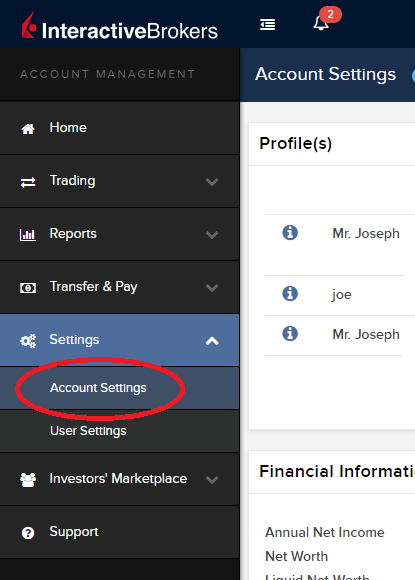
3) Find the Profile(s) section. Locate the User you wish to update and click on the Info button (the "i" icon) to the left of the User's name
.png)
4) Scroll down to the bottom where you will see the words Tax Forms. Next to it will be a link with the current tax form we have for the account. Click on this tax form to open it
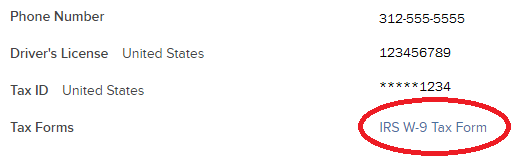
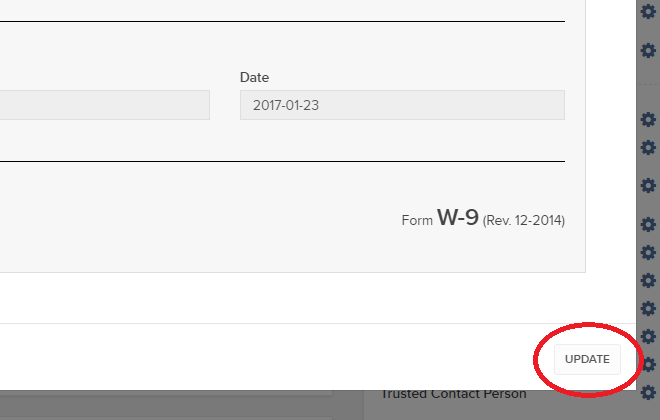
5) Review the form. If your US SSN/ITIN is incorrect, click on the UPDATE button at the bottom of the page
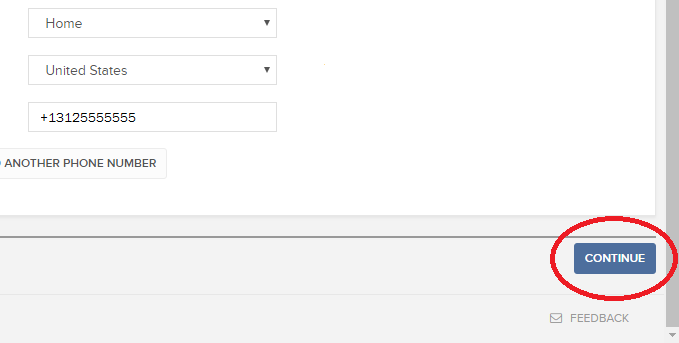
6) Make the requisite changes and click the CONTINUE button to submit your request.
7) If supporting documentation is required to approve your information change request, you will receive a message. Otherwise, your information change request should be approved within 24-48 hours.
Withholding Tax on Dividend Equivalent Payments - FAQs
Background
Beginning January 1, 2017, new IRS regulations will impose U.S. withholding taxes on US dividend equivalent payments to non-US persons holding derivative positions on US equities. Previously, US withholding tax was not imposed on these payments. The regulations require intermediaries, such as us, to act as withholding agents and collect US tax on behalf of the IRS. An overview of the tax, how it’s determined and the products impacted is provided below.
Overview
What is the purpose of the regulation?
The regulation derives from Section 871(m) of the Internal Revenue Code and is intended to harmonize the US tax treatment imposed on non-U.S. persons with respect to dividends on U.S. stock and dividend equivalent payments paid on derivative contracts that replicate (to a high degree) ownership of such stock.
An example of this would be a total return swap having IBM as its underlying. A non-U.S. person holding an IBM stock position would be subject to a 30% US withholding tax (reduced by treaty) on dividend payments. On the other hand prior to the implementation of Section 871(m), a non-U.S. person holding long exposure to IBM on the swap could receive payments equivalent to the dividends without imposition of U.S. withholding tax. This was the case even though the payments replicated similar economic exposure. Section 871(m) now considers those ‘dividend equivalent payments’ subject to US withholding tax.
What is a dividend equivalent payment?
A dividend equivalent payment is any gross amount that references the payment of a dividend on a U.S. equity and that is used to compute any net amount transferred to or from the long party, even if the long party make a net payment to the short party or the net payment is zero. Accordingly, such payments would include not only an actual payment in lieu of a dividend but also an estimated dividend payment that is implicitly taken into account in computing one or more of the terms of the transaction, including interest rate, notional amount or purchase price.
In the case of a listed call option on a U.S. stock, for example, the holder of the call is not entitled to receive a dividend unless the option is exercised prior to the dividend ex-date. Nonetheless, the premium paid by the holder to purchase the option implicitly takes into account the present value of the expected dividends over the option term.[1] Since this factor serves to lower the payment from the option buyer to the seller, it is viewed as a dividend equivalent payment potentially subject to the rules.
Who is subject to the dividend equivalent withholding tax?
The tax applies to qualifying positions held in an account of a non-U.S. taxpayer. It does not apply to U.S. taxpayers. Accounts of non-U.S. taxpayers generally are evidenced by the submission of an IRS Form W-8 and can include the following account types: individual, joint, organization and trust.
What derivative instruments potentially are subject to the dividend equivalent withholding tax?
The regulations adopt a two-part test to determine if a derivative instrument is subject to the rules. First, the derivative instruments must reference the dividend on a U.S. equity security. Examples include:
- equity options
- regulated single stock futures
- regulated index futures and options on index futures
- structured and exchange traded notes
- CFD contracts
- convertible bonds
- securities lending transactions
- derivatives on custom baskets and
- warrants
If the underlying position is a U.S. equity. The exchange upon which the instrument is traded and the identity of the counterparty do not affect the application of the rules. That is, a derivative can be subject to the rules, whether it is exchange listed or over the counter or trades in the United States or overseas.
Second, the derivative instrument must substantially replicate the economics of the underlying U.S. equity at the time of issuance. The rules look to delta (for simple contracts) and a substantially equivalency test (for complex contracts) to make this determination.
Delta is a correlation measurement that computes the ratio of the change in the fair market value of the derivative instrument to a change in the fair market value of the U.S. equity referenced by the derivative. In general, for purposes of this regulation, delta is only determined once over the life of the derivative instrument – at the time it is ‘issued’. It is not recomputed as the fair market value of the underlying security changes or when the derivative instrument is re-sold in the secondary market.
For most contracts, the rules are as follows:
· Pre-2017 – a derivative instrument issued prior to January 1, 2017 (i.e., anything held by a customer with us on December 31, 2016) is not subject to the new withholding tax rules.
· 2017 - a derivative instrument issued in 2017 is potentially subject to the new withholding tax regime if the delta at the time of issuance is 1.0.
· After 2017 – a derivative instrument issued after December 31, 2017 is potentially subject to the new withholding tax rules if the delta at the time of issuance is 0.8 or greater.
If the derivative is classified as “complex,” the delta test does not apply and instead the substantial equivalency test applies.
So When Is a Derivative Instrument Issued?
Identified when a derivative instrument is issued is very important. It determines if the instrument is subject to the rules (pre-2017 issued instruments are not) and when the delta computation is made. In general, an instrument is ‘issued’ when it comes into existence, its inception date or date of original issuance. Instruments are not issued when re-sold in the secondary market.
As a result, there are differences in the issuance rules for listed options, futures, other exchange traded products and over-the-counter products. For example, a listed option traded on a US exchange, generally, is not issued when first listed by an exchange as available for trading. Instead, the listed option is issued (delta determined) when the option is entered into by the customer. On the other hand, for transferable derivatives, such as exchange traded notes, convertible bonds and warrants, they would be issued only when first sold. The delta determined at that time would carryover when sold to a subsequent purchaser.
Are There Any Exceptions?
The rules do provide limited exceptions to withholding. These include:
• a derivative instrument that references a “qualified index” - generally, a passive broad publicly available index on U.S. equities such as the S&P 500, NASDAQ 100 or Russell 2000.
• a derivative instrument that references an index with little or no U.S. equity composition – such as the Hang Seng Index.
• if the dividend equivalent payment (or portion thereof) would not be subject to U.S. withholding tax if the non-US person owned the underlying security directly. This most often will occur for derivative instruments on U.S. mutual funds, REITs and exchange traded funds that pay ‘dividends’ which are re-characterized as capital gain distributions or returns of capital.
Can you provide some examples of when the rules will or will not apply?
• Customer purchases single stock futures on IBM on January 2, 2017. The delta of the future is 1.0. The future is subject to the rule.
• Customer purchases a deep in the money OCC listed option on IBM on December 28, 2016. The delta of the future is 1.0. The option is not subject to the rule as it was issued prior to 2017.
• Customer purchases index future on a narrow based index on January 15, 2017. Assume the index is not a ‘qualified index.’ The future is subject to the rule.
• Customer purchases an exchange trade note that tracks U.S. equities on January 2, 2017 with a delta of 1.0. The note was issued on July 1, 2016. The option is not subject to the rule as it was issued prior to 2017
How is the dividend equivalent withholding computed?
If the derivative instrument is subject to the new Section 871(m), a dividend equivalent payment with respect to such instrument equals the per share dividend on the underlying U.S. equity, multiplied by the number of underlying shares referenced by the instrument, multiplied by the delta (e.g., an option contract delivering 100 shares of a stock paying $1.00 dividend and having a delta of .80 would be subject to a tax based upon $80.00 dividend equivalent payment).
In the case of a complex derivative contract, the dividend equivalent will be equal to the per share dividend on the underlying, multiplied by the contract’s hedge equivalent to the underlying as calculated when the contract was issued.
How are contracts combined for purposes of determining delta?
Starting in 2018, customers who purchase derivative instrument such as a long call having a delta below the .80 threshold and selling a put on the same underlying and same share quantity within 2 days of one another will have those positions combined for the purpose of determining whether the threshold has been exceeded (e.g., the purchase of a long call with a delta of 0.60 coupled with the sale of a put with a delta of .40 would result in a long delta of 1.0).
In 2017, only over-the-counter instruments are potentially subject to combination to create a delta 1.0 instrument.
What information do we provide to inform clients about impacted positions?
To minimize exposure to the withholding tax, we intend to provide a TWS warning message will be provided when non-U.S. persons create an order that could generate the tax. This will give customers the option of canceling the order to avoid potential withholding or submitting the order and possibly paying the tax when a dividend occurs. Customers may avoid the potential withholding tax by not owning the derivative on the applicable withholding date (i.e., generally the dividend Record Date).
IMPORTANT NOTE: We do not provide tax, legal or financial advice. Each customer must speak with the customer’s own advisors to determine the impact that the Section 871(m) rules may have on the customer’s trading activity.
[1] While the holder of the call option does not receive a dividend, the premium paid by the holder for the option implicitly takes expected dividends into account (i.e., because the stock price is expected to drop by the amount of the dividend on the ex-dividend date, cash dividends imply lower call premiums).
Common Reporting Standard (CRS)
The Common Reporting Standard (CRS), referred to as the Standard for Automatic Exchange of Financial Account Information (AEOI), calls on countries to obtain information from their financial institutions and exchange that information with other countries automatically on an annual basis. The CRS sets out the financial account information to be exchanged, the financial institutions required to report, the different types of accounts and taxpayers covered, as well as common due diligence procedures to be followed by financial institutions. For more information about CRS, please visit the OECD website.
Interactive Brokers entities comply with the requirements of CRS as implemented in the jurisdictions where they are located, and report account information to the applicable government authorities. Clients reported by Interactive Brokers under CRS will receive a CRS Client Report in the Client Portal shortly after the reporting deadlines specified below. The CRS Client Report provides an overview of the information that was reported by Interactive Brokers.
- What information is reported under CRS:
- Account number
- Name
- Address
- Tax ID Number
- Tax residency country
- Date of birth
- Year-end account balance
- Gross proceeds (all sales)
- Interest income
- Dividend income
- Other income
- When and where is the information reported:
- Interactive Brokers Australia Pty. Ltd. reports to the Australian Taxation Office (ATO) by July 31.
- Interactive Brokers Canada Inc. reports to the Canada Revenue Agency (CRA) by May 1.
- Interactive Brokers Central Europe Zrt. reports to the National Tax and Customs Administration of Hungary (NAV) by June 30.
- Interactive Brokers Hong Kong Limited reports to the Inland Revenue Department of Hong Kong SAR (IRD) by May 31.
- Interactive Brokers India Pvt. Ltd. reports to the Reserve Bank of India/Central Board of Direct Taxes (RBI/CBDT) by May 31.
- Interactive Brokers Ireland Limited reports to the Office of the Revenue Commissioners of Ireland by June 30.
- Interactive Brokers Securities Japan Inc. reports to the National Tax Agency of Japan (NTA) by April 30.
- Interactive Brokers Singapore Pte. Ltd. reports to the Inland Revenue Authority of Singapore (IRAS) by May 31.
- Interactive Brokers U.K. Limited reports to Her Majesty's Revenue and Customs of the United Kingdom (HMRC) by May 31.
- Additional Notes:
- Information relating to clients of Introducing Brokers is not reported by Interactive Brokers. Introducing Brokers are responsible for their own reporting under CRS.
- Accounts held by Interactive Brokers LLC are not reported under CRS as the United States has not signed the CRS.
FATCA Procedures - Grantor Trust Tax Information Submission
Overview:
Interactive Brokers is required to collect certain documentation from clients to comply with U.S. Foreign Account Tax Compliance Act (“FATCA”) and other international exchange of information agreements.
This guide contains instructions for a Trust to complete the online tax information and to electronically submit a W-9 or W-8BEN.
U.S. Tax Classification
Your U.S. income tax classification determines the tax form(s) required to document the account.
You must login to Account Management with the trust's primary username to access the Tax Form Collection page.
1. Tax Form Collection
The Tax Form Collection page lets account holders review and update important tax-related information and lets account holders electronically fill out an IRS Form W-9 (U.S. taxpayers) and IRS Form W-8 (non-U.S. taxpayers).
Accessing the Tax Form Collection Page
a. Click Manage Account > Account Information > Tax Information > Tax Forms.
b. Click the Update Tax Forms button to access the Collection page.
The Tax Form Collection page opens, displaying a form with tax-related information that should already be completed. (Advisors and brokers can check the status of client updates to this page on the Dashboard Pending Items tab.
c. Review the Trust’s information and update as required.
Confirm the primary tax residency of the trust beside the Tax Residency question, "In what country is the trust a resident for tax purposes?" Select the appropriate country in the drop down menu.
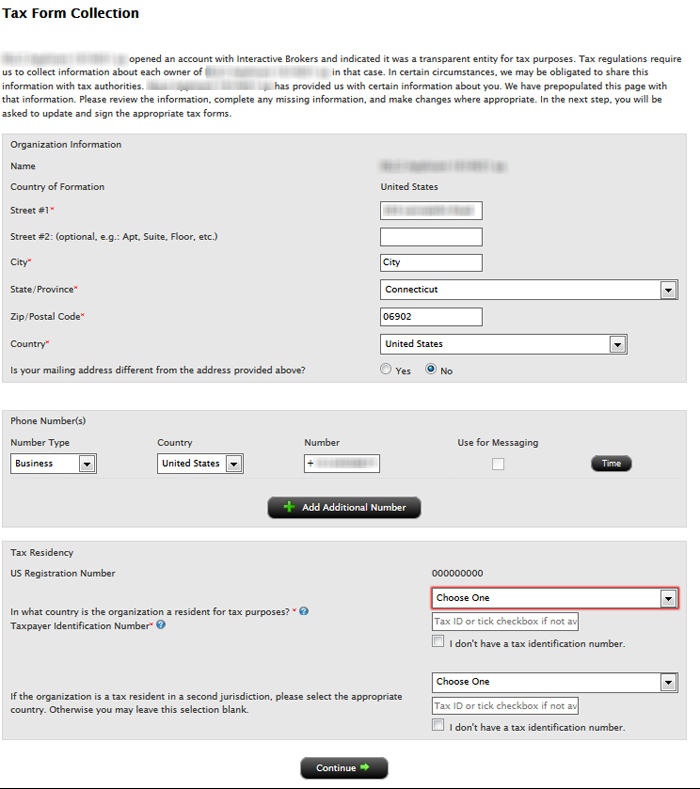
Select in the Tax Residency drop down menu the applicable country.
d. Click Continue.
2. Classification for US Tax Purposes
Confirming the Trust’s classification for U.S. purposes
a. Review the Trust’s status by confirming the question, “How are you classified for US tax purposes?” The answer is pre-filled based upon your information completed during the account application process.
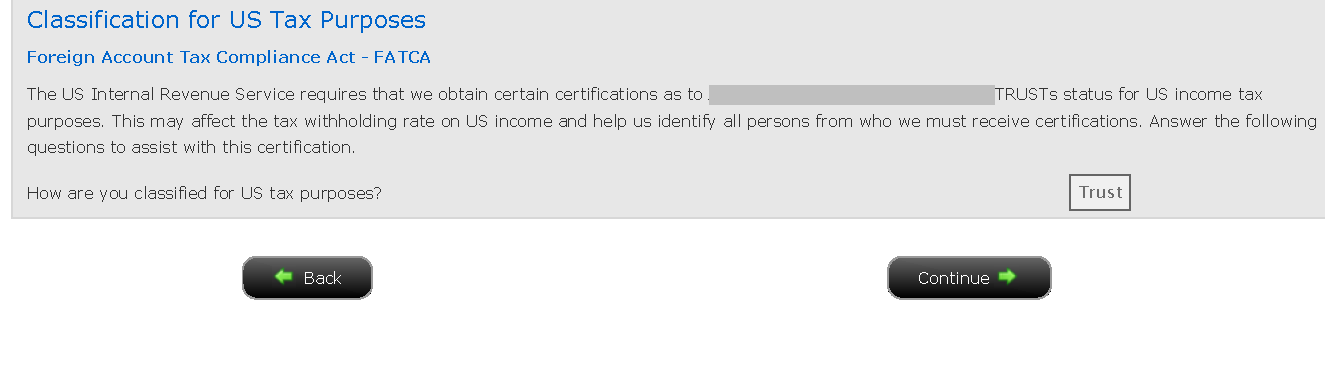
b. Click the Continue button to confirm the trust classification and complete the Form W-8 or W-9 for the entity.
c. Click the Continue button to identify each Grantor.
3. Identify Grantors
a. Click Manage Account > Account Information > Tax Information > Tax Forms.
b. Click the Create button beside each grantor to send each user the applicable tax questionnaire and to submit the tax certification form (W-8 or W-9).
Also, update the "Percentage of Ownership" to add up to 100%, if necessary.
.png)
c. Enter the required fields for the username and password for specified grantor and click the Continue button to complete the email delivery of the link.
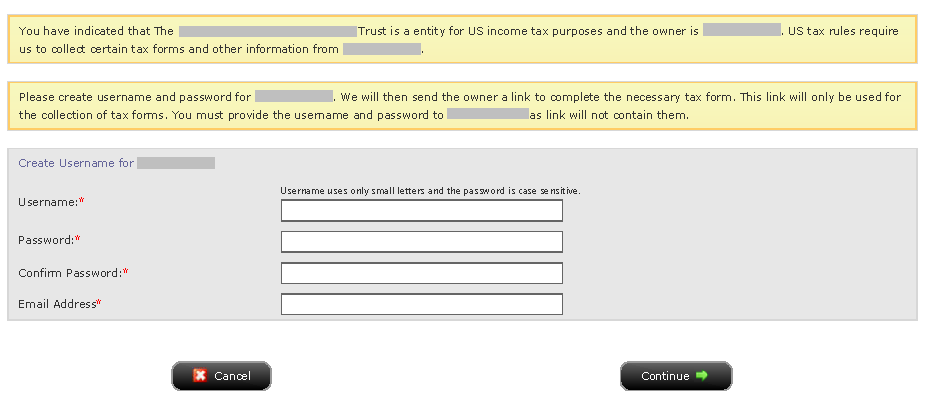
We will then send the owner a link to complete the necessary tax form. This link will only be used for the collection of tax forms. You must provide the username and password to the Grantor as link will not contain them.
Each Grantor must login with the username/password created and complete the pending tasks by going to Manage Account > Account Information > Tax Information > Tax Forms > Update Tax Forms.
d. Click the Continue button upon creating and sending usernames to each Grantor.
Disclaimer
This guide does not constitute tax or legal advice and Interactive Brokers cannot advise you on how to complete an IRS Forms W-8 or W-9. Instructions are for information purposes only and do not address all possible scenarios. Please consult your tax professional if you are unsure how to complete.
