
How to update the US Social Security Number (SSN) or Individual Taxpayer Identification Number (ITIN) on your account
Background:
If you have been informed or believe that your account profile contains an incorrect US SSN/ITIN, you may simply log into your Account Management to update this information. Depending on your taxpayer status, you can update your US SSN/ITIN by modifying one of the following documents:
1) IRS Form W9 (if you are a US tax resident and/or US citizen holding a US SSN/ITIN)
2) IRS Form W-8BEN (if you are a Non-US tax resident holding a US SSN/ITIN)
Please note, if your SSN/ITIN has already been verified with the IRS you will be unable to update the information. If however the IRS has not yet verified the ID, you will have the ability to update through Account Management.
How to Modify Your W9/W8
1) To submit this information change request, first login to Account Management
2) Click on the Settings section followed by Account Settings
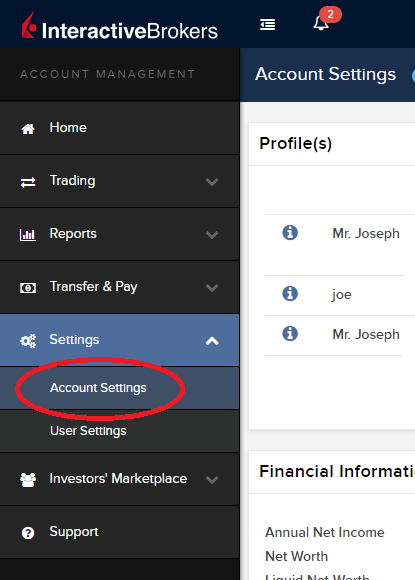
3) Find the Profile(s) section. Locate the User you wish to update and click on the Info button (the "i" icon) to the left of the User's name
.png)
4) Scroll down to the bottom where you will see the words Tax Forms. Next to it will be a link with the current tax form we have for the account. Click on this tax form to open it
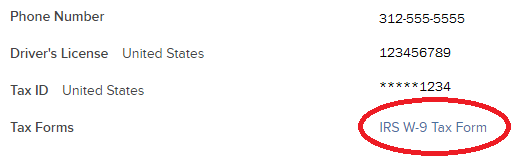
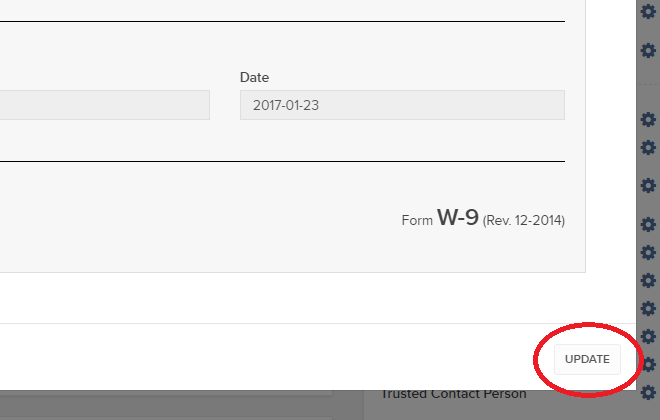
5) Review the form. If your US SSN/ITIN is incorrect, click on the UPDATE button at the bottom of the page
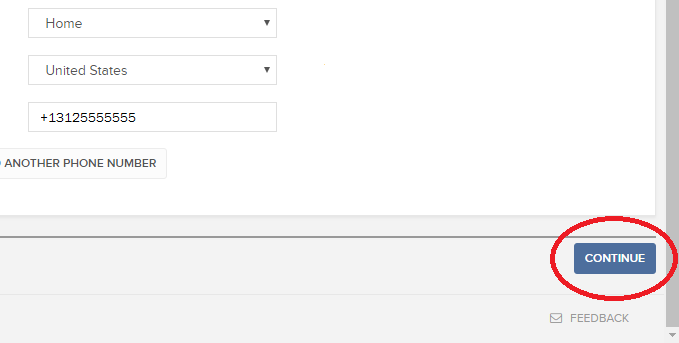
6) Make the requisite changes and click the CONTINUE button to submit your request.
7) If supporting documentation is required to approve your information change request, you will receive a message. Otherwise, your information change request should be approved within 24-48 hours.
Changing Market Data Subscriber Status from Pro to Non-Pro
概観:
For purposes of determining available quote subscriptions and fees, IB is obligated to determine whether account holders fall under the exchange classifications as a Professional or Non-Professional subscriber (See KB2369 for definitions). In most instances, account holders are allowed to self-declare their subscriber status at the point of application or update via Client Portal thereafter, although these declarations are subject to review and account holders electing Non-Professional status are subject to having their status amended to Professional based upon the account information they've submitted.
Account holders who no longer meet the definition of a Professional may request a change in their status to Non-Professional by following the steps below:
Individual and Joint Accounts
- Log into Client Portal and select the User menu (head and shoulders icon in the top right corner) followed by User Settings, click on the Configure (gear) icon for Market Data Subscriptions on the Trading Platform panel, and then click on Configure (gear) icon next to Market Data Subscriber Status. You will be presented with a page through which you can select the option titled Non-Professional and agree to the permitted use and notification of future change in status requirements.
- Your request will then be subject to a review by IB to determine whether it can be accepted or denied based upon the account information of record or whether completion of the Non Professional Questionnaire is required. You will be notified via the Message Center if accepted or denied.
- If completion of the questionnaire is required, you will receive an email advising you to log into Client Portal at which point you will be prompted with the form. Once completed, the responses will be reviewed by IB and you will be notified as to whether or not your change request has been accepted. Please allow between 1 - 2 business days for this review process to complete.
- If your request to change status is approved, your Professional Subscriptions will be canceled immediately and, as exchanges do not provide for prorated subscriptions, you will be charged for the subscription as if you had use of it the entire month. If you wish to subscribe to replacement quote services as a Non-Professional, you may do so through Client Portal. Again, please note that mid-month subscriptions are charged at the full monthly rate. Accordingly, depending upon your decision to request a change of status and elect replacement subscriptions, you may be subject to both Professional and Non-Professional fees for a given month.
16.00 Normal 0 false false false EN-US X-NONE X-NONE
Family Advisors and Non-Professional Advisor Accounts
- Submit your request to complete the Non-Professional Questionnaire via the Message Center located in Client Portal.
- Your request will then be subject to a review by IB to determine whether it can be accepted or denied based upon the account information of record or whether you are eligible to complete the Non Professional Questionnaire. You will be notified via the Message Center as to the decision.
- If eligible to complete the Non-Professional Questionnaire, you will receive an email advising you to log into Client Portal at which point you will be prompted with the form. Once completed, the responses will be reviewed by IB and you will be notified as to whether or not your change request has been accepted. Please allow between 1 - 2 business days for this review process to complete.
-
16.00
Normal
0
false
false
false
EN-US
X-NONE
X-NONE
Family Advisors and Non-Professional Advisor Accounts that are reclassified from Professional to Non-Professional are subject to the same market data cancellation, replacement and billing considerations as noted above for Individual accounts.
Organizations, Professional Advisor Accounts & Professional Trusts
- These types of accounts are classified as Professional by default per exchange rules and will not be considered for reclassification to Non Professional.
Market Data Non-Professional Questionnaire
概観:
Insight into completing the new Non-Professional Questionnaire.
Background:
The NYSE and most US exchanges require vendors to positively confirm the market data status of each customer before allowing them to receive market data. Going forward, the Non-Professional Questionnaire will be used to identify and positively confirm the market data status of all customer subscribers. As per exchange requirements, without positively identifying customers as non-professional, the default market data status will be professional. The process will protect and maintain the correct market data status for all new subscribers. For a short guide on non-professional definitions, please see https://ibkr.info/article/2369.
Each question on the questionnaire must be answered in order to have a non-professional designation. As exchanges require positive confirmations of proof for non-professional designations, an incomplete or unclear Non-Professional Questionnaire will result in a Professional designation until the status can be confirmed.
If the status should change, please contact the helpdesk.
Explanation of questions:
1) Commercial & Business purposes
a) Do you receive financial information (including news or price data concerning securities, commodities and other financial instruments) for your business or any other commercial entity?
Explanation: Are you receiving and using the market data for use on behalf of a company or other organization aside from using the data on this account for personal use?
b) Are you conducting trading of any securities, commodities or forex for the benefit of a corporation, partnership, professional trust, professional investment club or other entity?
Explanation: Are you trading for yourself only or are you trading on behalf of an organization (Ltd, LLC, GmbH, Co., LLP, Corp.)?
c) Have you entered into any agreement to (a) share the profit of your trading activities or (b) receive compensation for your trading activities?
Explanation: Are you being compensated to trade or are you sharing profits from your trading activities with a third party entity or individual?
d) Are you receiving office space, and equipment or other benefits in exchange for your trading or work as a financial consultant to any person, firm or business entity?
Explanation: Are you being compensated in any way for your trading activity by a third party, not necessarily by being paid in currency.
2) Act in a capacity
a) Are you currently acting in any capacity as an investment adviser or broker dealer?
Explanation: Are you being compensated to manage third party assets or compensated to advise others on how to manage their assets?
b) Are you engaged as an asset manager for securities, commodities or forex?
Explanation: Are you being compensated to manage securities, commodities, or forex?
c) Are you currently using this financial information in a business capacity or for managing your employer’s or company’s assets?
Explanation: Are you using data at all for a commercial purposes specifically to manage your employer and/or company assets?
d) Are you using the capital of any other individual or entity in the conduct of your trading?
Explanation: Are there assets of any other entity in your account other than your own?
3) Distribute, republish or provide data to any other party
a) Are you distributing, redistributing, publishing, making available or otherwise providing any financial information from the service to any third party in any manner?
Explanation: Are you sending any data you receive from us to another party in any way, shape, or form?
4) Qualified professional securities / futures trader
a) Are you currently registered or qualified as a professional securities trader with any security agency, or with any commodities or futures contract market or investment adviser with any national or state exchange, regulatory authority, professional association or recognized professional body? i, ii
YES☐ NO☐
i) Examples of Regulatory bodies include, but are not limited to,
- US Securities and Exchange Commission (SEC)
- US Commodities Futures Trading Commission (CFTC)
- UK Financial Service Authority (FSA)
- Japanese Financial Service Agency (JFSA)
ii) Examples of Self-Regulatory Organization (SROs) include, but are not limited to:
- US NYSE
- US FINRA
- Swiss VQF
出金リクエストの横に表示される「保留中アドバイザー」のステータス
概観:
Normal 0 0 2 false false false EN-US JA X-NONE MicrosoftInternetExplorer4
出金リクエストをしたクライアント口座のお客様はアカウントマネジメントの取引履歴項目で「保留中アドバイザー」とういうステータスが表示されることがあります。
-->概要:
クライアント・ポータルの取引履歴項目の中には、出金リクエストをしたクライアント口座のステータスが、「保留中アドバイザー」と表示されることがあります。
インフォメーション:
アドバイザー体系におけるクライアント口座は、個人口座と同様に、クライアント・ポータルにログインして出金リクエストを行うことができます。クライアント口座より出金リクエストが行われるとアドバイザーは出金を許可する必要がありますが、これが行われない場合、出金手続きは継続するものの最大で3営業日の延滞が発生します。
アドバイザー承認ステップ:
クライアント口座より出金リクエストが提出されると、アドバイザーは出金リクエストがある旨のEメール通知を受け取ります。アドバイザーはアドバイザー・ポータルにログインし、クライアント管理、ダッシュボート、保留中アイテムと進んで許可をします。アドバイザーは「許可」ボタンをクリックして、保留中の出金手続きを進めます。
保留期間についての注意点:
出金可能額の80%を超える金額の出金リクエストは、アドバイザーの許可が下りる、または3日間が経過するまで保留となります。出金可能額の80%以下の金額の出金リクエストは、アドバイザーの許可が下りる、または翌営業日まで保留となります。
この保留期間はお客様のアドバイザーに対して出金通知を行うため、および必要に応じては出金可能資金の準備期間として設けられています。
Financial Advisor How To: Linking Related Client Accounts
概観:
Account linkage provides account holders who maintain multiple accounts under a single advisor, the ability to group the accounts together under a single user name. The benefits of account linking include the following:
- The ability to log into all accounts via a single user name and password;
- Account accessed using a common security device;
- Activity fee minimums, when applicable, are determined based on commissions consolidated across the linked accounts;
- Consolidated reporting of accounts.
While linking may be performed by the client, this article outlines the steps by which an advisor may link accounts on behalf of the client
Steps:
1. Linkage begins by logging into Account Management at the master account level and selecting the Manage Clients, Accounts and then Link Client Accounts menu options.
.jpg)
2. You will then be provided with a drop down list of client which are eligible to be linked. While multiple clients may be linked in a given session, the linkage steps must be completed for a given client before proceeding to another.
.jpg)
3. After selecting the client to be linked, a list of all of the client's accounts that are eligible to be linked will be presented. Here, you will be prompted to specify which of the user names is to be retained for future account access. Once the linkage process has been completed, all other user names will be deactivated.
.jpg)
4. Next you will be presented with the Account Information page where confirmation of the client's personal information will be performed. In the event the client maintains information which differs among accounts (e.g., residential address), you will be prompted to select that which is accurate and is to be retained following completion of linkage.
.jpg)
5. Next, select any or all of the standing banking instructions which will be retained.
.jpg)
6. Confirmation of the linkage request is then provided.
.jpg)
IMPORTANT NOTES:
- You must select the client account with the highest level security device.
- Once the accounts are linked, the unique usernames and passwords for the accounts to be linked with this account will no longer function. The surviving username and password associated with the account will function for all linked accounts.
- Interactive Brokers will link these accounts on Fridays.
- Once the accounts are linked, the security devices for the accounts to be linked with this account will no longer function and the device associated with this account will function for all linked accounts. Those device do not need to be returned to IB, as per KB975
Welcome to Interactive Brokers
概観:
Now that your account is funded and approved you can start trading. The information below will help you getting
started as a new customer of Interactive Brokers.
- Your Money
- Configure your account to trade
- How to trade
- Trade all over the World
- Five points to enrich your IB experience
1. Your Money
Deposits & Withdrawals General Info. All transactions are administered through your secure Account Management
Deposits
First, you create a deposit notification through your Account Management > Funding > Fund Transfers > Transaction Type: “Deposit” How to create a deposit notification. The second step is to instruct your Bank to do the wire transfer with the bank details provided in your Deposit Notification.
Withdrawals
Create a withdrawal instruction via your secure Account Management > Funding > Fund Transfers > Transaction Type: "Withdrawals" How to create a withdrawal instruction
If you instruct a withdrawal over the Withdrawal limits, it will be considered an exceptional withdrawal and we will therefore need to match bank account holder and IB account. If destination bank account has been used for a deposit, withdrawal will be processed; otherwise, you must contact customer service and provide the documents needed.
Troubleshooting
Deposits: My bank sent the money but I do not see it credited into my IB account. Possible reasons:
a) A fund transfer takes 1-4 business days
b) A Deposit Notification is missing. You have to create it via your Account Management and send a ticket to Customer Service
c) Amending details are missing. Your name or IB account number is missing in the transfer details. You have to contact your bank and ask for the full amending details.
d) ACH initiated by IB is limited to 100k USD in a 7 business period. If you opened a Portfolio Margin account where the initial requirement is 110k, a wire deposit might be the better deposit option to reduce wait time for your first trade. If selecting ACH a wait time of almost 2 weeks or a temporary downgrade to RegT can be possible solutions.
Withdrawals: I have requested a withdrawal but I do not see the money credited to my bank account. Possible reasons:
a) A fund transfer takes 1-4 business days
b) Rejected. Over the max it can be withdrawn. Please check your account cash balance. Note that for regulatory requirements, when the funds are deposited, there is a 3 day holding period before they can be withdrawn.
c) Your bank returned the funds. Probably because receiving bank account and remitting bank account names do not match.
2. Configure your account to trade
Difference between Cash and Margin accounts: If you have chosen the FastTrack application, by default your account type is a cash account with US stock permission. If you would like to get leverage and trade on margin, here how to upgrade to a RegT Margin account
Trading Permissions
In order to be able to trade a particular asset class in a particular country, you need to get the trading permission for it via your Account Management. Please note that trading permissions are free. You might however be asked to sign risk
disclosures required by local regulatory authorities. How to Request Trading Permissions
Market Data
If you want to have market data in real-time for a particular product/exchange, you need to subscribe to a market data package charged by the exchange. How to subscribe to Market data
The Market data assistant will help you choose the right package. Please watch this Video explaining how it works.
Customers have the option to receive delayed market data for free by clicking the Free Delayed Data button from a non-subscribed ticker row.
Advisor Accounts
Have a look at the user guide getting started as advisors. Here you see how to create additional users to your advisor account and grant them access and much more.
3. How to trade
The Trader's University is the place to go when you want to learn how to use our Platforms. Here you will find our webinars, live and recorded in 10 languages and tours and documentation about our various Trading Platforms.
Trader Workstation (TWS)
Traders who require more sophisticated trading tools can use our market maker-designed Trader Workstation (TWS), which optimizes your trading speed and efficiency with an easy-to-use spreadsheet interface, support for more than 60 order types, task-specific trading tools for all trading styles, and real-time account balance and activity monitoring. Try the two models
TWS Mosaic: for intuitive usability, easy trading access, order management, watchlist, charts all in one window or
TWS Classic: the Advanced Order Management for traders who need more advanced tools and algos.
General Description and Information / Quick start guide / Usersguide
Interactive Tours: TWS Basics / TWS configuration / TWS Mosaic
How to place a trade: Video Classic TWS / Video Mosaic
Trading tools: General Description and Information / Users guide
Requirements: How to install Java for Windows / How to install Java for MAC / Port 4000 and 4001 needs to be open
Login TWS / Download TWS
WebTrader
Traders who prefer a clean and simple interface can use our HTML-based WebTrader, which makes it easy to view market data, submit orders, and monitor your account and executions. Use the latest WebTrader from every browser
Quick Start Guide / WebTrader User's Guide
Introduction: Video WebTrader
How to place a Trade: Video WebTrader
Login WebTrader
MobileTrader
Our mobile solutions allow you to trade your IB account on the go. The mobileTWS for iOS and the mobileTWS for BlackBerry are custom-designed for these popular models, while the generic MobileTrader supports most other Smart phones.
General Description and Information
Order Types Order Types available and Description / Videos / Tour / Users guide
Paper Trading General Description and Information / How to get a Paper Trading Account
Once your paper account is created, you can share the market data of your real account with your paper trading account: Account Management > Manage Account > Settings > Paper trading
4. Trade all over the World
IB accounts are multi-currency accounts. Your account can hold different currencies at the same time, this allows you to trade multiple products around the world from a single account.
Base Currency
Your base currency determines the currency of translation for your statements and the currency used for determining margin requirements. Base currency is determined when you open an account. Customers may change their base currency at any time through Account Management.
We do not automatically convert currencies into your Base currency
Currency conversions must be done manually by the customer. In this video you can learn how to do a currency conversion.
In order to open a position denominated in a currency that you do not have in your account, you have two possibilities:
A) Currency conversion.
B) IB Margin Loan. (Not available for Cash Accounts)
Please see this course explaining the mechanics of a foreign transaction.
5. Five points to enrich your IB experience
1. Contract Search
Here you will find all our products, symbols and specifications.
2. IB Knowledge Base
The Knowledge Base is a repository of glossary terms, how-to articles, troubleshooting tips and guidelines designed to assist IB customers with the management of their IB accounts. Just enter in the search button what you are looking for and you will get the answer.
3. Account Management
As our trading platforms give you access to the markets, the Account Management grants you access to your IB account. Use Account Management to manage account-related tasks such as depositing or withdrawing funds, viewing your statements, modifying market data and news subscriptions, changing your trading permissions, and verifying or changing your personal information.
Log In Account Management / AM Quick Start Guide / AM Users Guide
4. Secure Login System
To provide you with the highest level of online security, Interactive Brokers has implemented a Secure Login System (SLS) through which access to your account is subject to two-factor authentication. Two-factor authentication serves to confirm your identity at the point of login using two security factors: 1) Something you know (your username and password combination); and 2) Something you have (an IB issued security device which generates a random, single-use security code). As both knowledge of your username/password and physical possession of the security device are required to login to your account, participation in the Secure Login System virtually eliminates the possibility of anyone other than you accessing your account.
How to Activate your Security Device / How to Obtain a Security Code Card / How to return Security device
In case you forgot your password or lost your security code card, please call us for immediate assistance.
5. Statements and Reports
Easy to view and customize, our statements and reports cover all aspects of your Interactive Brokers account. How to view an Activity Statement
IRA: Required Minimum Distributions
IRA owners may be required to to withdraw funds beginning at age 73, and every year thereafter. Determining your Required Minimum Distribution (RMD) is significant while retaining an IRA, considering both your life expectancy and the IRA's fair market value.
The required amount for each eligible person is based on the December 31 IRA account value of the previous year and the IRA owners date of birth. Your spouse's date of birth may also be a factor if your spouse is at least 10 years younger than you. Interactive Brokers LLC provides several information resources to understand and calculate your RMD, including access to the online FINRA RMD Calculator.
Requesting Your RMD Withdrawal
The Internal Revenue Service (IRS) requires the IRA plan custodian to notify IRA owners about the RMD requirements by January 31 each year. If you turn 73 this year, you are required to begin taking RMDs before April 1 of the following year.
Eligible IRA owners must begin receiving withdrawals by December 31 of the year they reach age 73. The first RMD withdrawal, however, may be delayed until April 1 of the following year.
If you elect to delay the withdrawal, then please observe the following considerations:
(1) Two RMD withdrawals will be required the following year, the undistributed initial RMD and the new RMD.
(2) The new RMD will be slightly larger due to the December 31 market value's inclusion of the undistributed initial RMD.
Subsequent RMD withdrawals from your IRA must be distributed by December 31 to avoid a penalty tax.
Note: Roth IRAs are exempt from the RMD rules during the IRA owner's lifetime.
Requesting Your RMD Withdrawal
You may request a withdrawal of funds through the Transfer & Pay and then Transfer Funds menu options within Client Portal. The IRS deadline for taking RMDs is December 31 each year. Keep in mind that the year end withdrawal cut off for processing withdrawals from your Interactive Brokers account may occur before December 31.
Please note that you can elect to transfer your funds to your bank account or to an Interactive Brokers non-IRA account. To transfer funds to an Interactive Brokers non-IRA account, log into Client Portal, select Transfer & Pay, Transfer Funds then select Transfer Funds Between Accounts.
Your RMD is determined by dividing the account balance on December 31 of last year by your life expectancy factor. Your life expectancy factor is taken from the Life Expectancy Tables contained in IRS Publication 590. Your IRA beneficiary election may play an important role in determining your RMD, as well.
You must calculate your RMD separately for each qualifying IRA custodied at Interactive Brokers and any other financial institution. The RMD, however, may be satisfied from any single one or combination of your IRAs. The IRA Required Minimum Distribution Worksheets may provide additional assistance with the calculation of your RMD.
Click here to return to the Retirement Account Resource page.
Disclaimer: IB does not provide tax advice. These statements are provided for information purposes only, are not intended to constitute tax advice which may be relied upon to avoid penalties under any international, federal, state, local or other tax statutes or regulations, and do not resolve any tax issues in your favor. We recommend that you consult a qualified tax adviser or refer to the U.S. Internal Revenue Service.
IRA: Rollover Rules & Conditions
This information is for general educational purposes only. Individuals should consult with their financial adviser or legal counsel to determine how rollover regulations affect their unique situations.
Generally, an IRA rollover is a tax-free distribution to you of cash or other assets from one retirement plan that you contribute to another retirement plan. The contribution to the second retirement plan is called a rollover contribution.
This article outlines the types of IRA rollover transactions, rules and conditions, IB's Rollover Certification form, and rollover transaction details. Select from list below for details:
Eligible Rollover Transactions
Rules & Conditions
Prior to completing an IRA Rollover transaction, we recommend that you review the rules and conditions surrounding eligibility. Interactive Brokers can accept as a tax-free transaction an eligible rollover distribution as defined under the Internal Revenue Code. Included in this article is information about eligible transactions, as well as the Interactive Brokers IRA Rollover Certification form.
IRA Rollover Certification
Before accepting an IRA rollover transaction into an Interactive Brokers LLC IRA, we require that you review your eligibility for the rollover and certify your understanding of the rollover rules and conditions. The IRA Rollover Form includes the IRA Rollover Certification.
The Transfer Funds page within the Client Portal lets you notify IB of an IRA Rollover deposit of funds into your account. From the Transfer & Pay menu select Transfer Funds and then Make a Deposit. Select one of the saved deposit instructions and follow the prompts on the screen or create a new deposit instruction by selecting the Currency of the deposit from the drop-down menu. Click Connect or Get Instructions for the method you will use to transfer funds. And finally follow the remaining instructions provided to initiate the transfer with your bank.
Rollover Transactions
Two types of IRA rollover transactions exist with different guidelines and delivery methods:
- Direct Rollover - a transfer of assets from an employer-sponsored retirement plan directly to an eligible IRA. If you choose to receive the distribution first, then you may roll over the funds to the IRA within 60 days.
- Indirect Rollover - a distribution from an IRA paid to you, followed by a rollover into another IRA within 60 days. The IRS allows an indirect rollover of each IRA's funds once during a twelve-month period.
(Note: A distributions directly from one IRA trustee to another IRA trustee is a Trustee-to-Trustee transfer. It is not affected by the twelve-month waiting period.)
For additional information about rollovers, visit Understanding Rollovers. See also IRS Publication 590-A, Contributions to Individual Retirement Arrangements (IRAs) for more specific guidelines on moving retirement plan assets.
Eligible Rollover Transactions
Almost any distribution from a qualified plan can be rolled over to an IRA. Your retirement account may be eligible for one of the following eligible rollover transactions.
Traditional IRA or SIMPLE IRA to Traditional IRA Rollover
- Funds or property deposited less than 60 days of receipt by the IRA owner from the previous IRA
- During the preceding 12 months, no other distributions from the distributing IRA were rolled over
- The assets involved in the transaction have not been rolled over in the past 12 months
- Required Minimum Distribution satisfied (if over 73)
- For SIMPLE IRAs, after two years from the first contribution
Roth IRA to Roth IRA Rollover
- Funds or property deposited less than 60 days of receipt by the IRA owner from the previous IRA
- During the preceding 12 months, no other distributions from the distributing IRA were rolled over
- The assets involved in the transaction have not been rolled over in the past 12 months
Rollover or Direct Rollover from Qualified Plan into a Traditional IRA
- Eligible participant (participant, spouse beneficiary, or former spouse due to divorce)
- Funds or property deposited less than 60 days of receipt by the participant from the previous plan
- Funds received from an eligible qualified retirement plan
- Required Minimum Distribution satisfied (if over 73)
- Consists of funds, property, or proceeds from the sale of property distributed from the qualified plan
- All of the funds are eligible to be rolled over
Roth IRA to Roth IRA Rollover
- Funds or property deposited less than 60 days of receipt by the IRA owner from the previous IRA
- Required Minimum Distribution satisfied (if over 73)
Ineligible Rollover Transactions
Some funds distributed from a retirement plan are not eligible for rollover into an IRA. The following transactions are not eligible rollover transactions.
- Any portion of a distribution from a retirement plan not rolled over
- Required Minimum Distributions
- Distribution of excess contributions and related earnings
- Retirement plan loan treated as a distribution
- Hardship distributions
- Distributions part of substantially equal payments (73-t)
- Dividends on employer securities
- Non-spousal death benefit distributions
- The cost of life insurance coverage
Click here to return to the Retirement Account Resource page.
Disclaimer: IB does not provide tax advice. These statements are provided for information purposes only, are not intended to constitute tax advice which may be relied upon to avoid penalties under any international, federal, state, local or other tax statutes or regulations, and do not resolve any tax issues in your favor. We recommend that you consult a qualified tax adviser or refer to the U.S. Internal Revenue Service.
Non-Guaranteed Combination Orders
A combination order is a special type of order that is constructed of multiple separate positions, or ‘legs’, but executed as a single transaction. The legs of the combination may be comprised of the same position type (e.g. stock vs. stock, option vs. option or SSF vs. SSF) or different position types (e.g. stock vs. option, SSF vs. option or EFP). It’s important to note that many combination order types, while submitted via the IB trading platform as a combination, are not native to (i.e., supported by) the exchanges and therefore may not be guaranteed by IB. Accordingly, IB’s policy is to guarantee only Smart-Routed U.S. stock vs. option and option vs. option combination orders.
As combination orders which are not guaranteed are exposed to the risk of partial execution, both in terms of the quantity of legs and their balance, IB requires account holders to acknowledge the 'Non-Guaranteed' attribute at the point of order entry. There are two methods for setting this attribute:
- Method 1 - Users can select the Non-Guaranteed attribute in the Misc. section on the Order Ticket for a particular order
- Method 2 - Users can add the Non-Guaranteed column to the Order Management section of the TWS
Notes:
- Non-Guaranteed combination orders are not available for Financial Advisor allocation orders
The risk of such 'Non-Guaranteed' orders is illustrated through the example below:
Example
Assume the following quotes for a Stock vs. Stock combination order to purchase shares of Microsoft (MSFT) and sell shares of Appl (AAPL).
Current markets
MSFT - 26.30 bid, 26.31 offer
AAPL - 250.25 bid, 250.30 offer
A generic combination is created to buy 1 share AAPL and sell 1 share MSFT, the implied quote would be 223.94 bid, 224 offer.
The following order is entered:
Buy 200 AAPL, Sell 200 MSFT
Pay 224
Based on the current markets, the order would appear to be executable.
- A buy of 200 shares of AAPL are routed with a 250.30 limit. Only 100 execute.
- A sell of 200 shares of MSFT are routed with a 26.30 limit. No execution is received as the market moves to 26.29 bid.
With a Non-Guaranteed combination, the 100 shares of AAPL would be placed in the client account, even though no MSFT shares were executed. The remainder of the combination order will continue to work until executed in its entirety or until it is canceled.
Information Regarding Multi-Account Voluntary CA Elections
概観:
A tool is provided for accounts maintaining a master account/sub-account structure which accommodates bulk election decisions for voluntary corporate actions initiated by the master account on behalf of its sub-accounts. The account types provided with this tool include Financial Advisor, Non-Professional Advisor, Introducing Broker (undisclosed) and Separate Trading Limit. The following article provides step by step instructions for use of the tool along with a list of common FAQs.
Note
With respect to a Stock Purchase Plan (SPP) offer, the corporate action election tool will require the submission of a VALUE of stock to purchase in the offer. As such, the corporate action election tool will reflect the maximum allowable stock value to purchase rather than an eligible share quantity.
1. Accessing the Tool
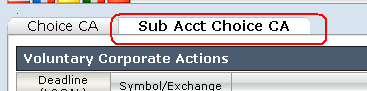
To access the Voluntary Corporate Action Election Tool, log into the Portal and click on the Tools icon located in the upper left hand corner of the screen. From the list of available tools, select Corp Actions. Then select the tab titled Sub Account Choice CA as depicted in the exhibit below.
2. Selecting an Event
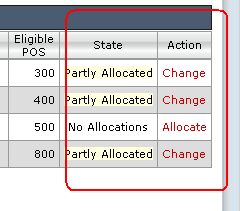
An event list window will appear detailing, by row, those voluntary corporate actions associated with positions maintained in a sub-account where the deadline for provided election instructions has not yet expired. Each event will reflect the deadline, eligible position and the state of election actions, if any, taken to-date (i.e., No Allocations, Partly Allocated, Allocated). To change an existing election action or to provide allocation instructions to an event not previously acted upon, click on the Change or Allocate link located in the Action column as displayed below
3. Submitting Instructions
Once an action has been specified the election screen will appear, providing summary information regarding the nature of the event, the method for submitting elections and detail as to the effective date and deadline. Located below the event information is the position detail aggregated across all sub-accounts, including the following:
- Total position eligible for allocation
- Current unallocated position
- Revised unallocated position

The Voluntary Corporate Action Election Tool offers two methods for submitting election instructions:
- Submit a quantity of shares per specified account
- Submit a percentage of shares to allocate across all accounts
Examples for each of these methods are provided below:
A. To submit shares or value for a specific account
Select the account from the drop-down selector located to the left of the Total eligible position detail
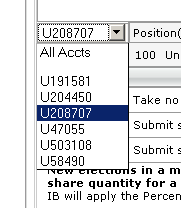
Under the column titled New, submit the specific number of shares you wish to submit to the given election for the selected account.
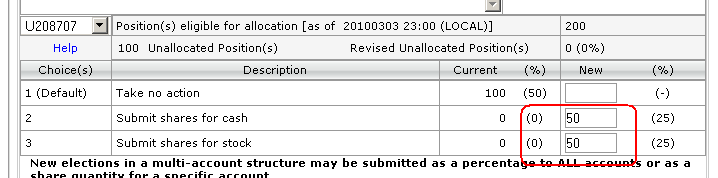
Submit Save
B. To submit a percentage of shares to allocate across all accounts
Select ALL from the drop-down selector located to the left of the Total eligible position detail
Under the column titled %, submit the percentage of shares you wish to submit to the given election

All new percentage allocations will be applied to the Revised Unallocated portion of the shares and will be added to any previous allocation.
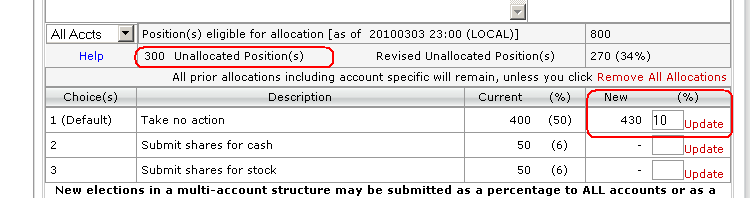
Submit Save
IMPORTANT NOTE: If one submits shares using a combination of share quantity and then percentage, any accounts designated for allocation on a per share quantity will also then have their unallocated shares submitted on the same percentage basis as the remaining accounts. If this is not your intent you will need to revisit those accounts and adjust their share allocations accordingly.
To reduce a previously submitted percentage allocation
- Select "Remove All Allocations"
- Enter a new % allocation for All accounts
Note: If elections have been made on a per-account basis, selecting "Remove All Allocations" will remove all account-specific allocations as well.
Frequently Asked Questions
How do I know if the election has been accepted?
After an election has been submitted and the user selects "SAVE" from the election screen, the user will be given a confirmation screen for review. In the event the election is incorrect, a user may re-enter the election screen (prior to the deadline) in order to update the elections.
How is the percentage allocation processed?
Each account will have the entered allocation applied to the eligible, unallocated shares.
Assume there are 4 sub-accounts with the following holdings:
| Account | Eligible Shares | Unallocated Shares |
| A | 200 | 200 |
| B | 100 | 100 |
| C | 100 | 100 |
| D | 50 | 50 |
An election for 50% of the shares is submitted to tender shares to an offer. The allocation will be applied as follows:
| Account | Eligible Shares | Unallocated Shares | Allocated Shares |
| A | 200 | 100 | 100 |
| B | 100 | 50 | 50 |
| C | 100 | 50 | 50 |
| D | 50 | 25 | 25 |
Can both methods be used on the same voluntary offer?
Yes. Both allocation methods may be used on the same offer. This will allow a user to easily allocate a percentage of all shares plus all eligible shares for a specific account.
If I submit an account specific election and a percentage allocation for all accounts, how will the election be made?
Percentage allocations are posted only to the eligible, unallocated share quantities. Therefore both the specific and percentage allocations will be allocated.
Assume there are four sub-accounts with the following holdings:
| Account | Eligible Shares | Unallocated Shares |
| A | 200 | 200 |
| B | 100 | 100 |
| C | 100 | 100 |
| D | 50 | 50 |
If an election is made to tender 50 shares in Account A the elections will be as follows:
| Account | Eligible Shares | Unallocated Shares | Allocated Shares |
| A | 200 | 150 | 50 |
| B | 100 | 100 | 100 |
| C | 100 | 100 | 100 |
| D | 50 | 50 | 50 |
If an election is then made to allocate 50% of ALL remaining shares, the elections will be as follows:
| Account | Eligible Shares | Unallocated Shares | Allocated Shares |
| A | 200 | 75 | 125 (50 + 75) |
| B | 100 | 50 | 50 |
| C | 100 | 50 | 50 |
| D | 50 | 25 | 25 |
How will fractional shares be treated as a result of using a percentage allocation?
If the election quantity is a fractional share as a result of the percentage allocation, then the fractional share will be truncated and submitted to the default allocation.
Assume there are 3 sub-accounts with the following holdings
| Account | Eligible Shares | Unallocated Shares |
| A | 100 | 100 |
| B | 100 | 100 |
| C | 75 | 75 |
If an election of 50% is submitted, each account will have 50% of the eligible, unallocated shares elected on.
| Account | Eligible Shares | Unallocated Shares | Allocated Shares |
| A | 100 | 50 | 50 |
| B | 100 | 50 | 50 |
| C | 75 | 38 | 37 (37.5 truncated to 37) |
Does it matter the order in which I allocate to the accounts?
If a user first allocates positions as a percentage using the All Accounts function and then selects an individual account, the user may override the percentage allocation for the individual account. In this manner, a user may elect 50% of all unallocated eligible shares to be allocated and subsequently reduce the election in Account A to fewer than 50% by making a change in the account specific allocation.
